Understand the Dataverse security model
The Dataverse security model uses multiple layers working together to determine what a specific user can do with specific data. Understanding how these layers interact is essential before you configure any individual component. Remember, the Dataverse security model is specific to an environment, not a tenant. It must be configured separately for each environment.
Security model components
Four primary components control data access in Dataverse:
| Component | Controls | Scope |
|---|---|---|
| Security roles | What actions (read, write, delete) a user can perform on which tables | Defines privilege levels per table |
| Business units | Which records are visible based on organizational boundaries | Constrains security role scope |
| Teams | How groups of users share access and record ownership | Aggregates and extends user access |
| Column-level security | Which columns a user can read or update within accessible records | Protects sensitive fields |
These components are additive - a user's effective access is the union of all privileges granted through their directly assigned roles, team memberships, and record sharing. You can't use a security role to hide a specific record that another mechanism grants access to.
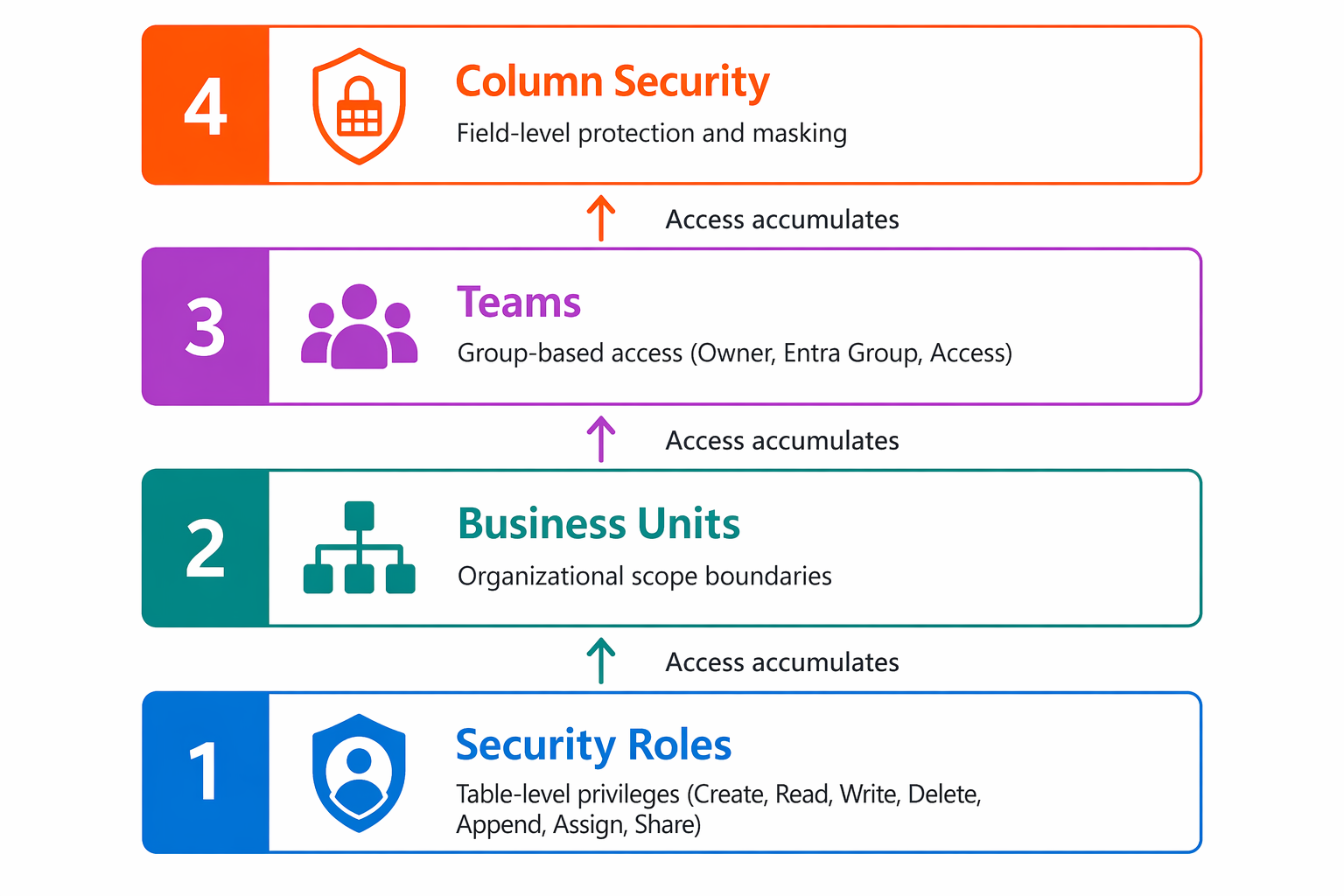
Beyond record-level permissions, security roles also control access to platform capabilities such as creating and customizing tables, managing solutions, configuring business processes, administering users, and performing other environment-level tasks.
How security roles define privileges
A security role is a collection of privileges organized by table. For each table, you configure up to eight privileges:
- Create - Add new records
- Read - View existing records
- Write - Modify existing records
- Delete - Remove records
- Append - Attach a record to another record
- Append To - Allow other records to be attached to this record
- Assign - Transfer record ownership
- Share - Grant another user access to a record
Each privilege has an access level that determines its scope:
| Access level | Records accessible |
|---|---|
| None | No access |
| User | Only records the user owns |
| Business Unit | Records owned by anyone in the user's business unit |
| Parent: Child Business Units | Records in user's business unit and all child business units |
| Organization | All records in the environment |
Privileges accumulate across all assigned roles. If one role grants Read at the User level and another grants Read at the Business Unit level, the user effectively has Business Unit–level Read access.
How business units constrain access
Business units create logical security boundaries within an environment. Every user belongs to exactly one business unit. Records in user-owned or team-owned tables have an owner and an owning business unit. Records in organization-owned tables do not participate in ownership in the same way and are not tied to an owning user, team, or business unit for security purposes.
At Zava, the business unit structure might look like:
- Zava (root) - Corporate functions
- Zava Pay - Financial services division
- Stores - Retail operations
- Marketing - Customer engagement
A user in the "Stores" business unit with Business Unit–level Read access on the Transactions table can only see transactions owned by other Store users - not Zava Pay's financial records.
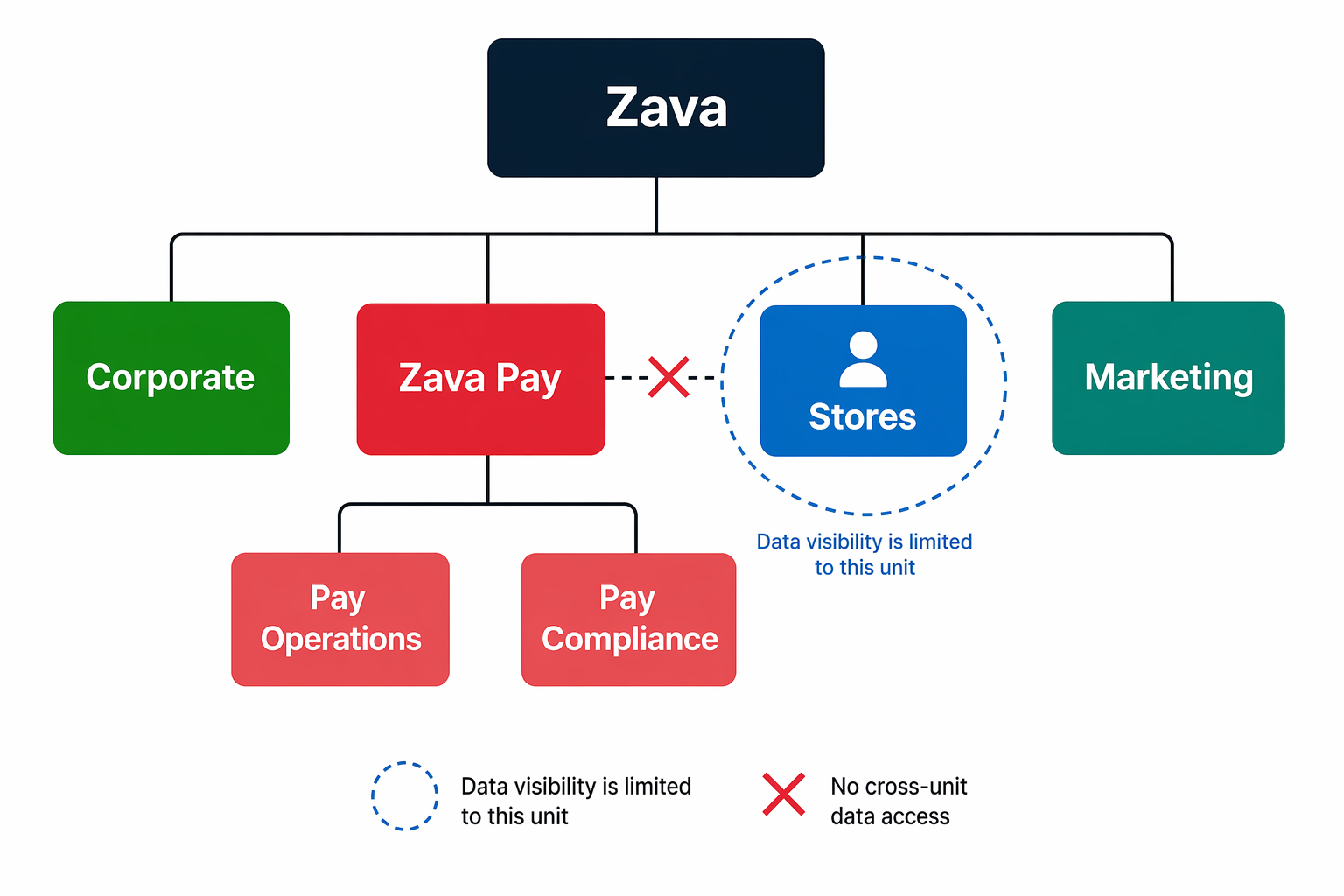
In a matrix organization, users work across multiple business units and projects, requiring access to data in those units. The modernized business units feature allows administrators to assign access to data for these cross-functional users across different business units securely and easily. You can learn more about this in Modernized business unit security.
How teams extend access
Teams provide flexible ways to grant access beyond individual user assignments:
- Owner teams - Own records and have security roles assigned directly. Members inherit the team's security role privileges. Useful for shared record ownership (for example, "Compliance Team" owns all audit records).
- Microsoft Entra group teams - Membership managed automatically through Entra ID security groups. Like owner teams, they can own records and have security roles. Ideal for aligning Dataverse access with Entra ID group governance.
- Access teams - Don't own records or have security roles. Instead, they provide sharing-based access to specific records. Useful for cross-business-unit collaboration without broad role grants.
How column-level security adds protection
Even with proper record-level security, some columns contain data that not everyone with record access should see. Column-level security adds a final protection layer:
- Column security is configured through column security profiles - a named collection of column permissions assigned to users or teams.
- Four permissions per column: Read, Read Unmasked, Update, and Create.
- Data masking - For Read access without Read Unmasked, users see masked values (for example,
***-**-1234for an ID number). Only users with Read Unmasked permission see the full value.
Column-level security only applies to users who already have record-level access. It can't grant access to a record. It restricts what's visible within a record the user can already reach.
Security evaluation flow
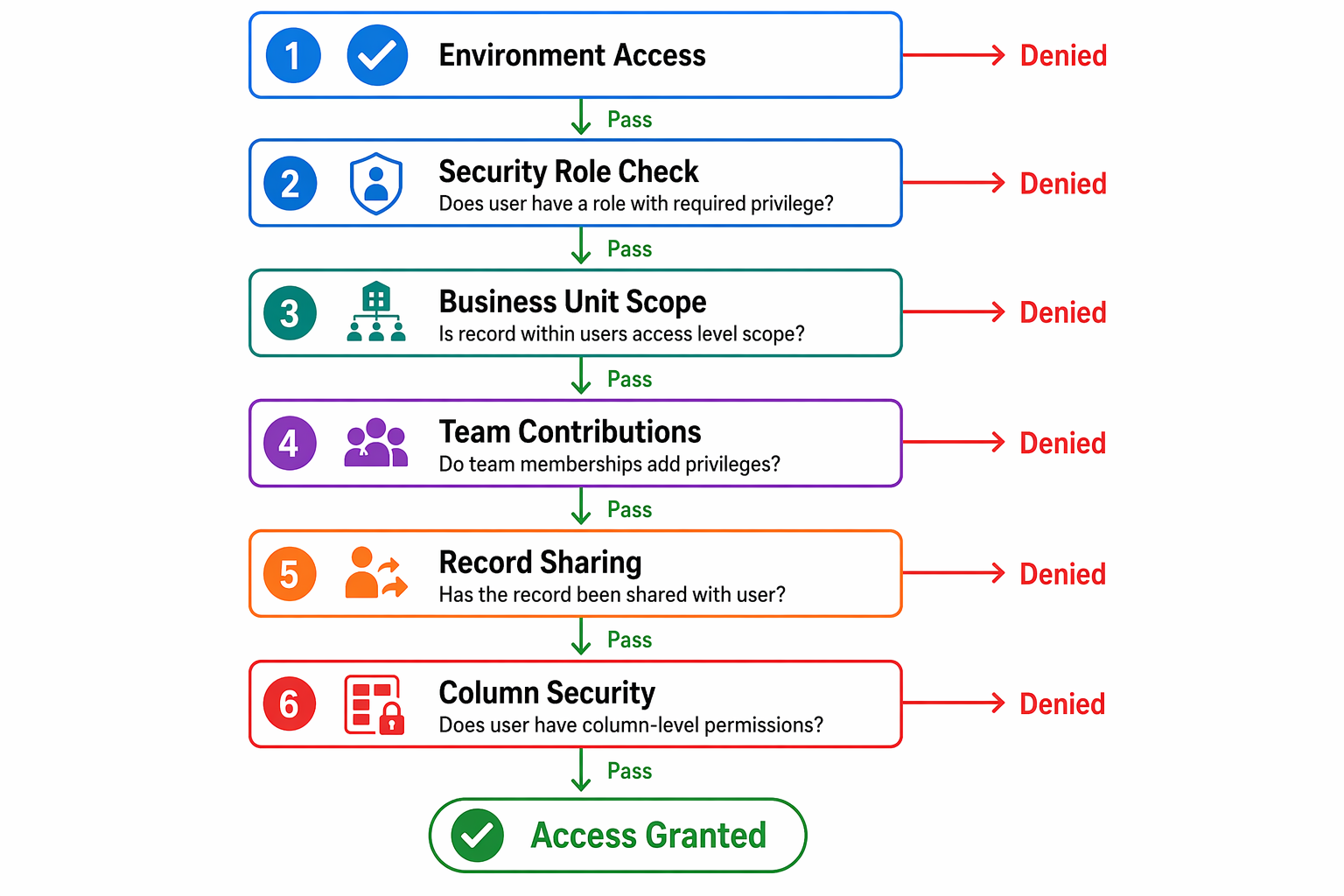
When a user tries to access a record, Dataverse evaluates security in this order:
- Environment access - Is the user in the security group associated with this environment? (Covered in the previous module.)
- Security role check - Does the user have the required privilege (Read, Write, etc.) on this table at a level that includes this record?
- Business unit scope - Does the access level (User, Business Unit, Organization) include the record's owning business unit?
- Team contributions - Do any of the user's team memberships contribute additional privileges?
- Record sharing - Has this specific record been shared with the user or their team?
- Column-level security - For each column in the record, does the user have Read/Update permission through a column security profile?
If any layer denies access, the user can't perform that action - even if other layers seem to grant it. The exception: privileges always accumulate (you can't subtract an explicit grant).
Note
System Administrator and System Customizer roles bypass most security checks. Use these roles sparingly - they exist for environment administration, not daily operations.