Understand how mail routes through Exchange Online
When someone emails support@relecloud.com, or a rep's reply heads back out to a customer, that message has to travel somewhere before it lands in an inbox. This unit is awareness-only: you don't build a connector or write a transport rule here. You just need to recognize how mail moves into and out of Exchange Online and know where routing is configured, so you can speak to it and know where to look if a message doesn't arrive.
See how mail moves with no configuration at all
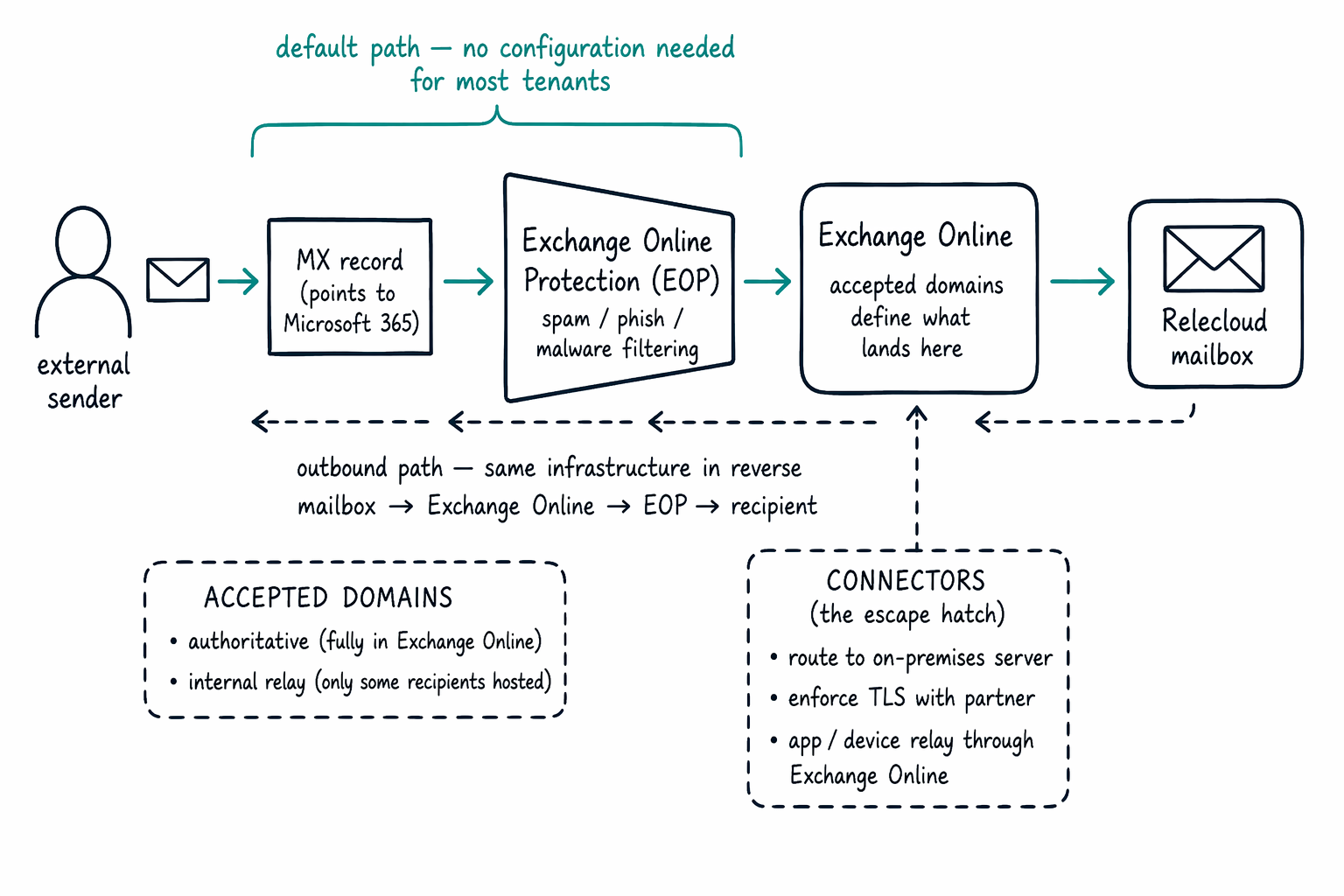
Relecloud's domain, like most Microsoft 365 tenants, has an MX record that points to Microsoft 365. That single DNS setting is what puts Exchange Online Protection (EOP) in the path of every inbound message before Relecloud even opens the Exchange admin center. EOP filters incoming mail for spam, phishing, and malware, then hands it off to the right mailbox in Exchange Online. Outbound mail leaves through the same infrastructure in reverse: Exchange Online sends it out, EOP applies its outbound protections, and the message reaches the recipient's mail system. Most tenants never touch this path, and that's the point. It works by default, which is exactly why nothing in this module asks you to configure mail flow.
Recognize what an accepted domain controls
Exchange Online only delivers mail for domains it's told to accept, and an accepted domain is where that acceptance gets defined. Relecloud's accepted domain marks relecloud.com as authoritative, meaning every recipient at that domain has a mailbox in Exchange Online. Some organizations instead configure a domain as internal relay, which tells Exchange Online that only some recipients live in the cloud and the rest sit on a mail system elsewhere, such as an on-premises Exchange server during a hybrid migration. You don't need to build either configuration here—just recognize that accepted domains are the setting that decides whether Exchange Online treats a domain as fully hosted or only partially hosted.
Know when a connector is the right tool
A connector is the configurable control point for mail flow that doesn't fit the default path. Relecloud would add one to route mail to an on-premises server that still hosts some mailboxes, to exchange mail with a partner organization that requires enforced TLS encryption, or to let a device or line-of-business app relay mail through Exchange Online. Most customers, including Relecloud today, don't need a connector at all—the default path handles everything. Knowing a connector exists, and recognizing the kind of scenario that calls for one, is enough for now.
Both accepted domains and connectors live under mail flow in the Exchange admin center, so that's where you'd look first if Relecloud ever needs custom routing. And when a message seems to vanish, message trace is the tool that shows exactly where it went instead.
Email is one place Relecloud collaborates. But the account managers actually work day to day in Teams. What do you actually create when you stand up a new team?