Describe Azure Storage network security controls
Azure Storage accounts accept connections from clients on any network by default. This open configuration simplifies initial development and testing, but it creates security risks for production workloads. The storage firewall provides the foundation for restricting network access to only approved sources.
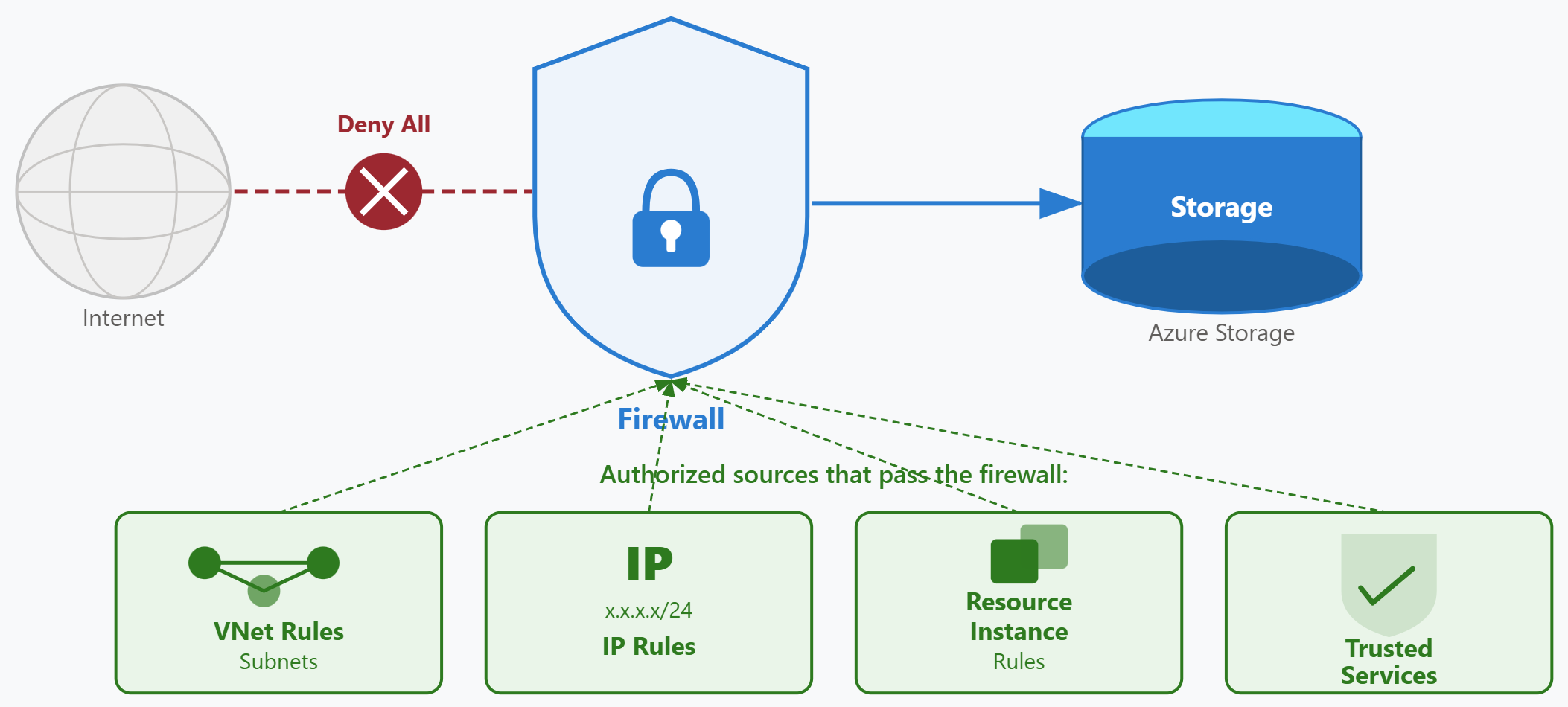
How the storage firewall changes default behavior
When you configure network rules on a storage account, the firewall behavior changes from allow-all to deny-all. Only traffic from explicitly allowed sources can reach the storage account through the public endpoint. The deny-all baseline ensures that any client not explicitly authorized can't access your data, even if they have valid credentials.
Network rules control access through the public endpoint only. They don't affect traffic that uses private endpoints. If you deploy a private endpoint for blob storage, for example, traffic through that private endpoint bypasses firewall rules entirely. This distinction becomes important when you combine multiple network security strategies in the same storage account.
Four types of network rules
Azure Storage provides four ways to allow specific traffic through the firewall. Each rule type addresses a different access scenario.
| Rule Type | Source | Use Case |
|---|---|---|
| Virtual network rules | Traffic from subnets with service endpoints enabled | Azure-hosted workloads (VMs, App Service, Azure Functions) |
| IP network rules | Traffic from specific public IP address ranges | On-premises systems, internet-facing services |
| Resource instance rules | Traffic from specific Azure resource instances | Azure AI services, Azure Machine Learning workspaces |
| Trusted service exceptions | Traffic from Microsoft platform services | Azure Backup, Azure Monitor, Azure Event Grid |
Virtual network rules grant access to traffic originating from specific subnets in Azure virtual networks. You enable a service endpoint on the subnet, which routes storage traffic over the Azure backbone network rather than the public internet. The storage account then adds that subnet to its allowed list.
IP network rules grant access to traffic from specific public IP address ranges. You provide the IP ranges using CIDR notation (for example, X.X.X.X/24). These rules work for clients that don't run in Azure virtual networks. Examples include on-premises systems that connect over the internet or through ExpressRoute with public peering.
Resource instance rules grant access to specific Azure resource instances that operate from infrastructure you don't control. Azure AI Foundry projects and Azure Machine Learning workspaces, for example, run in Microsoft-managed infrastructure. You can't place them in your own virtual networks, so virtual network rules don't work. Resource instance rules identify the specific resource using its resource ID and verify its managed identity when it connects.
Trusted service exceptions grant access to a defined list of Microsoft platform services. When you enable this exception, services like Azure Backup and Azure Monitor can access the storage account using strong authentication. Microsoft maintains the list of trusted services, which includes services that require storage access to perform platform operations.
Network rules and authorization
Network rules determine whether traffic can reach the storage account. Authorization determines whether that traffic can perform specific operations on data. Both checks must pass for a request to succeed.
A client that passes the network firewall still needs proper authorization to read or write data. Authorization can use shared keys, shared access signatures, or Microsoft Entra ID with role-based access control (RBAC). The storage account evaluates network rules first. If the client's network source isn't allowed, the request fails immediately without checking authorization. If the network check passes, the storage account then evaluates the client's credentials and permissions.
Now that you understand how firewall rules establish a deny-all baseline and allow specific traffic sources, you're ready to configure the first two rule types: virtual network rules for Azure-hosted clients and IP rules for on-premises systems.