Configure virtual network and IP rules
Virtual network rules and IP network rules form the foundation of storage account network security. These rule types cover the most common access scenarios: workloads running in Azure virtual networks and systems connecting from public IP addresses.
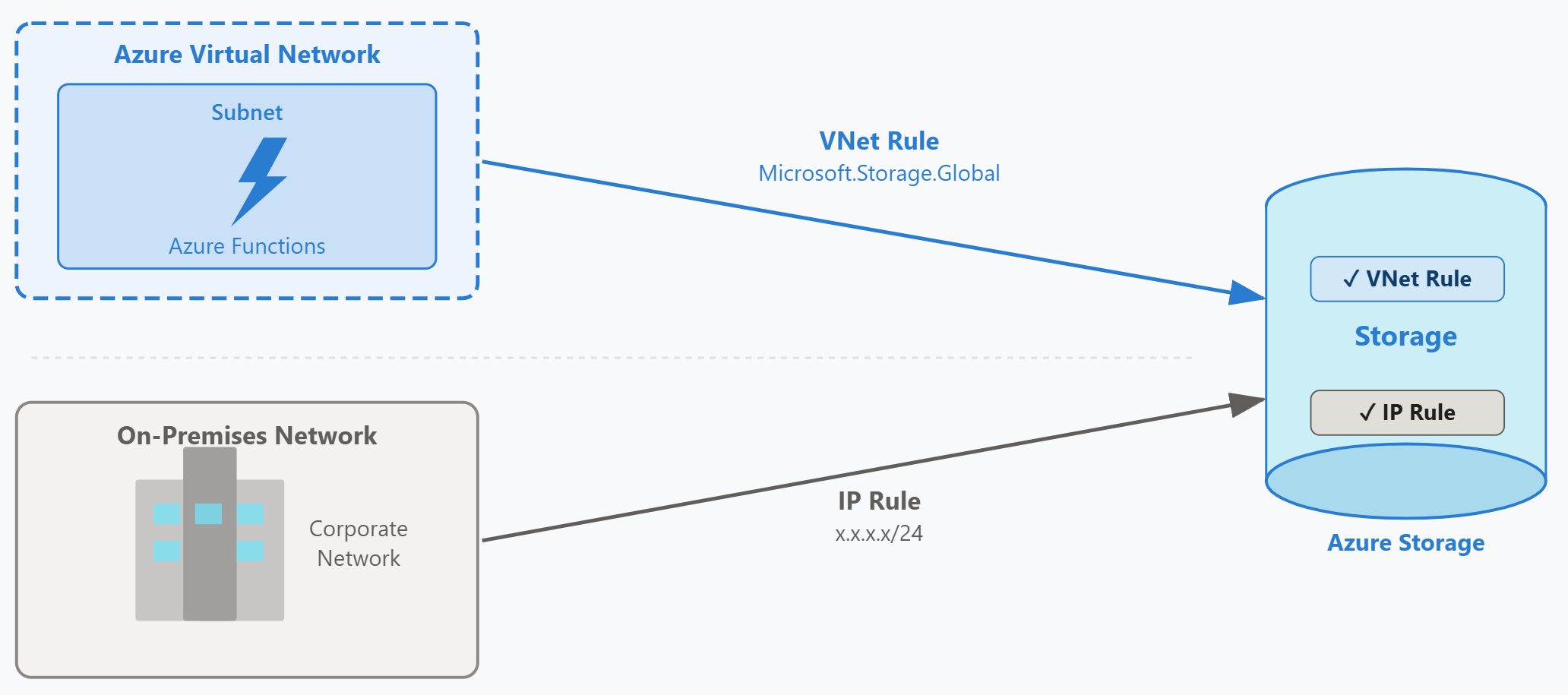
Virtual network rules and service endpoints
Virtual network rules grant storage access to traffic originating from specific subnets. To create a virtual network rule, you first enable a service endpoint on the subnet. The service endpoint routes traffic destined for Azure Storage over the Azure backbone network instead of the public internet. Traffic from the subnet appears to originate from the subnet's private IP address space rather than from an Azure public IP.
Azure provides two service endpoint types for storage: Microsoft.Storage and Microsoft.Storage.Global. The Microsoft.Storage endpoint restricts traffic to storage accounts in the same region as the subnet. The Microsoft.Storage.Global endpoint allows traffic to storage accounts in any region. You can enable only one endpoint type per subnet, so choose based on whether your workload needs cross-region storage access.
The global endpoint is important for geo-redundant storage scenarios. If your storage account uses geo-redundant storage (GRS) or read-access geo-redundant storage (RA-GRS), data replicates to a paired region. During a regional failover, your storage account's endpoint changes to the secondary region. Clients in the original region need the global service endpoint to access the storage account after failover.
After you enable the service endpoint on a subnet, you add the subnet as an allowed source in the storage account's network rules. The Azure portal combines these steps: when you select a subnet in the storage account's networking screen, the portal automatically enables the service endpoint if it's not already active. The storage account supports up to 400 virtual network rules.
When virtual network rules take effect
An important consideration emerges when you enable service endpoints on a subnet that already has running workloads. Traffic from that subnet immediately begins using private source IP addresses. If you previously relied on IP network rules to allow that subnet's public IP range, those rules no longer match the traffic's source. The virtual network rule takes precedence.
For example, Contoso's Azure Functions app initially connects to storage using the function app's public IP address. The security team adds an IP network rule allowing that public IP range. Later, they enable the Microsoft.Storage service endpoint on the function app's subnet to improve routing performance. As soon as the endpoint is active, traffic from the subnet uses the subnet's private IP space as the source address. The previous IP network rule no longer applies to this traffic. The team must add the subnet as a virtual network rule to maintain connectivity.
IP network rules for public addresses
IP network rules grant access to traffic from specific public IP address ranges. You specify ranges using Classless Inter-Domain Routing (CIDR) notation, such as x.x.x.x/24 for a range or 198.51.100.42 for a single IP address. The /31 and /32 prefix sizes aren't supported—enter single addresses without a prefix suffix. These rules work for any client that connects from a public IP address.
On-premises systems frequently require IP network rules. If your on-premises network connects to Azure over the internet or through ExpressRoute with Microsoft peering, traffic appears to originate from your organization's public IP address ranges. For ExpressRoute with Microsoft peering, use the NAT IP addresses assigned for that peering—either provided by your connectivity provider or by your own network team. You add these ranges as IP network rules to grant storage access.
IP network rules only accept public IP address ranges. Private IP ranges defined in RFC 1918 (10.0.0.0/8, 172.16.0.0/12, 192.168.0.0/16) aren't valid in IP rules. If you need to allow traffic from private IP space in Azure, use virtual network rules instead. The storage account supports up to 400 IP network rules.
IP network rules also have no effect on traffic from clients in the same Azure region as the storage account. Services in the same region communicate using private Azure IP addresses, which bypass IP rule evaluation entirely. Use virtual network rules to control same-region Azure workloads.
Preparing for regional failover
If your storage account uses geo-redundant replication, prepare for the possibility of regional failover. During a failover, Azure changes your storage account's primary endpoint to the secondary region. Clients that were previously accessing the account in the primary region now need to reach it in the secondary region.
Clients in virtual networks require virtual network rules in the secondary region. If your primary region's virtual network has a subnet with a storage service endpoint and a corresponding rule on the storage account, create matching infrastructure in the paired region. Deploy a virtual network in the secondary region, enable the Microsoft.Storage.Global service endpoint on subnets that need storage access, and add those subnets to the storage account's virtual network rules. This preparation ensures that clients can reach the storage account after failover without waiting for you to create new network infrastructure during an outage.
Applying the rules to Contoso's scenario
Contoso's AI document processing pipeline has two categories of clients. Azure Functions apps run in an Azure virtual network and process documents continuously. On-premises document scanning systems push scanned files to storage from the corporate network over the internet.
For the Azure Functions workload, the security team enables the Microsoft.Storage.Global service endpoint on the subnet where the function apps run. They choose the global endpoint because Contoso's storage accounts use RA-GRS replication. Then they add the subnet as a virtual network rule in the storage account's network configuration. This change ensures that function apps can access storage even during a regional failover.
For the on-premises scanning systems, the team identifies the public IP address range used by the corporate network's internet gateway. They add this range as an IP network rule using CIDR notation. Now the scanning systems can upload files to storage, while all other internet traffic remains blocked by the deny-all default policy.
These two rules cover Azure-hosted and on-premises clients. Next, you learn how to handle Azure services that don't fit either category—services that operate from Microsoft-managed infrastructure and need resource instance rules or trusted service exceptions.