Configure resource instance rules and trusted services
Some Azure services operate from infrastructure that Microsoft manages rather than infrastructure you control. These services can't use virtual network rules because they don't run in your virtual networks, and they don't have stable public IP addresses for IP network rules. Resource instance rules and trusted service exceptions address these scenarios.
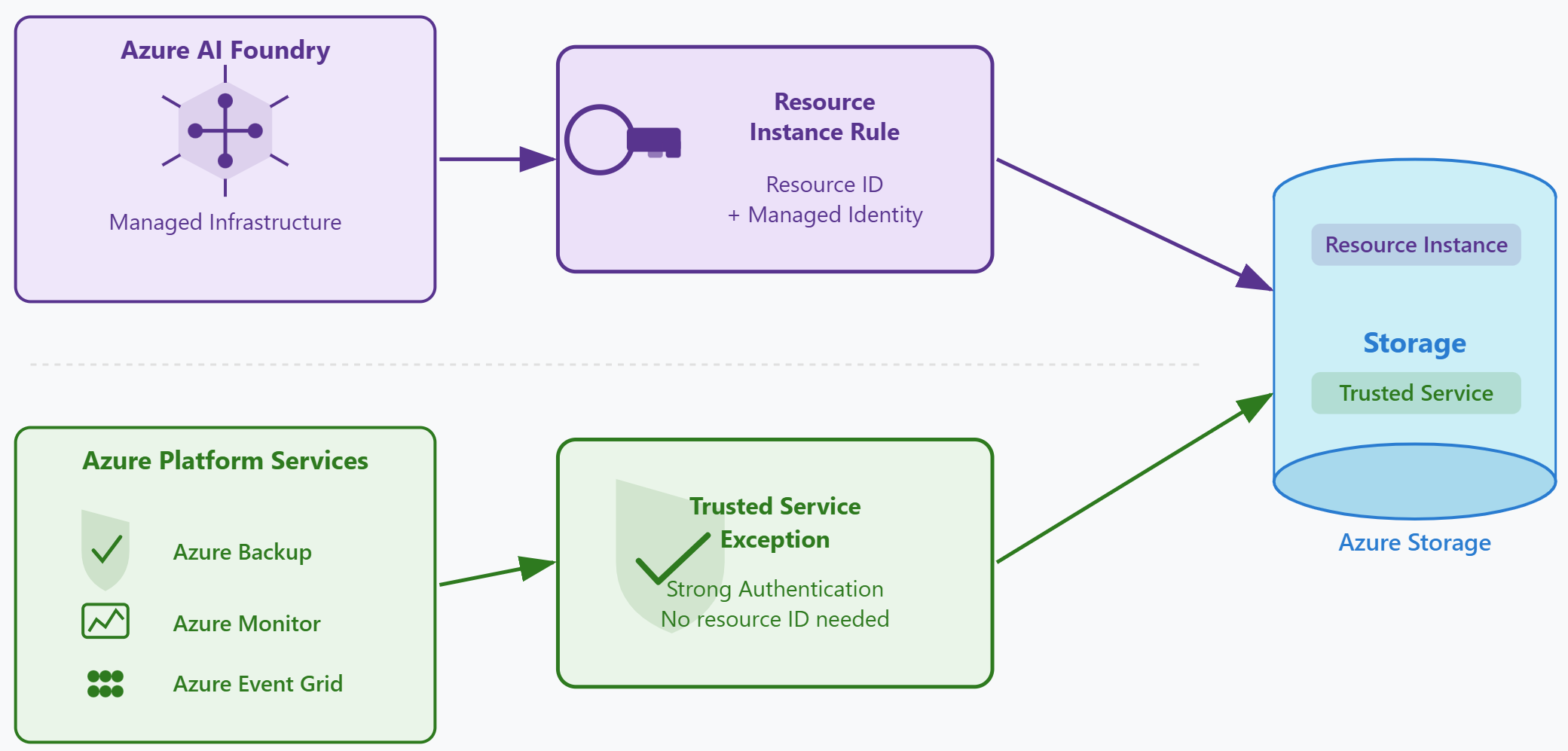
The resource instance rule solution
Azure AI Foundry projects, Azure Machine Learning workspaces, and similar services run in Microsoft-managed infrastructure. You don't deploy these resources into your own virtual networks, and you don't control their outbound IP addresses. Yet these services need to read and write data in your storage accounts.
Resource instance rules solve this problem by allowing specific Azure resource instances to access storage. Instead of identifying traffic by network source, these rules identify the resource by its resource ID and verify its managed identity during authentication. The resource must have a managed identity enabled and must have appropriate role based access control (RBAC) role assignments on the storage account.
To configure a resource instance rule, you specify the resource type and the specific resource instance. For example, you might add a rule for resource type Microsoft.MachineLearningServices/workspaces and provide the resource ID of a specific Azure Machine Learning workspace. That workspace can then access the storage account using its managed identity, subject to its RBAC permissions. The resource can exist in any subscription within the same Microsoft Entra tenant.
The resource type you select depends on which Azure service you're granting access to. Azure AI Foundry projects use a different resource type than Azure Machine Learning workspaces—select the type that matches the specific service in your workload.
| Element | Purpose | Example |
|---|---|---|
| Resource type | Identifies the Azure service category | Microsoft.MachineLearningServices/workspaces (Azure Machine Learning) or Microsoft.CognitiveServices/accounts (Azure AI Foundry) |
| Resource instance | Identifies the specific resource | /subscriptions/{sub-id}/resourceGroups/{rg}/providers/Microsoft.CognitiveServices/accounts/contoso-foundry |
| Managed identity | Authenticates the resource when it connects | System-assigned or user-assigned managed identity |
| RBAC role assignments | Determines what operations the resource can perform | Storage Blob Data Contributor, Storage Blob Data Reader |
The resource instance rule grants network access. The resource's RBAC role assignments determine what it can actually do with that access. If the Azure Machine Learning workspace has the Storage Blob Data Reader role, it can read blobs but can't write or delete them. If it has the Storage Blob Data Contributor role, it can read, write, and delete blobs. Network access and authorization remain separate concerns, just as they do with virtual network and IP rules.
Trusted service exceptions
Microsoft maintains a list of Azure platform services that require storage access to perform core platform operations. These trusted services include Azure Backup, Azure Event Grid, Azure Monitor, Azure Networking services, Azure Synapse Analytics, and others. When you enable the trusted service exception, all services on this list can access your storage account using strong authentication methods.
Trusted service exceptions are broader than resource instance rules. A resource instance rule grants access to one specific resource instance that you identify. A trusted service exception grants access to all instances of every service on Microsoft's trusted services list. The services authenticate using mechanisms that meet Microsoft's security standards, such as managed identities or service-specific authentication protocols.
When you enable the trusted service exception, you don't configure individual services or provide resource IDs. You simply set a single option in the storage account's network settings. All trusted services immediately gain access. This approach simplifies configuration when you need multiple platform services to access storage.
Choosing between resource instance rules and trusted service exceptions
The choice between resource instance rules and trusted service exceptions depends on the scope of access you need to grant and the service you're working with.
Use resource instance rules when you need granular control over which specific Azure resource instances can access storage. This approach works well for AI and machine learning workloads. You can grant access to your own Azure AI Foundry project or Azure Machine Learning workspace without granting access to every similar resource in your tenant.
Use the trusted service exception when you need to grant access to Azure platform services that perform operational tasks on your behalf. Azure Backup needs to write backup data to storage. Azure Monitor needs to write diagnostic logs. Azure Event Grid needs to read blob content for event processing. These platform services are on Microsoft's trusted list and benefit from the broad exception.
You can combine both approaches in the same storage account. Contoso, for example, might enable the trusted service exception to support Azure Backup and Azure Monitor, while also adding a resource instance rule for their specific Azure AI Foundry project used in the document classification pipeline.
Applying resource instance rules to Contoso's scenario
Contoso's document processing pipeline uses an Azure AI Foundry project to classify documents after they're uploaded. This project runs in Microsoft-managed infrastructure and can't be placed in Contoso's virtual networks. Virtual network rules don't apply to this service.
The security team creates a resource instance rule for the Azure AI Foundry project. They select resource type Microsoft.CognitiveServices/accounts in the storage account's networking settings, then choose the specific project resource ID. They verify that the project has a system-assigned managed identity enabled. Then they assign the Storage Blob Data Contributor role to the project's managed identity, scoped to the document storage account. This role assignment grants read, write, and delete permissions on blobs.
After Contoso adds the resource instance rule with the correct resource type and resource ID, the Azure AI Foundry project can access the storage account. The project authenticates using its managed identity, and the RBAC role determines what operations it can perform. The storage firewall's deny-all policy still blocks all other traffic sources.
The team also enables the trusted service exception to support Azure Backup, which creates daily backups of critical storage containers. They don't need to configure specific backup vault resource IDs—the trusted service exception covers all Azure Backup operations automatically.
Contoso's storage account now has virtual network rules, IP rules, resource instance rules, and trusted service exceptions configured. Together, these rules allow all legitimate clients while blocking everything else. The final step is to consider whether the workload requires fully private connectivity without any public endpoint exposure—a scenario addressed by private endpoints.