Implement private endpoints for storage accounts
Virtual network rules, IP rules, and resource instance rules control access through the storage account's public endpoint. The storage account still has a public IP address that's reachable from the internet, even though firewall rules block most traffic. Private endpoints provide an alternative: they give the storage account a private IP address in your virtual network and eliminate the need for a public endpoint entirely.
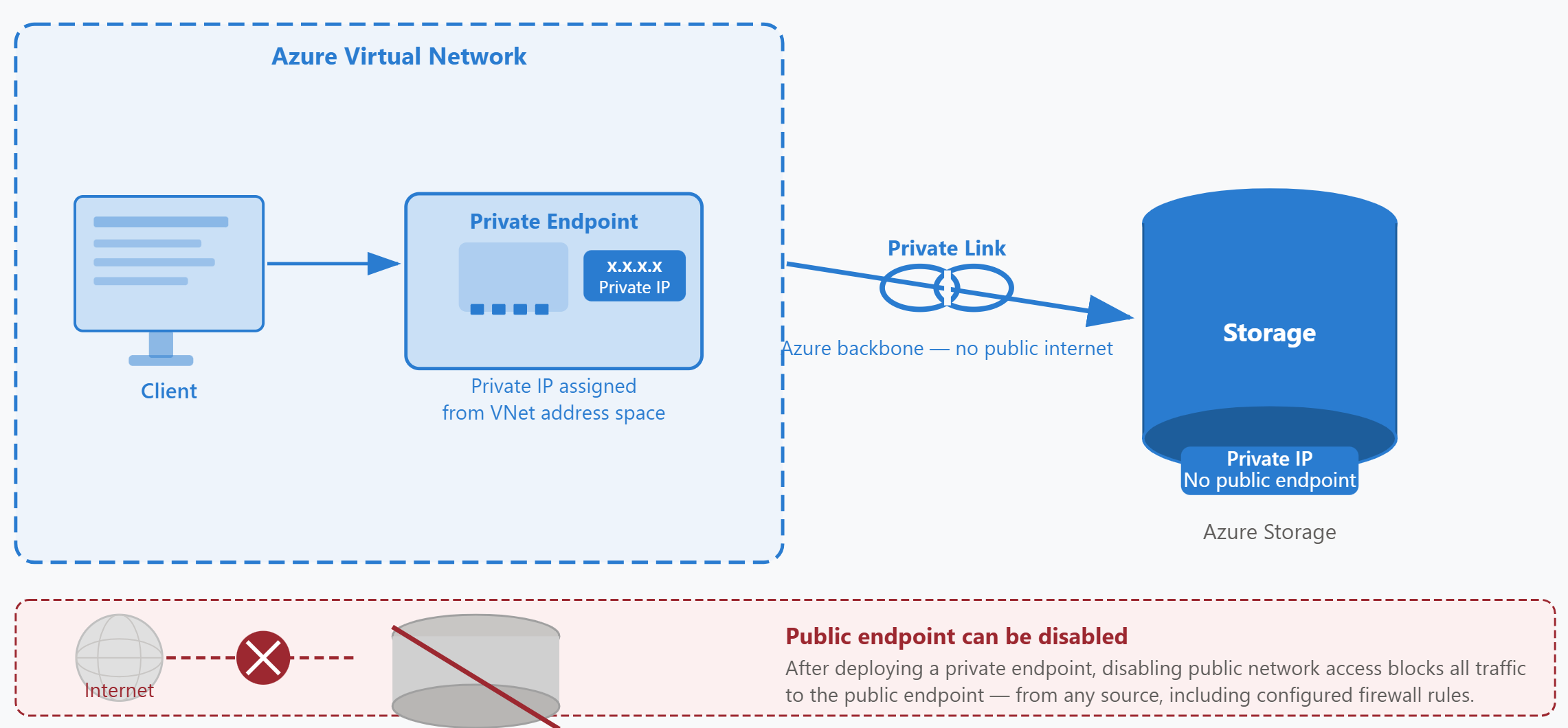
What private endpoints provide
A private endpoint is a network interface in your virtual network with a private IP address from the virtual network's address space. Azure Private Link connects this network interface to a specific Azure Storage service endpoint—blob, file, queue, table, or DFS (Azure Data Lake Storage Gen2). Each storage service requires its own private endpoint. If you need private access to both blob and file storage, you create two private endpoints.
When you create a private endpoint for blob storage, Azure assigns a private IP address like 10.1.2.45 to the endpoint. Clients in your virtual network connect to mystorageaccount.blob.core.windows.net, and Azure resolves this name to the private IP address instead of the storage account's public IP. Traffic flows directly from your virtual network to the storage service over the Azure backbone network, never traversing the public internet.
Private endpoints versus virtual network service endpoints
Both private endpoints and virtual network service endpoints optimize network routing between your virtual network and Azure Storage, but they differ significantly in architecture and capabilities.
| Aspect | Virtual Network Service Endpoint | Private Endpoint |
|---|---|---|
| Storage account IP address | Public IP address | Private IP address in your virtual network |
| DNS resolution | Resolves to public IP | Resolves to private IP |
| Network traffic path | Azure backbone (optimized routing) | Azure backbone (Private Link) |
| Public endpoint exposure | Storage account remains publicly addressable | Can disable public endpoint completely |
| Compliance scenarios | Suitable when public endpoint is acceptable | Required when public endpoint is prohibited |
Virtual network service endpoints optimize routing and let you create firewall rules based on subnets. Always remember the storage account still has a public endpoint that's reachable from the internet. Firewall rules can block unauthorized traffic, but they don't remove the public endpoint. Private endpoints give the storage account a private IP address and let you disable the public endpoint entirely if needed.
DNS configuration for private endpoints
Private endpoints require DNS configuration to work correctly. When a client queries mystorageaccount.blob.core.windows.net, DNS must return the private endpoint's IP address (10.1.2.45) instead of the storage account's public IP address.
Azure creates a private DNS zone automatically when you use the Azure portal to create a private endpoint. For blob storage, the zone is named privatelink.blob.core.windows.net. The portal adds a DNS record that maps your storage account's name to the private endpoint's IP address. The portal also links your virtual network to this private DNS zone so that clients in the virtual network use these private DNS records.
If you create private endpoints using Azure CLI, PowerShell, or Bicep templates, you must create the private DNS zone and configure DNS records manually. Clients in your virtual network won't resolve the private endpoint's IP address until you complete the DNS configuration.
Disabling the public endpoint
After you deploy a private endpoint, you can disable public network access on the storage account. This configuration blocks all traffic to the public endpoint, even from sources that would otherwise pass firewall rules. The storage account becomes accessible only through private endpoints.
Disabling public access prevents clients outside your virtual network from reaching the storage account. If you have on-premises systems that need storage access, ensure they connect through Azure ExpressRoute or VPN and route traffic through a virtual network that has the appropriate private endpoint. Internet-based clients can't reach the storage account after you disable the public endpoint, regardless of IP rules or other firewall configurations.
When to use private endpoints
Private endpoints add complexity and cost compared to virtual network service endpoints. Choose private endpoints when your scenario requires one or more of these capabilities:
- Compliance requirements prohibit public endpoint exposure: Some regulatory frameworks or organizational policies require that storage accounts have no public IP address at all.
- On-premises access over ExpressRoute or VPN: Private endpoints work with private peering over ExpressRoute and with VPN connections. They provide fully private connectivity from on-premises networks without requiring ExpressRoute public peering or internet access.
- Cross-virtual-network private access: You can create private endpoints in hub virtual networks and access them from spoke virtual networks through peering, simplifying network architecture for multi-VNet designs.
- Defense-in-depth strategy: Private endpoints eliminate an entire attack surface (the public endpoint) rather than relying solely on firewall rules to protect it.
For simpler scenarios where public endpoint exposure is acceptable and you only need to optimize routing from Azure virtual networks, virtual network service endpoints provide a lower-complexity solution.
Applying private endpoints to Contoso's scenario
Contoso's security team evaluates whether the document processing pipeline requires private endpoints. The pipeline runs entirely in Azure, with Azure Functions processing documents and Azure AI Foundry performing classification. The on-premises scanning systems need to upload files, but they connect over ExpressRoute with private peering rather than the public internet.
The team decides to implement private endpoints to eliminate public endpoint exposure entirely. They create a private endpoint for the blob service in the virtual network where the Azure Functions apps run. Azure automatically creates the privatelink.blob.core.windows.net private DNS zone and links it to the virtual network.
On-premises scanning systems connect through ExpressRoute with private peering. The corporate network's DNS servers forward queries for *.blob.core.windows.net to Azure DNS resolvers in the virtual network. This configuration ensures that on-premises systems resolve the storage account name to the private endpoint's IP address and send traffic over the ExpressRoute connection.
After verifying that all clients can reach the storage account through the private endpoint, the team disables public network access on the storage account. The storage account now has no public endpoint exposure. All traffic flows over private IP addresses through the virtual network or over ExpressRoute private peering.
The combination of network security controls—private endpoints with public access disabled, resource instance rules for Azure AI Foundry, and trusted service exceptions for Azure Backup—creates a layered defense. It allows only authorized clients to access storage while blocking all other traffic at the network perimeter.