Introduction
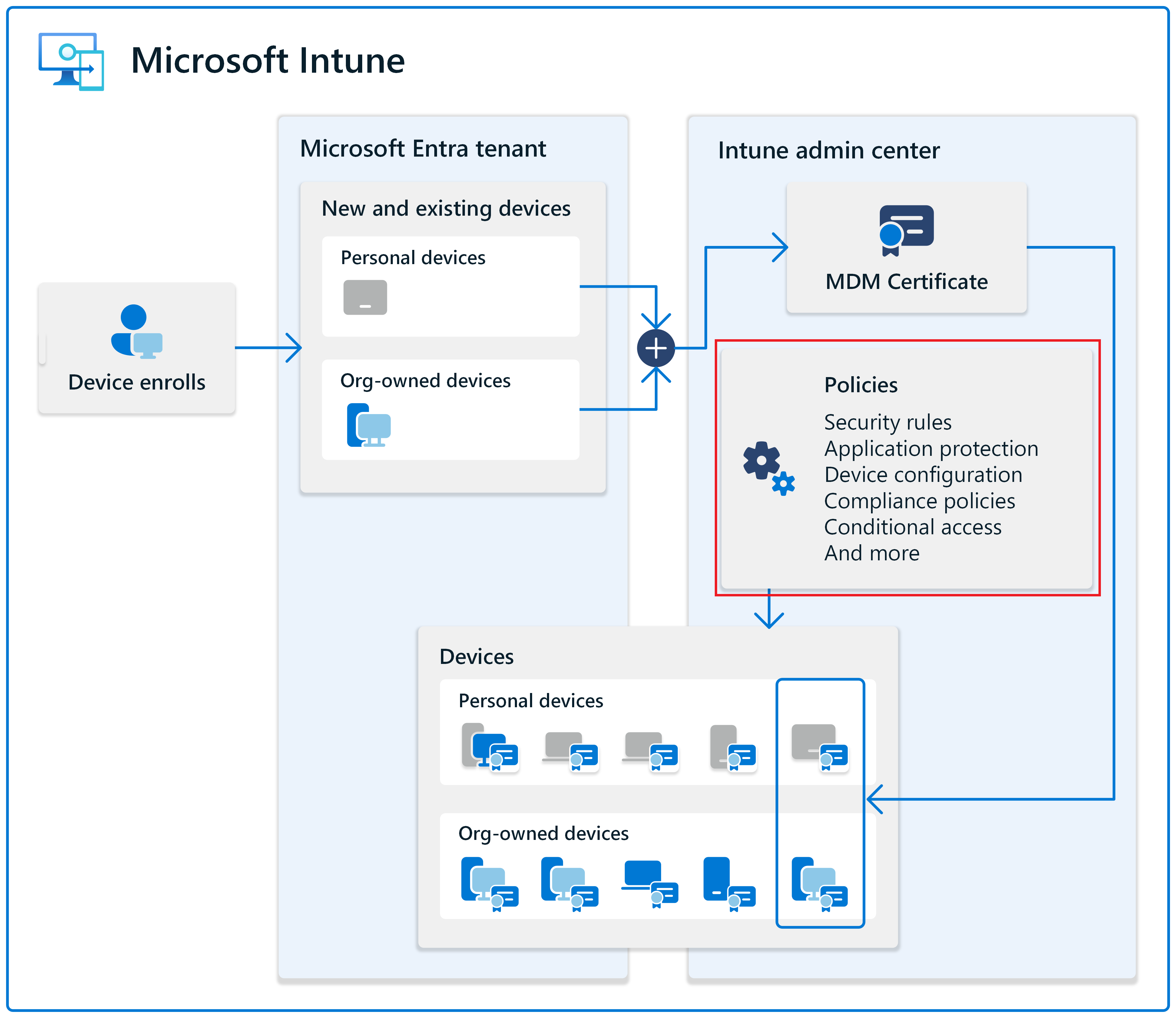
Enrolling devices in Microsoft Intune gives you visibility and the ability to manage endpoints, but enrollment alone doesn't secure your organization. Without policies, enrolled devices remain unmanaged—users can disable encryption, skip operating system updates, and access corporate resources from noncompliant devices. In traditional on-premises environments, Group Policy and manual configuration scripts provided some control, but these tools can't reach remote devices outside the corporate network and require significant administrative overhead to maintain.
Modern organizations face a critical challenge: how do you ensure consistent security standards across devices that work from anywhere? Employees connect from home offices, coffee shops, airports, and client sites. Personal devices (BYOD) access corporate email alongside company-owned laptops. Some devices run Windows 11, others iOS or Android. Without centralized policy management, IT teams face an impossible task—manually configuring each device, hoping users don't change settings, and discovering security gaps only after a breach occurs.
This is where device configuration profiles and compliance policies become essential. Configuration profiles deploy and enforce device settings automatically—enabling BitLocker encryption, configuring firewall rules, setting password requirements, and deploying certificates. These settings apply regardless of whether the device ever connects to your corporate network. Compliance policies define security requirements that devices must meet before accessing corporate resources—ensuring antivirus is active, disks are encrypted, operating systems are updated, and jailbroken devices are blocked.
Microsoft Intune provides cloud-native policy management that operates entirely over the internet. Once a device enrolls, it receives policies automatically and reports compliance status in real time. This means you can enforce BitLocker encryption on a laptop in Tokyo, deploy VPN settings to a sales team in São Paulo, and verify that Android work profiles have adequate passwords—all from a single management console. Intune eliminates the gap between enrollment and security, ensuring every managed device meets your standards from day one.
Configuration and compliance policies work together to support Zero Trust security principles: verify explicitly (compliance policies verify security posture before granting access), use least privilege access (configuration profiles enforce security baselines and minimize attack surface), and assume breach (automated remediation responds to compliance failures without manual intervention). Combined with Conditional Access, these policies ensure only compliant, properly configured devices can access corporate data—regardless of where users work or what networks they connect to.
Contoso scenario: From enrollment to policy
In Modules 1 and 2, Contoso's IT team successfully:
- Configured Microsoft Entra ID for automatic enrollment
- Enrolled Windows devices through Microsoft Entra join
- Validated device management and applied enrollment restrictions
Now, the IT team needs to configure device settings and enforce security standards across all enrolled devices.
Contoso's requirements:
- Standardize device settings: Configure Windows settings like BitLocker encryption, Windows Defender Firewall, and password policies
- Enforce compliance: Ensure devices meet security requirements (antivirus enabled, disk encrypted, OS up to date)
- Target specific groups: Apply different policies to different departments (sales team gets VPN settings, finance team gets stricter encryption)
- Automate remediation: Fix common compliance issues automatically instead of relying on manual intervention
In this module, you follow along as Contoso implements these policies using Microsoft Intune, transforming enrolled devices into securely managed endpoints that meet organizational security standards wherever they operate.
What you learn
In this module, you complete the essential policy configuration steps to secure and manage enrolled devices:
- Create and assign device configuration profiles to standardize device settings across Windows, iOS/iPadOS, and Android platforms
- Define and apply compliance policies that enforce security requirements and identify noncompliant devices
- Target policies precisely using dynamic groups, assignment filters, and applicability rules
- Validate that policies apply successfully and monitor compliance status across your device fleet
- Automate remediation for common compliance issues using PowerShell scripts and compliance actions
What is the main goal?
By the end of this module, you can deploy and enforce security policies across your enrolled device fleet. You understand how to configure device settings, define compliance requirements, target policies effectively, and automate responses to compliance failures. Your devices transition from simply enrolled to fully managed and compliant with organizational security standards.