Identify the Global Administrator
The admin centers—Microsoft 365 Admin Center (Surface Support Portal) and Intune Admin Center (Surface Management Portal)—are where administrators manage key settings. This includes assigning the user roles and permissions required to access each portal. In these admin centers, administrators assign the roles and permissions required to access each portal.
Follow these steps to identify Global Admin in Microsoft 365 Admin Center:
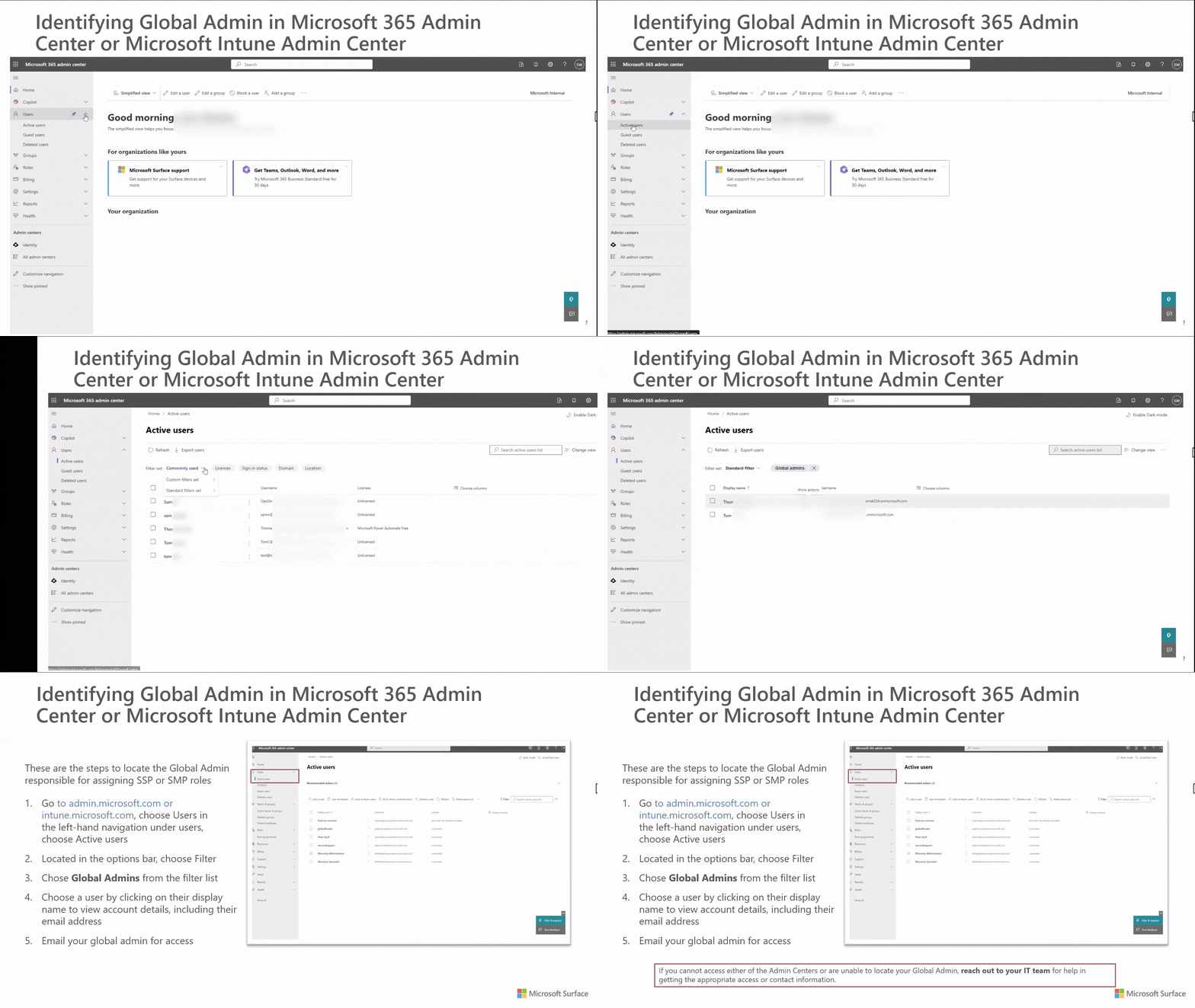
- Go to the Microsoft 365 Admin Center (admin.microsoft.com).
- Navigate to Users on the left-hand navigation pane, then select Active Users in the options bar.
- Select Filter, then choose Global Admins.
- Record the Global Admin contact information, then email them for access.
To look up Global Admin on Intune Admin Center for Surface Management Portal:
- Go to the Intune Admin Center (intune.microsoft.com).
- Navigate to Users on the left-hand navigation pane.
- Select Per-User MFA.
- In the View filter select Global Administrators.
Important
To assign access to Surface portals, you must have the Global Administrator role. If you're unable to access either of the Admin Centers or are unable to locate your Global Admin, reach out to your IT team for help with getting the appropriate access or contact information.