Perform table and metadata operations on Dataverse data
The previous unit wired the code app to the logistics connector so it could check device availability before a request ever reaches Dataverse. This unit points that same data-source pattern at Dataverse itself, adding the Employee, Device, Request, and Allowance tables.
That lets the app create, retrieve, and update records, and adapt its labels, required fields, and option-set values to however your organization customizes those tables. The shift here moves you from calling a single connector action to working directly against table structure through CRUD and metadata calls.
Add the Dataverse tables as data sources
Dataverse follows the table-based pattern from the previous unit: you add one logical table at a time, not a single action. Adding each table looks like the command you already know, with the table's logical name in place of a connector action. A non-interactive or scripted run also needs --org-url <dataverse-org-url>, since only an interactive terminal prompts you for that value instead:
pa app add data-source --connector dataverse --table request
Run this once per table, replacing request with employee, device, and allowance as you wire up each one. Every run generates a typed model and service pair in /generated/models/ and /generated/services/, so adding the Request table produces RequestModel.ts and RequestService.ts, and adding the Device table produces DeviceModel.ts and DeviceService.ts. You import these the same way you imported the logistics service:
import { RequestService } from './generated/services/RequestService';
import type { Request } from './generated/models/RequestModel';
With the data sources in place, the Request and Device services expose the same five core methods as any other Dataverse table service: create, get, getAll, update, and delete, with delegation support for filtering, sorting, paging, and top queries.
Create a request without guessing at read-only fields
An employee submits a replacement request by creating a Request record, but not every field on that table belongs in your create payload. System-managed columns, including the primary key and ownership fields, populate automatically, and including them causes the call to fail or behave unexpectedly.
Build the record from only the fields the employee actually sets. In this scenario, that means a starting status plus the lookup associations for the employee and device records. Current code-apps guidance still handles those lookup associations through the underlying Dataverse Web API patterns, rather than through a simplified raw-ID shortcut.
import { RequestService } from './generated/services/RequestService';
import type { Request } from './generated/models/RequestModel';

const newRequest: Omit<Request, 'requestid'> = {
  // add the employee and device lookup associations by using the
  // Dataverse Web API guidance for lookup relationships
  statuscode: 1 // Submitted
};

const created = await RequestService.create(newRequest);
Notice the Omit<Request, 'requestid'> type: it tells the compiler you deliberately leave out the primary key, since Dataverse assigns that value when it creates the record. The same exclusion applies to any field your organization marks read-only, which is something you confirm with table metadata rather than by trial and error, as the next section covers.
For lookup associations, follow the documented Dataverse Web API patterns for associating records on create or associating with a single-valued navigation property.
Try it yourself: Think of a table you work with outside this scenario. Which fields would you exclude from a create payload for that table, and why? Separate the fields the system assigns automatically from the fields a user is supposed to set.
Retrieve a single request or query request history
Reading data from Request splits into two patterns, depending on whether you already know which record you want. When an employee reopens a request they already submitted, retrieve it directly by its primary key:
const existingRequest = await RequestService.get(requestId);
When an employee instead wants their request history, query the table with getAll and an options object instead of pulling every record and filtering client-side:
const myRequests = await RequestService.getAll({
  select: ['requestid', 'statuscode', 'createdon'],
  filter: `_employee_value eq '${employeeId}'`,
  orderBy: ['createdon desc'],
  top: 25
});
The select option matters as much as the filter here. Dataverse tables commonly carry dozens of columns, and requesting only the three the list view actually displays keeps the call fast and the response small. The options available on getAll cover the common query needs:
| Option | Purpose |
|---|---|
select |
Limit the columns returned; always set this instead of fetching every column |
filter |
An OData filter string, such as scoping requests to one employee |
orderBy |
Sort the results, for example newest first |
top |
Cap how many records come back in one call |
maxPageSize |
Set the page size for large result sets |
skip / skipToken |
Page through results beyond the first page |
Update a request, and know when delete applies
Canceling a request is an update, not a delete: the record stays for history, but its status changes. The detail that trips up a first attempt at this is including fields you don't mean to change. If you fetch a request to display it, then submit that entire object back with just the status flipped, you resend every unchanged property alongside the one that actually changed.
await RequestService.update(requestId, {
  statuscode: 3 // Canceled
});
Sending only the changed property avoids two real problems. First, Dataverse business logic, such as a workflow that fires when a particular column changes, can trigger even though that column's value is identical to what it already was. Second, audit history records that a field changed when it didn't, which corrupts the trail someone later relies on to understand what happened to a request.
Delete follows the same primary-key pattern (RequestService.delete(requestId)), but this scenario rarely needs it. Removing a request record erases its history instead of preserving the canceled status, so an update is almost always the better fit for an employee-facing cancel action.
Adapt your app to however Device and Allowance are customized
Every claim so far assumes you know the Request and Device tables' column names, labels, and required fields ahead of time. In practice, Dataverse tables in a production environment carry customizations: renamed columns, added required fields, organization-specific choice options. Table metadata is how the app discovers the renamed columns and required-field changes at runtime.
getMetadata returns column display labels, the IsRequiredForForm flag, and manyToOne, oneToMany, and manyToMany relationship metadata, instead of the app hardcoding assumptions that break when someone customizes the Device table. It doesn't return the list of possible options for a choice (picklist) column, though, because those options come from a derived type that AttributeMetadata doesn't expose.
When you need the label for an option-set value already on a retrieved record, that label comes from the record's formatted value. That's a different thing from discovering the full set of options a choice column can hold.
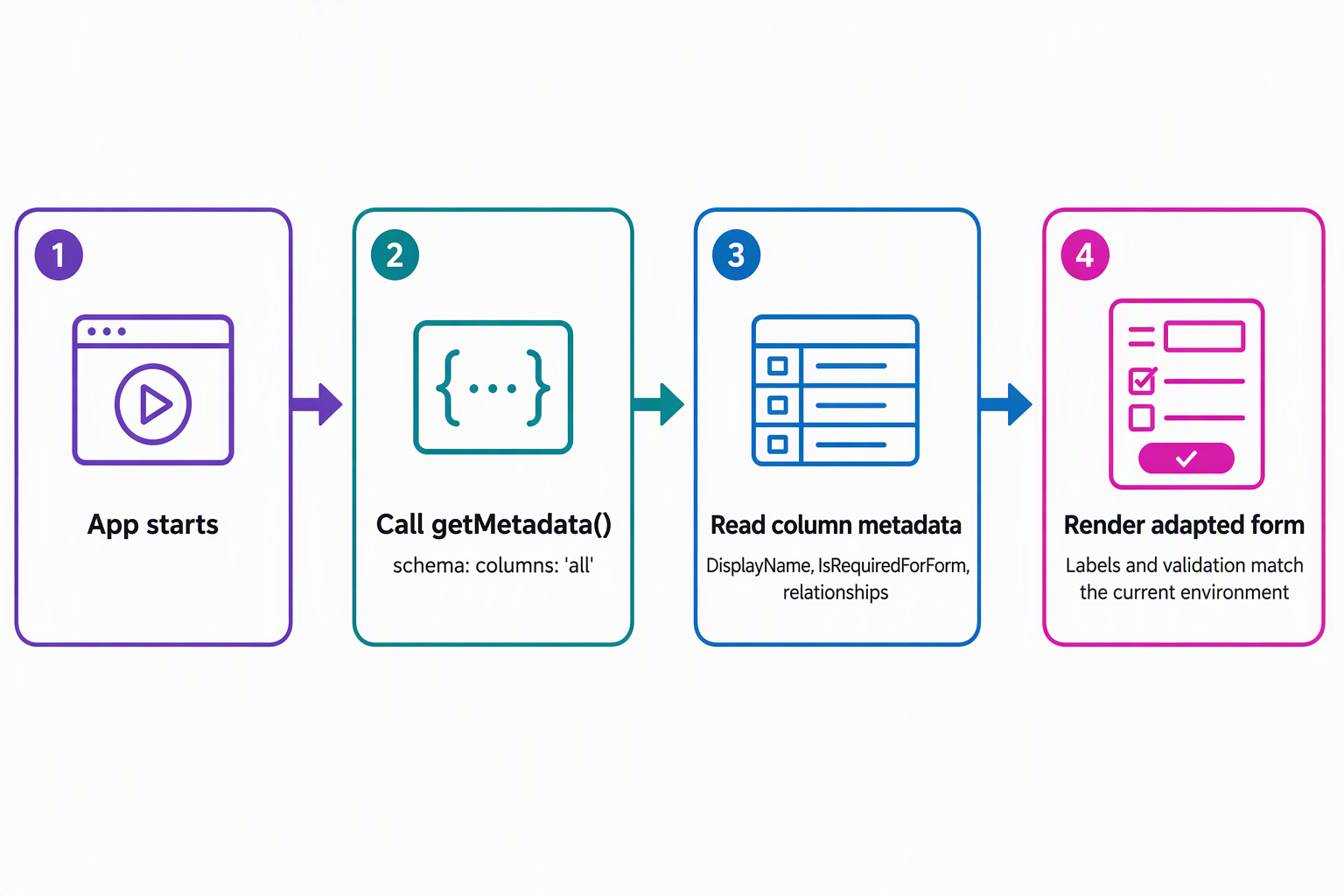
const { data } = await DeviceService.getMetadata({ schema: { columns: 'all' } });
const requiredFields = data.Attributes?.filter(a => a.IsRequiredForForm);
The getMetadata call accepts a schema option that controls exactly what comes back, which matters because a full metadata response is a relatively heavy call:
| Schema option | Returns |
|---|---|
columns: 'all' or columns: [...] |
Column (attribute) metadata, either for every column or a specific list |
oneToMany |
Relationships where this table is the "one" side |
manyToOne |
Lookup relationships from this table to others |
manyToMany |
Many-to-many relationship metadata |
Three uses of that Attributes array cover most of what a form-driving UI needs:
- User-localized display labels (
attr.DisplayName?.UserLocalizedLabel?.Label) replace hardcoded label strings, so the form shows whatever label an administrator configured instead of the raw logical name. - The
IsRequiredForFormflag drives client-side validation without maintaining a separate list of required fields by hand. manyToOnerelationship metadata surfaces lookups like Request's connection to Employee and Device, letting the app discover related tables instead of assuming they never change.
Two habits keep metadata calls cheap. Request specific columns instead of 'all' once you know which ones the form needs. Cache the result at app start or per session, rather than calling getMetadata on every render, since the underlying data rarely changes within a session.
Know the current limits before you design around them
Two gaps shape how far you push this pattern today. Associating a Request with its Employee and Device through a lookup field at creation or update time currently falls outside the dedicated code-apps guidance. Until a dedicated how-to arrives, you instead follow the general Dataverse Web API pattern for associating records. Treat this as a planning constraint rather than something to work around with custom code.
A short list of scenarios also isn't supported yet: polymorphic lookups, schema definition (entity metadata) CRUD, FetchXML support, and alternate key support. None of these affect the create, retrieve, update, and metadata operations this unit covers, but you still account for them before you plan a feature around any one of them.
With create, retrieve, update, and metadata calls in place, the code app can take an employee's request from submission through cancellation. It adapts its labels and required fields instead of hardcoding them. The next unit moves beyond calling tables directly, triggering a Power Automate cloud flow that routes a submitted request to a coordinator for approval.