Inspect tools and invoke a Dataverse operation
In the previous unit, you connect your client to Contoso's governed Dataverse MCP server and confirm success by listing the tools the server returns. That list ended with a quiet observation: an excluded tool never appears, rather than showing up and getting rejected. This unit picks that thread up: you read what a tool actually promises to do, invoke one, and learn to tell apart the two different reasons a call can fail to deliver what you expect.
Review the tool list for what it tells you
Look again at what your client received when it connected. For Contoso's equipment-provisioning server, that list contains read-oriented tools:
read_query, for running a supported SQL-styleSELECTagainst Dataverse data.describe, for pulling schema details about a table or record. It replaces the removeddescribe_table,list_tables, andfetchtools.search, for keyword lookups across table schemas, metadata, and business skills.search_data, for keyword lookups across structured and unstructured Dataverse data.searchandsearch_dataare two separate tools that Contoso's IT team can allow-list independently, andsearch_dataonly appears in the list when Dataverse search is enabled for the environment. A real, current Dataverse MCP server can also expose write-oriented tools,create_record,update_record,delete_record, and table-level equivalents likecreate_tableanddelete_table, but none of those appear in what your client sees. Contoso's IT team allow-lists only the read-oriented set, so the write tools aren't hidden behind a permission check; they're absent from the list entirely.
That absence is the whole point of an allow-list. The tools you see are a deliberate, pre-connection decision about what this server is for, not a reflection of what Dataverse itself can do. With that list in front of you, the next question is what each tool actually expects and returns, and that's where its definition comes in.
Read a tool's definition before you call it
Every tool your client discovered carries a JSON definition alongside its name: a natural-language description of what it does, an input schema listing the parameters it accepts, and a description of the shape of data it returns. You read this definition the same way you'd read a function signature before calling it in code: it tells you what to supply and what to expect back without guessing.
An illustrative definition for a read-oriented tool over Contoso's data looks something like this:
{
  "name": "read_query",
  "description": "Runs a supported SQL-style SELECT query against Dataverse tables and returns matching records.",
  "inputSchema": {
    "type": "object",
    "properties": {
      "query": {
        "type": "string",
        "description": "A SELECT statement targeting one or more Dataverse tables, for example the request table."
      }
    },
    "required": ["query"]
  },
  "output": {
    "type": "array",
    "description": "An array of record objects matching the query, each containing the selected columns."
  }
}
Notice what isn't here: nothing in this definition grants you access to any particular row or column. The definition describes the shape of the call and the shape of the response. Whether a specific call actually returns data is a separate question, and that's exactly where the distinction this unit builds toward becomes important.
Try it yourself: In your connected client, open the definition for the
describetool (or its equivalent in your client's tool list) and read its input schema. What does it ask you to supply, a table name, a record ID, something else, and how closely does that match what you'd expect from its description?
Tell apart a missing tool from a denied call
Two different things can stand between you and the data you want, and mixing them up sends you looking in the wrong place when something doesn't work.
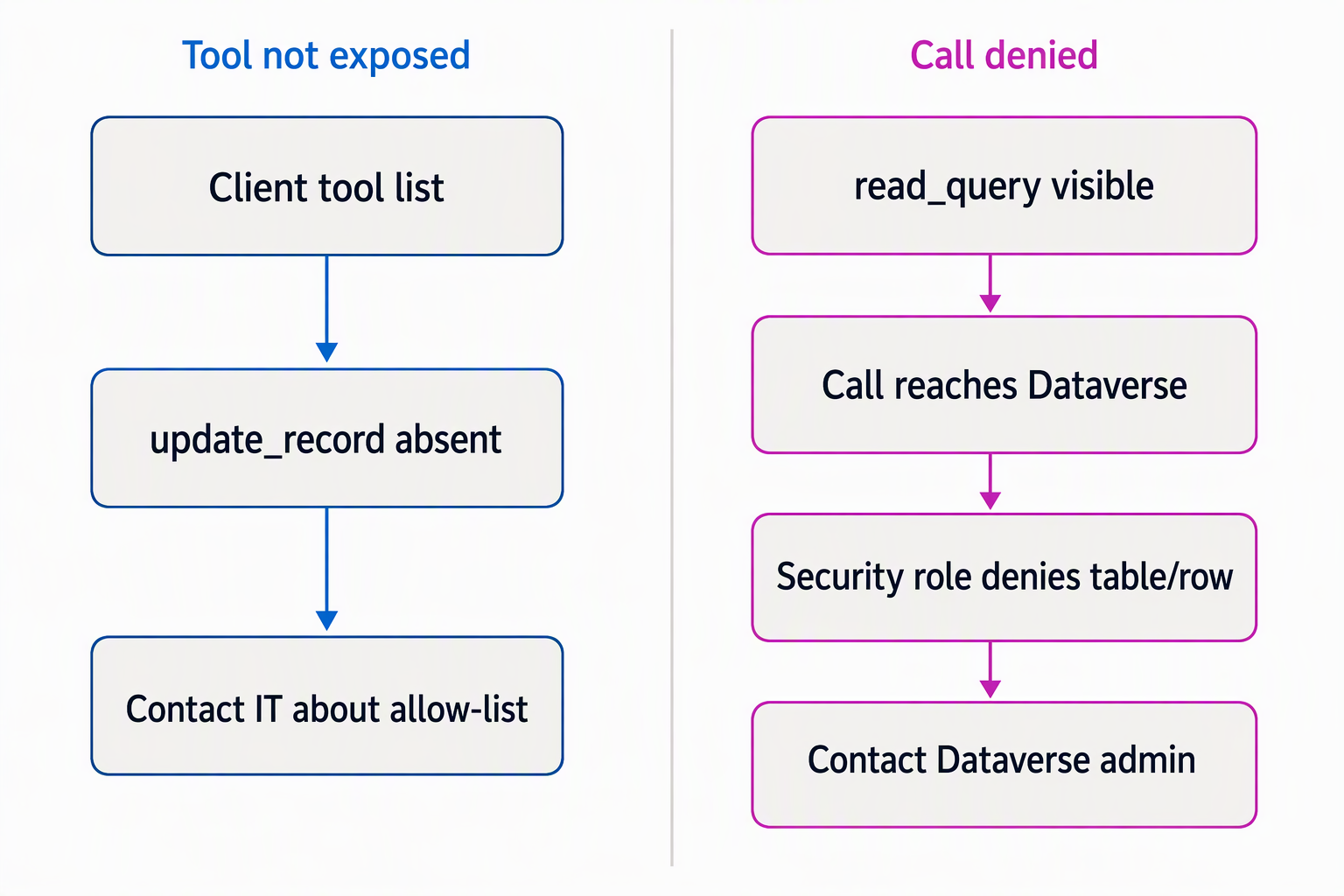
Not exposed (allow-list layer): a write-oriented tool like update_record or delete_record never appears in the list Contoso's server returns to any client. There's nothing to call, so there's no error to debug. This is a governance decision IT made before you ever opened your client, and no amount of retrying the connection surfaces a tool that isn't allow-listed.
Rejected despite being permitted (Dataverse security layer): read_query is allow-listed and fully callable, so the tool reaches Dataverse every time you invoke it. But a specific call, say, one that queries the allowance table, can still come back as a permission error.
That happens if your signed-in user's Dataverse security role doesn't grant read access to that table or to specific rows. The tool is available and the request lands; Dataverse's own role-based security is what says no.
The same evaluation applies to any write-oriented tool too, if Contoso ever allow-listed one: being on the allow list only makes a tool visible and callable, while your Dataverse security role decides what a specific call actually touches. These are two independent layers, and the MCP server enforces no separate access rules beyond the ones your Dataverse role already defines.
Knowing which layer you're looking at tells you where to look when a call doesn't behave as expected. A tool that's missing points back to the server's allow-list, a question for IT. A tool that's present but a call to it gets refused points to your own security role assignment in Dataverse, a different conversation entirely.
Invoke a read-only operation and interpret the response
With that distinction in mind, you're ready to call something. Contoso's developer needs the list of open equipment replacement requests, a task that maps cleanly onto read_query filtered to the request table's open or pending status. You pass a query parameter through the tool, and the server runs it against Dataverse. Dataverse then evaluates the call against your security role, exactly as it would for any other read.
The response comes back as structured JSON, an array of record objects rather than free text:
{
  "records": [
    {
      "requestId": "REQ-1042",
      "employee": "J. Alvarez",
      "deviceType": "Laptop",
      "status": "Open"
    },
    {
      "requestId": "REQ-1058",
      "employee": "T. Okafor",
      "deviceType": "Monitor",
      "status": "Pending approval"
    }
  ]
}
Each object maps to one request record, with fields you can read directly: a request identifier, the employee who filed it, the device type involved, and its current status. Because the response is structured rather than a block of prose, you parse it the same way you'd parse any JSON payload in your client or script. You pull individual fields, rather than scanning text for an answer.
This same shape and this same security evaluation apply no matter which read-oriented tool you call or which table you point it at. You can now read a definition, invoke the tool it describes, and tell a missing tool apart from a denied call. That covers everything this module asks of you as a consumer of an already-governed server.
What you haven't seen yet is why Contoso's server is shaped the way it is, why these particular tools made the allow-list and not others. The next unit looks at that governance boundary directly and explains why building or configuring it isn't part of your role here.