Apply the MCP server governance boundary
The previous unit ends on an open question: why does Contoso's server expose exactly these tools, and not others? This unit answers that question and explains why the answer was never yours to decide.
Recognize the work you're not doing
Contoso's equipment-provisioning server didn't start with anyone writing server code. The Dataverse MCP server is a built-in, Microsoft-hosted capability. An organization doesn't stand it up with an MCP software development kit (SDK) the way a team might build a custom server from scratch.
Instead, a Power Platform administrator turns it on for the environment: in the environment's settings, under Product > Features, the admin locates Dataverse Model Context Protocol and turns on Allow MCP clients to interact with Dataverse MCP server.
That single setting is enough to make Copilot Studio work immediately, because Copilot Studio is enabled by default the moment the server itself is on. Every other client, including the command-line client you connected in unit 2, has to be enabled separately in Advanced Settings before it can reach the server at all.
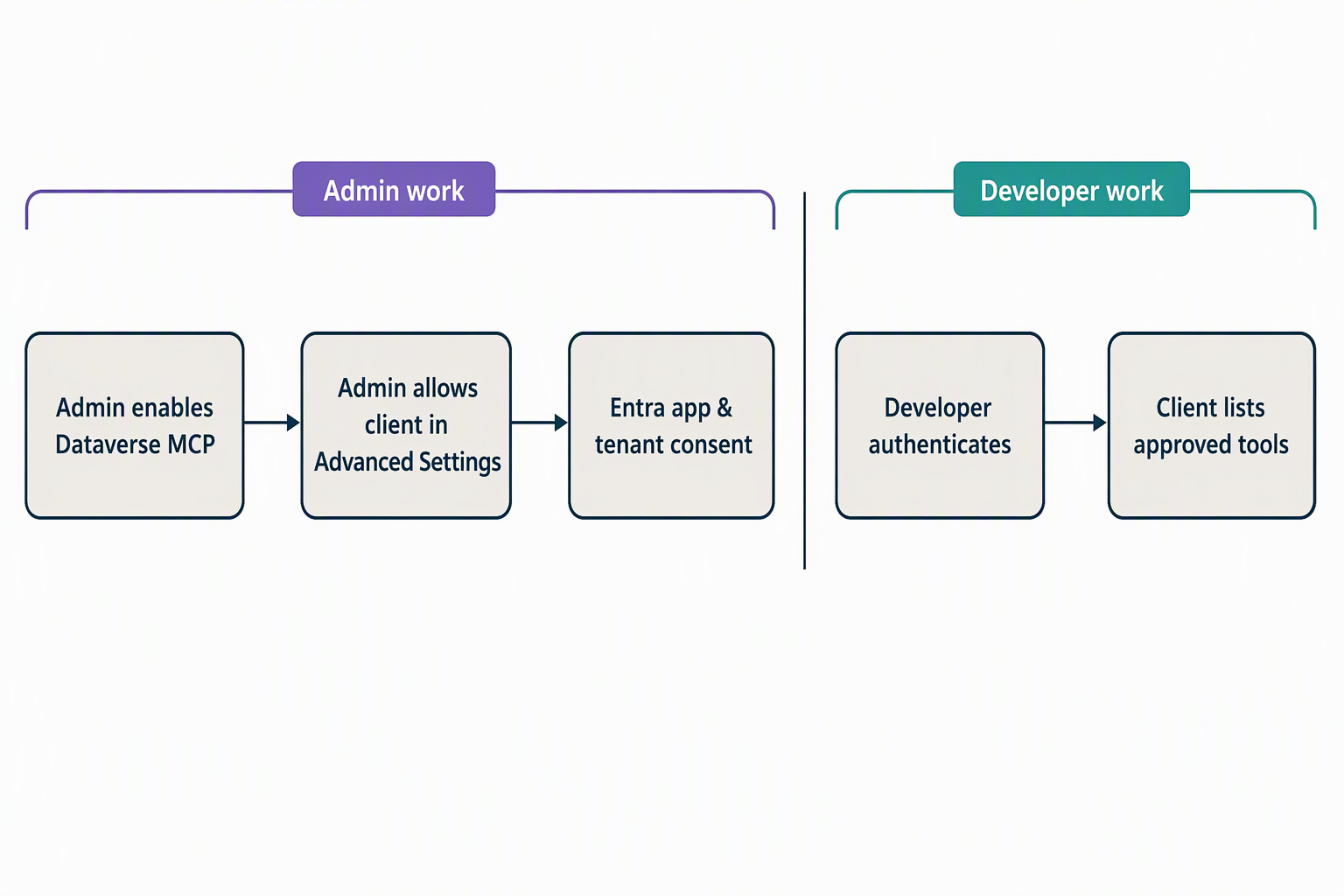
Enabling a client that isn't one of Microsoft's built-in options can ask more of the admin than flipping a toggle. A custom or non-built-in client can require registering a Microsoft Entra app, granting that app the mcp.tools API permission, and adding its client ID to the allowed-client list in Advanced Settings.
Some connection paths also need a one-time tenant admin consent step, approved once for the whole tenant, before any user can authenticate through that client. None of this is a walkthrough for you to follow. It's a sketch of what that work looks like. That way, you recognize it on sight and know it already happened, by someone else, before Contoso's equipment-provisioning server ever reached your client.
If a different sketch comes to mind, one where a team chooses an SDK, picks an API key or OAuth 2.0 as its authentication method, and registers an application with an identity provider, that describes building a separate, custom MCP server from the ground up. It doesn't describe the built-in Dataverse MCP server Contoso's IT team turned on: nobody at Contoso wrote that server's code or chose its SDK, because there was no server to build.
Separate the builder's role from yours
That sketch matters because it draws a clean line between two jobs that are easy to blur together. The table below places what you've done across this module against what a platform or admin team does instead.
| Task | Who does it |
|---|---|
| Choose an MCP SDK and stand up the server | Platform/admin team |
| Pick an authentication method (API key or OAuth 2.0) and register the app with an identity provider | Platform/admin team |
| Approve the server for broader use across the tenant | Platform/admin team |
| Allow-list which MCP clients can connect | Platform/admin team |
| Grant tenant admin consent for a non-built-in client | Platform/admin team |
| Point a supported client at the server's base URL | You |
| Authenticate with credentials already issued and allow-listed for your client | You |
| Read a tool's definition and invoke it within what your Dataverse security role permits | You |
Every row in the left column below the halfway point is something you actually did in units 2 and 3. Every row above it already happened before you opened your client. That's the governance boundary in one table: construction and registration sit upstream of you, and consumption sits downstream, inside limits someone else already set.
Trust the governance layers already in place
Knowing that boundary exists is one thing. Seeing the specific mechanisms that make it safe to consume Contoso's server, without auditing it yourself, is what turns that boundary into something you can rely on.
The first layer is the allow-list itself. An admin enables the MCP server for a specific Power Platform environment and explicitly names which MCP clients may connect to it. Only an allow-listed client can reach the server's /api/mcp endpoint at all, the same endpoint you pointed your own client at in unit 2. That decision is made once, centrally, rather than negotiated separately for each developer who wants to connect.
For clients that aren't built-in to a product, connecting can also require a one-time tenant admin consent step. A tenant administrator approves the permissions that client application needs before any user in the tenant can authenticate through it. You benefit from that approval; you don't perform it.
A third layer rides on infrastructure Contoso's IT team already had before MCP entered the picture. Power Platform's connector-based data policies govern which connectors an organization permits and how. Access to a Dataverse MCP server's tools relies on those same connectors for connectivity.
A data policy that regulates a connector also regulates access to any MCP tool built on that connector, with no separate MCP-specific policy to write or maintain. Governance Contoso already had in place for connectors governs MCP access too.
The last layer is the one you watched work directly in unit 3. The Dataverse MCP server enforces your signed-in user's existing Dataverse security roles and row-level security on every call. That's exactly what happened when a query against the allowance table came back as a permission error rather than data.
There's no second, parallel permission system layered on top of MCP for you to learn or configure. The same least-privilege model that already governs Dataverse access governs what an MCP tool call can do.
Connect the mechanisms back to what you've already seen
Put these four layers together and the shape of the whole module comes into focus. The allow-list decided which tools could ever appear in the list your client received in unit 2. Tenant consent, where it applied, decided whether your client could authenticate in the first place. Data-policy inheritance and Dataverse security roles together decided what a specific call, like the read_query request you ran in unit 3, was actually allowed to return.
None of those four decisions required you to write a line of server configuration. They're why a developer can safely consume a server that somebody else built, configured, and approved, without that developer needing to touch any of it.
Reflect: Walk back through this module's scenario. A tool was missing from the list in unit 2, and a call was denied in unit 3. Which governance mechanism from this unit explains each outcome? And what does that tell you about where to look the next time a Dataverse MCP server behaves differently than you expect?
With the governance boundary traced from construction through consumption, you've covered everything this module sets out to teach. The module now moves to a knowledge check that tests what you've learned across all three content units, followed by a short summary.