Set limits and alerts
Limits and alerts help you manage a policy's budget day to day. Two settings do most of the work: the limit itself, and the alert that warns people before it's reached.
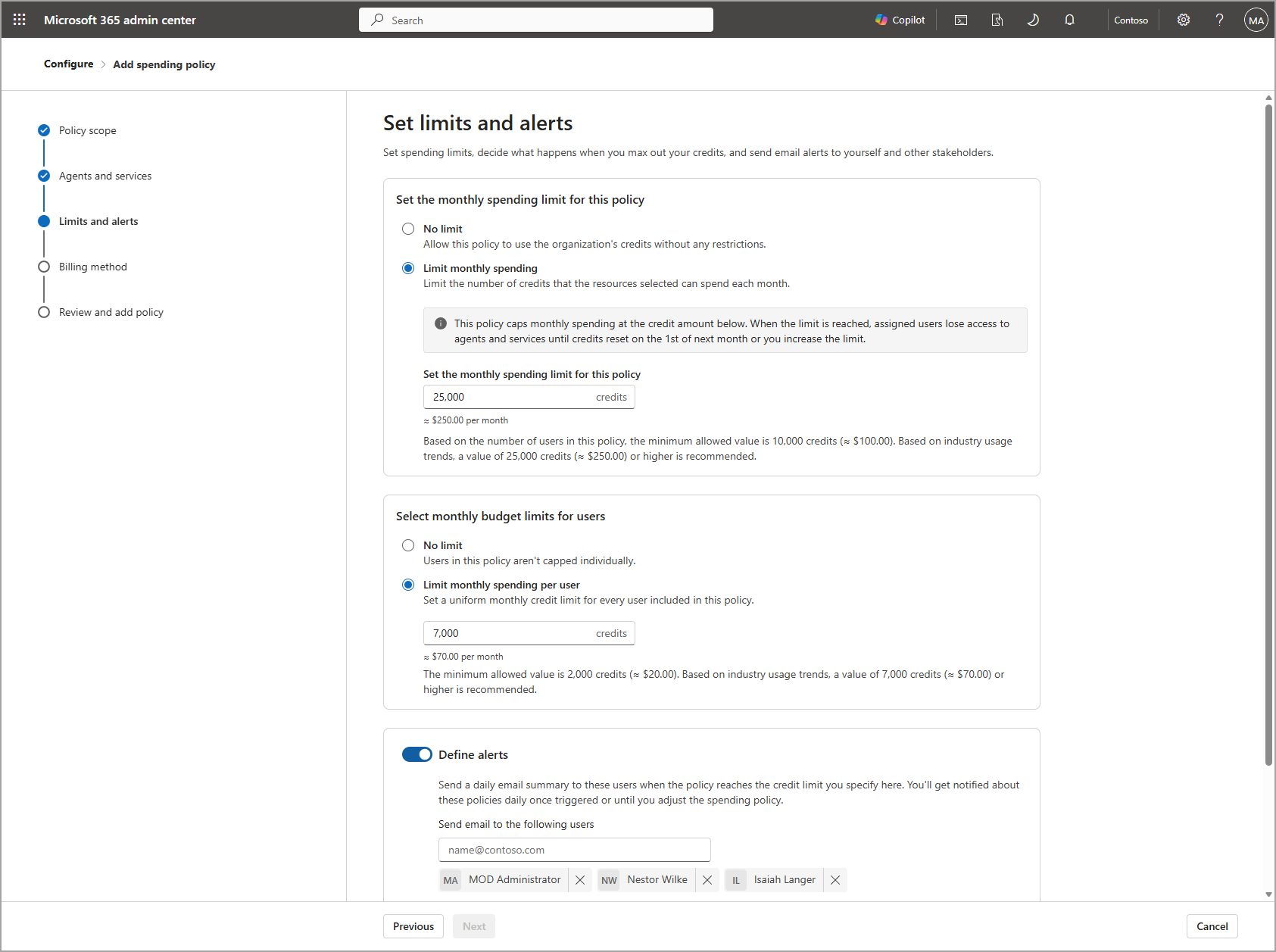
Setting limits
Within a spending policy, you can set:
- A monthly policy limit, the total credits the policy can spend in a month, or no limit at all if the policy's billing method should flow freely to pay-as-you-go. Microsoft sets a minimum limit so a policy isn't configured too low to be usable, and suggests a healthier starting point based on typical usage.
- A per-user monthly cap, so a single person can't consume a disproportionate share of the policy's budget. This is optional, but recommended: without it, one heavy user could consume the entire shared budget before other users can access it.
Both configuration and monitoring run on a monthly cadence, resetting on the first of each month, which keeps budgeting predictable.
Setting alerts
Admins set alert thresholds (in credits or as a percentage of the limit) and choose who receives them, such as the budget owner or an alerts distribution list. Once a threshold is crossed, alert emails begin and continue daily until either the month resets or an admin adjusts the limit.
New services and agents can also join a policy automatically: Allow new Agents and services as they become available is enabled by default, so a policy includes future supported services without extra setup. Disable it for any policy that should only cover what you've explicitly selected.
What users see
Users don't need to check a dashboard to know where they stand. As someone approaches their limit, Copilot Cowork shows an in-product banner; users can also open an embedded view of their own credit usage, remaining credits, and history at any time by typing /cost. Checking /cost doesn't use any credits itself, and it reflects recent activity rather than being an authoritative billing record.
If a user reaches their limit mid-task, the task continues and finishes normally—the service blocks only new tasks until the limit resets or an admin grants more capacity. This matters for planning: the service enforces limits between tasks, not by interrupting one in progress.
A practical sequence
Put together, a well-configured policy behaves like this:
- A user's usage approaches their per-user cap; they see a banner warning them in the product.
- The budget owner receives an alert email at the threshold they configured.
- The user's current task, if any, completes normally.
- The user can't start a new task until they request more capacity (covered next) or the month resets.
Caldova decision
Caldova sets its pilot policy's monthly limit to 25,000 credits and a 7,000-credit per-user cap, based on the Copilot Credit Estimator range, and sets an alert at 80 percent of the policy limit, sent to the department lead and the IT admin. The department lead also tells pilot users what the in-product banner and /cost mean, so nobody is surprised if they see one.