Understand AI-powered schema conversion
To tackle Contoso Retail's migration, you first need to understand how the conversion feature works and what role each component plays. Before you open the Migration Wizard, a clear mental model of the pipeline helps you interpret the output and understand where the AI adds value, and where your judgment is required.
Understand the conversion capability
The Oracle to Azure Database for PostgreSQL schema conversion feature is built into the PostgreSQL extension for Visual Studio Code (extension ID: ms-ossdata.vscode-pgsql, published by Microsoft). You don't need a separate migration tool or an another cloud service beyond the resources the tool uses. The entire workflow runs within VS Code.
The feature converts Oracle schema objects into PostgreSQL-compatible DDL ready to deploy to Azure Database for PostgreSQL flexible server.
Identify the architecture components
The conversion involves five components working together:
| Component | Role |
|---|---|
| Source Oracle database | The Oracle schema to convert. The tool reads schema metadata from the Oracle data dictionary, never row-level application data. |
| VS Code PostgreSQL extension | The primary interface. Manages connections, runs the Migration Wizard, hosts the Schema Review pane, and produces all conversion artifacts. |
| Azure Database for PostgreSQL flexible server | Hosts the scratch schemas used for validation. The converted DDL runs against this server before the tool generates final output. |
| Microsoft Foundry | Hosts the language models that power AI-driven schema translation. Your organization creates a model deployment and the tool calls it during conversion. |
| Schema conversion agents | AI agents that orchestrate the conversion process, passing schema context to the language model and processing the results. |
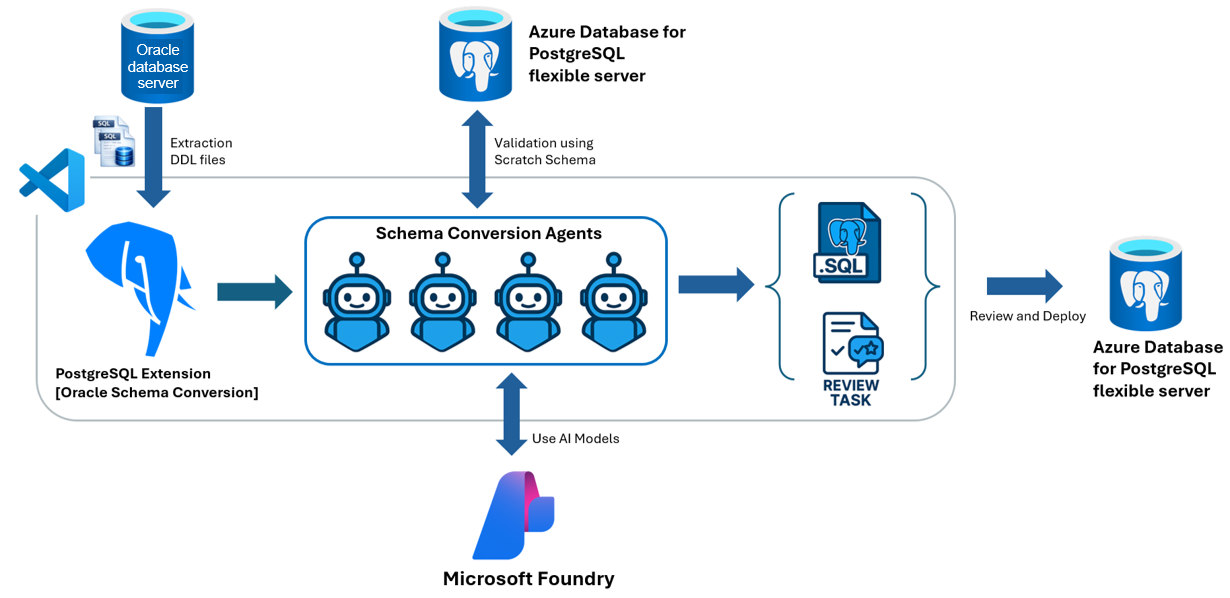
Follow the conversion pipeline
The conversion runs through six sequential stages. Understanding each stage helps you interpret the conversion report and focus your effort after the run completes.
Connect and discover schema objects
The tool connects to your Oracle database and catalogs all schema objects. It reads catalog views in the Oracle data dictionary, such as DBA_TABLES, DBA_PROCEDURES, and DBA_DEPENDENCIES, to extract DDL and map object dependencies. This stage is fully deterministic: the tool reads what Oracle exposes, batches objects into dependency-aware groups, and prepares them for transformation.
Transform DDL with AI
Schema conversion agents pass the batched Oracle DDL to language models hosted in Microsoft Foundry. The models translate Oracle-specific constructs, such as PL/SQL syntax, Oracle data types, implicit conversions, and Oracle-specific built-in functions, into PostgreSQL-compatible equivalents. The AI takes object relationships, platform best practices, and Azure Database for PostgreSQL–specific behaviors into account when generating the output.
This is the stage where AI adds the most value: translating complex DDL that would take significant time to rewrite manually.
Validate in scratch schemas
The tool tests every converted object by applying the generated DDL to scratch schemas in your Azure Database for PostgreSQL flexible server. The scratch schemas use the _mig_scratch_ prefix and are created and dropped automatically by the tool.
This stage catches problems that text-level review would miss: syntax errors, unresolved dependencies, and incompatibilities with the target PostgreSQL version. Because validation runs against your actual target server, it also detects extension and search_path issues specific to your configuration.
Generate review tasks
Objects that the tool can't fully validate, or that it converts with a fallback approach, are flagged as review tasks. Common triggers include:
- Complex PL/SQL logic with no direct PostgreSQL equivalent
- Oracle data types with multiple valid PostgreSQL mappings (for example,
NUMBERtypes that could map tonumeric,integer, orbigintdepending on actual usage) - Oracle behaviors that differ semantically in PostgreSQL, such as empty-string vs. NULL handling, numeric precision, date and time handling, or transaction control
Review tasks aren't failures. They're the tool's way of telling you: "this object converted, but verify the result before production."
Resolve tasks with guidance
For each review task, you can use GitHub Copilot agent mode for guided resolution. Select Run Task in the Schema Review pane, and GitHub Copilot agent mode opens in VS Code with the source DDL, the generated PostgreSQL DDL, and the task evidence as context. Copilot suggests a fix; you review and accept or modify it.
You can also resolve tasks manually by editing the generated .sql file directly in VS Code.
Generate the final output
Once objects pass validation and review tasks are addressed, the tool writes the final PostgreSQL DDL to organized .sql files grouped by schema and object type, along with a deploy.sql consolidated deployment script and several reports.
Recognize where AI helps, and where it doesn't
The conversion pipeline uses AI selectively. Microsoft Foundry Models handle the translation work: mapping PL/SQL to PL/pgSQL, converting Oracle data types to PostgreSQL equivalents, and expressing Oracle-specific logic in PostgreSQL idioms. This is context-sensitive work that benefits from language model capability.
The other pipeline stages run as deterministic, rule-based steps. These include source parsing, metadata extraction, dependency ordering, scratch-schema validation, and script generation. This hybrid approach keeps behavior predictable and auditable across the stages where it matters most.
Important
The same AI that converts schema objects can also assist with reviewing those objects. AI systems can occasionally confirm their own mistakes. You must independently validate all converted objects and review-task resolutions before deploying to production. Don't treat AI-generated output as production-ready without independent verification.
Identify what the tool converts
The tool supports a broad range of Oracle schema and code objects:
Data definition objects: tables (with column specifications and table-level constraints), primary keys, foreign keys, unique constraints, check constraints, B-tree indexes, unique indexes, composite indexes, sequences, schemas, and public and private synonyms (with limitations).
Views and code objects: standard views, materialized views, triggers (row-level and statement-level), functions, stored procedures, packages (specifications and bodies), and types (object types, TYPE BODY member methods, VARRAY, nested tables, and SUBTYPE declarations).
Objects outside this supported scope, such as Oracle system schemas, Advanced Queuing, Java in the database, or wrapped PL/SQL, are either excluded from extraction or flagged as limitations. Unit 5 covers how to plan around these categories.
Check supported Oracle source versions
The tool supports schema conversion from Oracle 12.1, 12.2, 18c, 19c, and 21c. The target is Azure Database for PostgreSQL flexible server running PostgreSQL version 15 or later.
Note
Before you run a conversion on a production-complexity schema, list the Oracle features your schema uses most heavily, such as PL/SQL packages, complex triggers, materialized view refresh logic, and Oracle-specific data types. These are the areas most likely to generate review tasks and deserve the most attention during the review stage.