AI built for work

Imagine that you're a small business owner. Your company runs a tight team and works on stringent timelines where every hour and decision matters. With various tools and solutions deployed, data is scattered, and security becomes an afterthought. The best solution is to bring all your data together and focus on growth and not gap-filling.
Microsoft 365 Copilot offers your company an integrated approach, working conveniently in Microsoft 365 apps that your team already uses. With direct integration with OneDrive and SharePoint, Copilot enables your team to author and collaborate on files in real-time—keeping everything in your company knowledge base. This matters most when users are working across meetings, documents, and email.
Powered by Work IQ, Microsoft 365 Copilot personalizes your organization's AI experience by understanding user context, work patterns, and organizational data—enabling faster, more exact, and secure AI responses across Microsoft 365 apps and agents. This context helps Copilot automatically enforce permissions, file protections, and company policies—helping to keep confidential data secure through existing permissions.
Note
Work IQ is the intelligence layer that personalizes Microsoft 365 Copilot for users and organizations. Built atop leading foundation models from providers like OpenAI and Anthropic, it understands work context, relationships, and patterns so Copilot and agents can deliver faster, more accurate, and more secure responses than connector-only approaches. Learn more here.
Microsoft 365 Copilot also offers business users access to leading models in one experience—ensuring that there's an AI model for every task with no tool switching required. Let's explore some of the advantages that Microsoft 365 Copilot offers:
- End-to-end AI solution: Powered by Work IQ, Microsoft 365 Copilot carries context across meetings, documents, emails, and organizational relationships. Because it's built into apps like Teams, Word, Excel, and PowerPoint, users can draft, summarize, and analyze without leaving their workflow.
- Security: Microsoft 365 Copilot inherits the security, compliance, and permissions already built into Microsoft 365. It only returns information users can access, helping reduce compliance gaps across workflows.
- Agents and extensibility: Microsoft 365 Copilot provides a governed platform for building, deploying, and managing agents end to end. Teams can start with prebuilt or no-code options, then extend to low-code and full-code tools within the same platform.
- Microsoft 365 integration: Copilot is built directly into the Microsoft 365 apps employees already use, making AI help easy to access. This reduces app-switching, preserves context, and helps lower the risk of duplicated data across tools.
Note
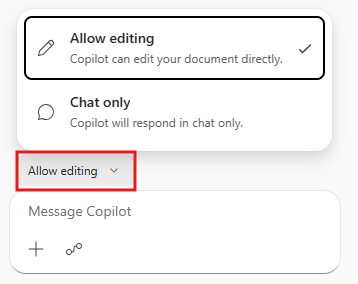
You can choose to stop editing with Copilot and select Chat only if you wish for Copilot to only respond in the chat pane. From Copilot Chat you can select Allow editing from the menu above the prompt box to allow direct edits to your workbook.
Microsoft 365 Copilot enables business users to confidently collaborate in real-time with AI to help in the same context without app-switching while preserving security protections. This reduces collaborative friction and eliminates the need to enable connectors that add complexity. In the next units, we'll look at various Copilot assistance capabilities and how to use them in everyday business scenarios.