Create a knowledge agent
In this unit, you create an agent in Copilot Studio that serves as the foundation for adding knowledge sources.
Agent creation process
When you create an agent using a natural language description, Copilot Studio uses AI to:
- Generate initial instructions for your agent
- Suggest relevant knowledge sources based on your description
- Recommend appropriate triggers and tools
- Set up a basic conversational flow
Let's create your knowledge-enabled agent:
Navigate to the Home page in Copilot Studio.
In the agent creation prompt, enter a descriptive prompt that explains your agent's purpose, such as:
Create an agent that helps users understand how to create agents with Copilot StudioSelect the Send icon to create the agent.
Copilot Studio analyzes your prompt and creates an agent with:
- Prepopulated instructions based on your description
- Suggested knowledge sources relevant to your use case
- Recommended triggers for common interactions
- Basic conversational flow structure
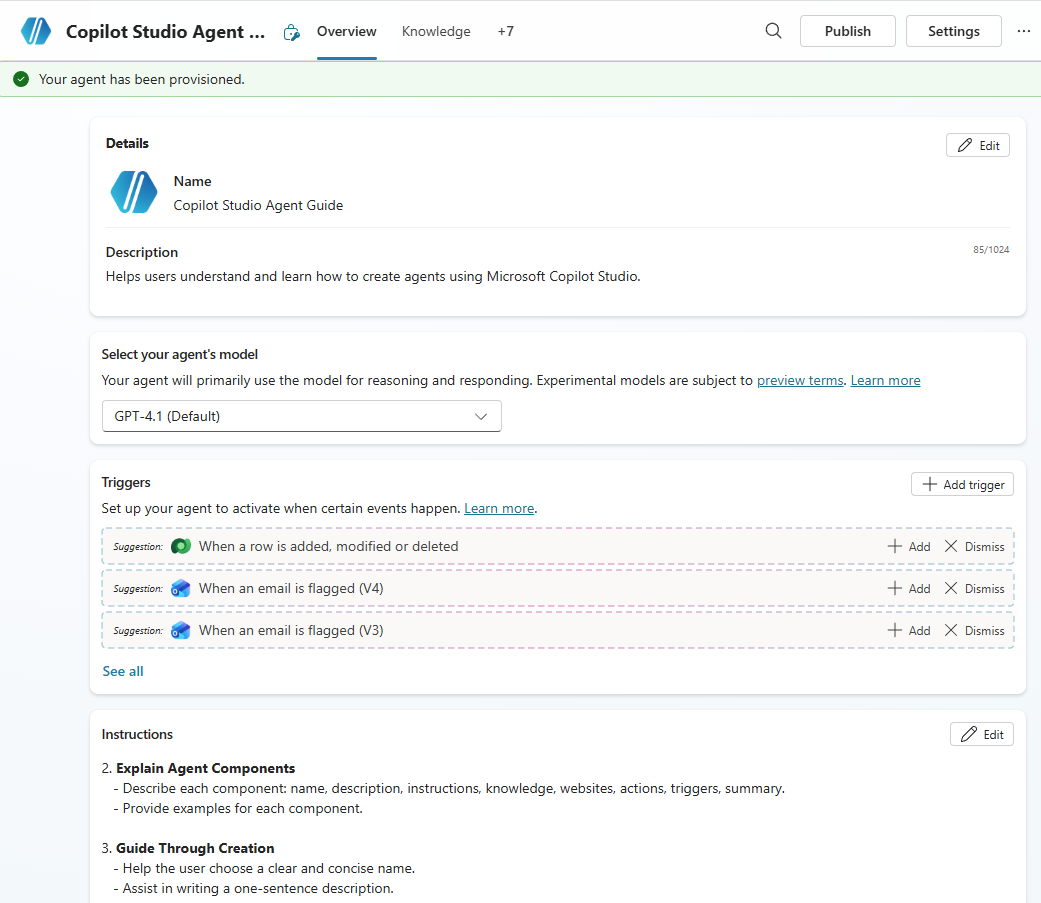
Understand the generated content
Review the automatically generated components:
- Instructions: Define how your agent should behave and respond
- Knowledge suggestions: AI-recommended sources relevant to your prompt
- Triggers: Phrases that activate your agent
- Tools: Suggested integrations for enhanced functionality
In the next unit, you'll learn how to add and configure knowledge sources to make your agent more intelligent and helpful.