Add Copilot Studio workflows as tools to topics
You can add Copilot Studio workflows as tools by using action nodes in a topic's conversation flow, so workflows run in a specific order with defined inputs.
Calling workflows from within a topic has several benefits:
- Predictable execution: Topics trigger workflows deterministically whereas generative AI may vary.
- Strong control: Guaranteed parameters, validation, branching, and error handling.
- Reusability: A workflow is callable from multiple topics without extra configuration.
- Reliability: The workflow execution path is deterministic and produces consistent, predictable results.
- Maintainability: Logic resides in the workflow, keeping topics simple and focused on the conversation.
- Governance: Topic-level control helps you apply validation and approvals in a traceable way.
Add a Copilot Studio workflow tool to a topic
If you have already added a Copilot Studio workflow as a tool to the agent, you can add that workflow tool as an action in a topic's conversational flow.
To add a workflow to a topic as a topic-level tool:
Open your agent by choosing Agents in the left-hand navigation pane and selecting your agent from the list.
Go to the Topics tab for the agent.
Create or select the topic that you want to add a workflow to.
Select the Add node icon below any node.
Select Add a tool.
Select the Tool tab.
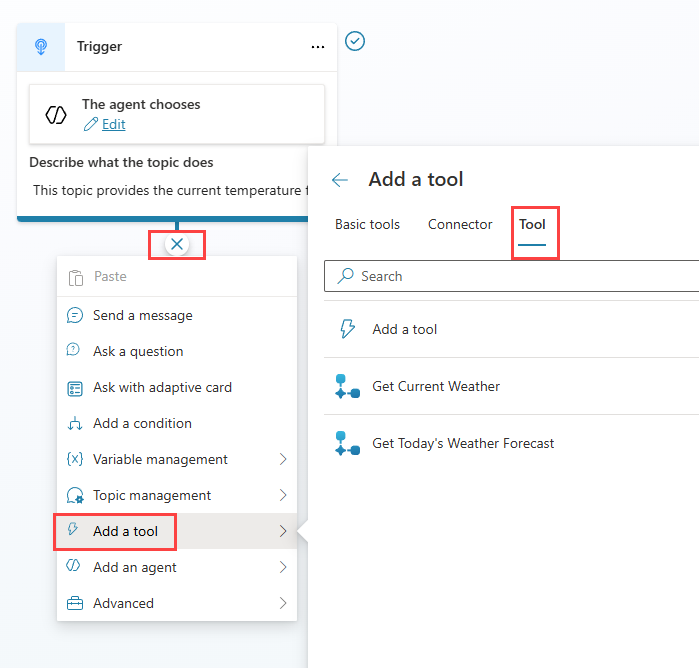
Select the tool from the available tools.
Your Action node is now added to your topic.
Note
If the workflow tool hasn't been added to the agent, you can add or create the workflow tool when adding the action node.
Important
To only use the tool from a topic, When this tool may be used should be set to Only when referenced by topics or agents.
For more information on using workflows as tools in topics, see Call an agent flow.
Variables
You can use variables as input and output parameters to pass information between workflow tools and Copilot Studio agents.
You can add question nodes to capture the information required by the workflow explicitly.
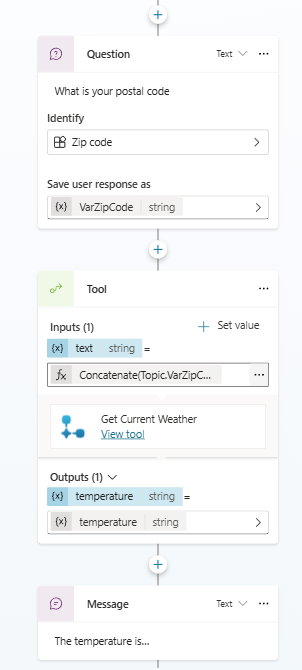
For more information on using variables with workflows as tools in topics, see Use input and output variables to pass information.