Apply naming conventions
Naming conventions are fundamental to effective data governance in Azure Databricks Unity Catalog. When you apply consistent naming patterns across catalogs, schemas, and tables, you enable your team to quickly understand data organization, enforce access controls, and maintain compliance with organizational standards.
Understand Unity Catalog naming requirements
Unity Catalog imposes specific technical constraints on object names that you must follow when designing your naming conventions. These constraints ensure compatibility across the platform while supporting international characters and diverse organizational needs.
All Unity Catalog object names are limited to 255 characters and are stored in lowercase, regardless of how you create them. This means SalesData, salesdata, and SALESDATA all resolve to the same object. When you reference objects in queries, Unity Catalog performs case-insensitive matching, simplifying query syntax while maintaining consistency.
Certain characters are prohibited in object names. You can't use periods (.), spaces, forward slashes (/), or ASCII control characters. However, you can include hyphens and other special characters by enclosing the name in backticks. For example, `sales-data` is valid, while sales.data isn't because periods serve as namespace separators in the three-level hierarchy.
Column names follow different rules. Unity Catalog preserves the casing you specify for column names, though queries remain case-insensitive. You can use special characters in column names by enclosing them in backticks, giving you flexibility for descriptive field names while maintaining query simplicity.
Apply naming patterns for data organization
Effective naming patterns balance descriptiveness with brevity, helping your team understand data purpose without creating unwieldy identifiers. The three-level namespace structure of Unity Catalog—catalog.schema.table—provides natural boundaries for applying meaningful conventions.
sales_data (Catalog)
└── bronze (Schema – raw data)
    ├── raw_orders (Table)
    └── raw_customers (Table)

└── silver (Schema – cleaned / validated)
    ├── cleaned_orders (Table)
    └── validated_customers (Table)

└── gold (Schema – aggregated / business-level)
    ├── sales_summary (Table)
    ├── customer_lifetime_value (Table)
    └── vw_customer_stats (View example: prefix views with vw_)
Use lowercase with underscores as your primary pattern. Names like customer_data, sales_summary, and product_inventory are immediately readable and comply with Unity Catalog requirements. Avoid camelCase or PascalCase, as Unity Catalog converts all names to lowercase anyway, potentially creating confusion between what you specify and what the system stores.
Choose descriptive but concise names that clearly indicate content without excessive detail. sales_summary_gold effectively communicates both the domain and data quality level. In contrast, sales_final_report_v1_updated includes unnecessary version information that belongs in metadata or table properties rather than the name itself.
Align schema names with data layers when implementing a medallion architecture. Use bronze for raw ingested data, silver for cleaned and validated data, and gold for aggregated business-level data. This pattern makes the data transformation pipeline immediately apparent. For example, sales_data.bronze.raw_orders clearly indicates raw order data, while sales_data.gold.monthly_revenue represents a refined business metric.
Prefix specialized objects to distinguish them from base tables. Add vw_ for views and materialized views (vw_customer_stats), and tmp_ for temporary staging tables (tmp_import_staging). This convention helps you identify object types at a glance when browsing the catalog or writing queries.
Consider your catalog naming strategy based on whether you're organizing by business domain or environment. Domain-based catalogs like sales_data, marketing_data, and finance_data provide clear functional boundaries and align with data ownership models. Environment-based catalogs like dev, test, and prod separate workspaces by lifecycle stage, reducing risk of accidental production changes.
Design naming strategies for environment isolation
Environment isolation is critical for preventing accidental data modifications and maintaining clear separation between development, testing, and production workloads. Your naming strategy should make environment boundaries immediately obvious to anyone working with the data.
unity_catalog
└─ catalogs
   ├─ sales_dev
   │  ├─ raw               (schema)
   │  ├─ staging           (schema)
   │  └─ curated           (schema)
   │     ├─ orders_dev         (table)
   │     └─ customers_dev      (table)
   │
   ├─ sales_test
   │  ├─ raw
   │  ├─ staging
   │  └─ curated
   │     └─ orders_test
   │
   └─ sales_prod
      ├─ raw
      ├─ staging
      └─ curated
         ├─ orders
         └─ customers
Use separate catalogs for each environment when strong isolation is your priority. Catalogs named sales_dev, sales_test, and sales_prod provide complete separation at the highest level of the namespace. With this approach, you grant permissions at the catalog level, making access control straightforward. Developers work exclusively in the dev catalog, while production queries reference only the prod catalog, eliminating cross-environment contamination risk.
Combine domain and environment in catalog names when you need both dimensions. A pattern like {domain}_{environment} produces catalogs such as sales_prod, sales_dev, marketing_prod, and marketing_dev. This strategy scales well across multiple business domains while maintaining environment separation. However, it increases the total number of catalogs, so you need robust catalog management practices.
Organize by layer within environment catalogs when environment separation happens at the workspace level rather than the catalog level. Within a prod catalog, you might have schemas named sales_bronze, sales_silver, and sales_gold, while a separate dev catalog contains sales_bronze, sales_silver, and sales_gold for development work. This approach consolidates all production data under a single catalog, simplifying Unity Catalog governance while maintaining clear layer boundaries.
For external sharing scenarios, choose catalog names that are meaningful to external partners without exposing internal organizational structure. A catalog named customer_analytics_shared clearly indicates both purpose and sharing status, while internal_sales_raw_data signals data not intended for external access. This convention helps prevent accidental sharing of sensitive data.
External storage paths should mirror your naming conventions for consistency. Following a pattern like abfss://container@storage.dfs.core.windows.net/env/layer/domain/table/ aligns storage organization with Unity Catalog structure. For example, abfss://datalake@company.dfs.core.windows.net/prod/gold/sales/monthly_revenue/ makes the relationship between storage and catalog objects transparent.
Apply naming conventions for compute and development resources
Beyond data objects, consistent naming conventions for compute resources, development artifacts, and operational components help you navigate the Azure Databricks workspace efficiently and maintain clear ownership boundaries.
Clusters
Name clusters according to their purpose and environment to make resource allocation transparent. Use patterns like {environment}_{domain}_cluster to produce names such as dev_sales_cluster, prod_etl_cluster, and ad_hoc_analysis_cluster. This convention immediately identifies whether a cluster is for development experimentation or production workloads, helping you manage costs and apply appropriate access controls.
Jobs and pipelines
Structure job names using the pattern job_{layer}_{purpose} to align with your data transformation pipeline. Examples include job_bronze_orders_ingestion, job_silver_orders_transformation, and job_gold_sales_aggregation. This naming pattern makes dependencies between jobs immediately visible and helps you trace data lineage across the medallion architecture.
For Lakeflow pipelines, use the prefix pipe_ followed by the data domain or purpose: pipe_orders_processing, pipe_customer_data_cleaning.
Name streaming pipelines to include both source and target, following patterns like stream_{source}_to_{target}. Examples such as stream_kafka_to_bronze and stream_iot_sensor_data make data flow explicit without requiring pipeline documentation. This convention is especially valuable when managing multiple concurrent streaming workloads.
Notebooks and repositories
Organize notebooks in folder hierarchies aligned with your project structure and data layers. A recommended pattern mirrors the medallion architecture:
/Repos/
  sales_project/
    bronze/
      ingestion_orders/
    silver/
      transformation_orders/
    gold/
      sales_aggregation/
Individual notebook names should reflect their purpose and layer using patterns like notebook_{layer}_{purpose}. Examples include notebook_bronze_orders_ingestion, notebook_silver_orders_transformation, and notebook_gold_sales_reporting. This creates consistency between notebook names and the job names that execute them.
Repository names should identify the project or domain they contain. Use patterns like repo_{project_name} to produce names such as repo_sales_project and repo_customer_analytics. When you integrate with Git, this naming convention helps map Databricks repositories to their corresponding remote repositories.
Dashboards and monitoring
Name SQL dashboards to reflect their business purpose using patterns like dashboard_{domain}_{purpose}. Examples include dashboard_sales_performance and dashboard_customer_trends. This convention helps business users quickly locate relevant dashboards and distinguishes operational dashboards from exploratory analyses.
Individual SQL queries should be named descriptively using patterns like query_{purpose}. Names such as query_monthly_sales_report and query_customer_retention_analysis make query libraries searchable and help teams identify reusable queries for similar reporting needs.
Implement conventions across your organization
Successful implementation of naming conventions requires more than technical patterns—you need organizational alignment, documentation, and enforcement mechanisms that make conventions easy to follow and hard to bypass.
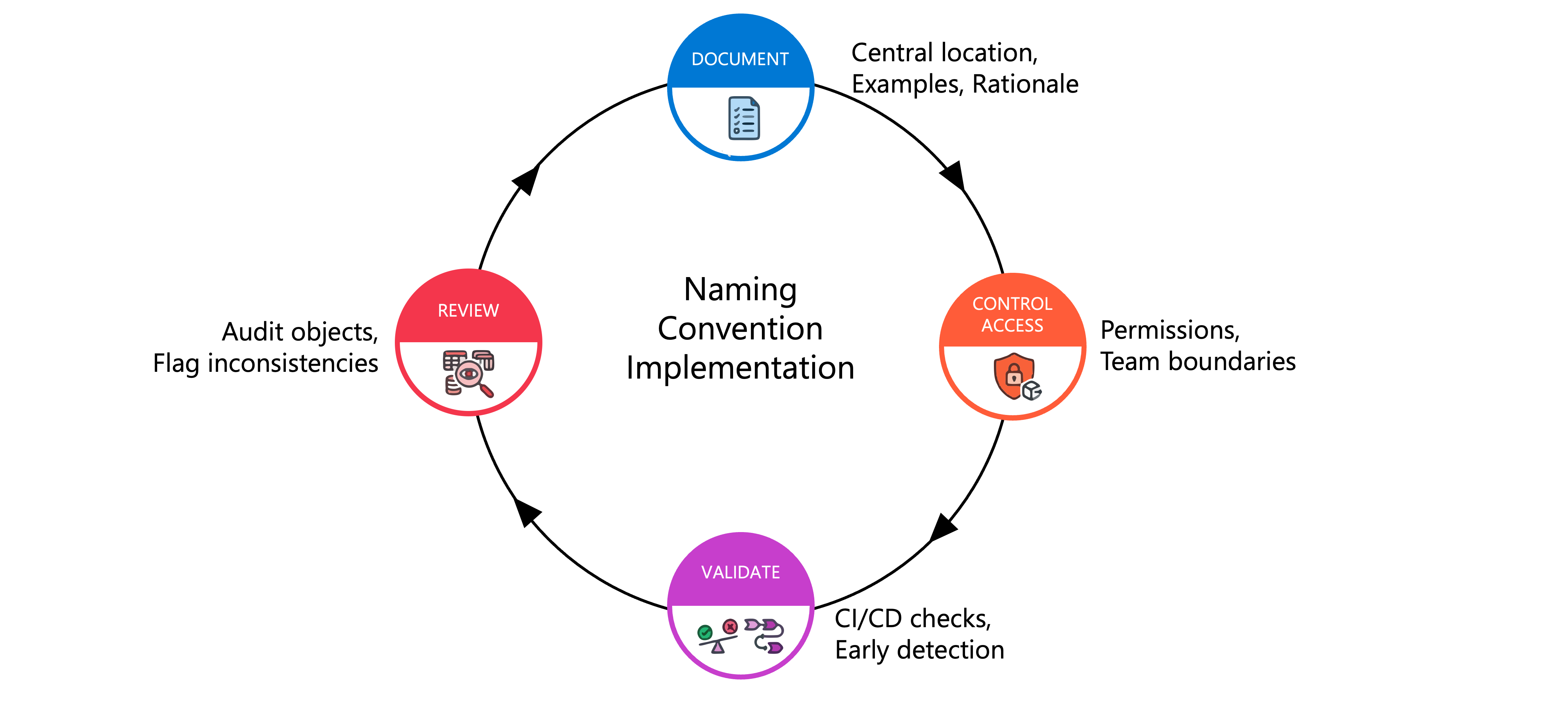
Start by documenting your conventions in a central location accessible to all data team members. Include specific examples, decision criteria, and rationale for each pattern. A documented standard like "Use {domain}_{layer} for schema names, where domain is the business area and layer is bronze/silver/gold" removes ambiguity. Provide examples of both correct and incorrect names to illustrate the pattern clearly.
Control access through Unity Catalog permissions to limit who can create objects in specific catalogs and schemas. While you can't enforce naming patterns through permissions alone, restricting CREATE TABLE and CREATE SCHEMA privileges to specific teams helps maintain organizational boundaries. For example, grant the marketing team permissions only to the marketing catalog, reducing the risk of objects being created in the wrong location.
Validate names during CI/CD pipelines when deploying data assets through automation. Include checks in your deployment scripts that reject names violating your standards before objects are created. This automated validation catches errors early and maintains consistency across all environments.
Review existing objects regularly to identify naming inconsistencies and plan remediation. Use Unity Catalog's information schema to query object names and flag those that don't match your patterns. For newly identified legacy objects, decide whether to rename them for consistency or document them as exceptions with justification.
Balance flexibility with standardization based on your organization's needs. Strict enforcement works well for highly regulated environments where consistency is critical for compliance. More flexible guidelines may be appropriate for smaller teams or during periods of rapid experimentation, as long as you eventually converge on standards for production data.