Configure an agent in Microsoft Copilot Studio
Creating an effective agent involves translating a defined support need into configuration elements that guide what the agent does and how it responds.
For the Contoso scenario, you'll use the completed planning brief to configure an agent that answers employee questions by using an approved IT support guide. In this unit, you examine how the decisions in the planning brief map to the name, description, instructions, knowledge, and test prompts used in Microsoft Copilot Studio.
| Planning decision | How you apply it |
|---|---|
| Purpose and audience | Name and description |
| Scope and boundaries | Instructions |
| Approved source material | Knowledge |
| Expected behavior | Instructions |
| Escalation approach | Instructions |
| Validation criteria | Test prompts and expected results |
Note
Available agent capabilities can depend on your environment, licensing, and organizational configuration. This module focuses on the configuration required for the Contoso IT support scenario.
Start an agent with a natural-language description
The Microsoft Copilot Studio web app provides a prompt-based creation experience for starting an agent. You describe the agent's purpose in your own words, and Copilot Studio generates an initial configuration that you can review and refine.
Note
This module uses the prompt-based creation experience in the Microsoft Copilot Studio web app. Agent Builder in Microsoft 365 Copilot Chat and SharePoint provides related lightweight creation experiences, but its interface and available capabilities can differ. This module doesn't cover those creation paths.
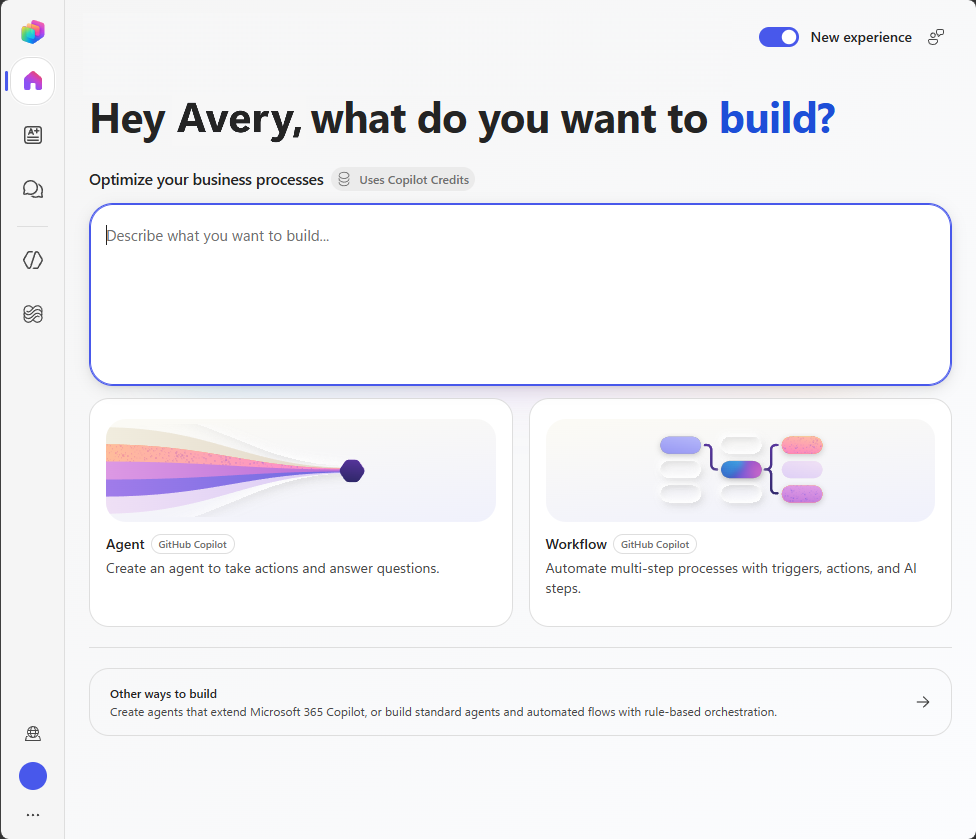 Screens and option names in the Microsoft Copilot Studio web app can vary by environment and enabled experience. If your screen differs from the example, use the equivalent option for creating an agent from a description.
A useful creation prompt identifies:
- The agent's intended audience.
- The problem the agent should help solve.
- The approved information the agent should use.
- The type of assistance the agent should provide.
For the Contoso scenario, you can use the following creation prompt:
Create an agent that helps Contoso employees find answers to common internal IT support questions by using the approved Contoso IT support guide.
The generated configuration is a starting point. Review each configuration element and compare it with the planning brief before you continue. Revise generated content that is incomplete, inaccurate, or broader than the agent's intended purpose.
When you begin creating the agent, confirm that the generated configuration:
- Identifies the intended audience.
- Focuses on the support need defined in your planning brief.
- Refers only to the approved source you plan to connect.
- Doesn't expand the agent's purpose beyond the planned scenario.
- Doesn't introduce capabilities that aren't part of the planning brief.
The creation prompt starts the authoring process, but it doesn't replace the planning brief. Continue to use the planning brief as the source of truth for the agent's purpose, scope, boundaries, and expected behavior.
Define the agent's identity
The name and description help makers and users identify the agent and understand its purpose. Both should align with the intended audience and the task the agent performs.
| Configuration element | Purpose | Contoso example |
|---|---|---|
| Name | Identifies the agent to makers and users | Contoso IT support |
| Description | Summarizes who the agent supports and what it does | Helps Contoso employees find guidance for common internal IT support questions. |
Choose a name that is:
- Concise.
- Specific.
- Easy for users to recognize.
- Consistent with the agent's intended purpose.
Avoid names that imply capabilities the agent doesn't provide. For example, a name such as Contoso IT issue resolver could imply that the agent can directly resolve every technical issue. Contoso IT support more accurately reflects an agent that provides guidance and directs employees to additional assistance when needed.
Write a description that explains the agent's primary purpose. A useful description should:
- Identify the intended audience.
- Describe the type of assistance the agent provides.
- Use terminology that the audience understands.
- Remain consistent with the agent's defined scope.
- Avoid promising outcomes that the agent can't provide.
The name and description establish the agent's identity, but they don't provide all the behavioral guidance the agent needs. Use instructions to define how the agent should respond to employee requests.
Write effective instructions
Instructions tell the agent how to behave and approach user requests. Organize the requirements from your planning brief by using the following structure:
- Purpose: Define the agent's role and intended audience.
- Tasks: Identify the requests the agent should support.
- Knowledge: Identify the approved information the agent should use.
- Behavior: Define its communication style and how it should handle unclear requests.
- Boundaries: Identify requests or actions the agent shouldn't address.
- Escalation: Define when the agent should acknowledge a knowledge gap or direct the user to human support.
The following structure can help organize the instructions:
Purpose:
Describe the agent's role and intended audience.

Tasks:
Describe the requests the agent should support.

Knowledge:
Identify the approved information the agent should use.

Behavior:
Explain how the agent should communicate and handle unclear requests.

Boundaries:
Identify requests the agent shouldn't answer.

Escalation:
Explain when the agent should direct the user to human support.
For the Contoso agent, the instructions should direct the agent to:
- Answer common internal IT support questions for Contoso employees.
- Base answers about Contoso procedures on the approved support information connected to the agent.
- Provide clear and concise responses.
- Ask a relevant clarifying question when a request is ambiguous.
- If the approved information doesn't support an answer, acknowledge the limitation rather than inventing a procedure.
- Explain when a request falls outside the scope of internal IT support.
- Never request, retrieve, or expose passwords, credentials, personal information, or other sensitive information.
- Direct employees to the IT help desk when additional assistance is required.
Write instructions as specific actions rather than broad goals. For example:
- Specific: Ask the employee to identify the affected device and provide the displayed error message.
- Broad: Be helpful when the request is unclear.
The specific instruction tells the agent what information to request. The broad instruction doesn't define what action the agent should take.
Instructions should also distinguish among different request types:
| Request type | Instructional guidance |
|---|---|
| Supported | Answer by using relevant information from the approved support guide. |
| Ambiguous | Ask a relevant clarifying question before providing guidance. |
| Out of scope | Explain that the request falls outside the agent's internal IT support purpose. |
| Knowledge gap | Acknowledge that the approved guide doesn't contain enough information. |
| Requires escalation | Direct the employee to the IT help desk for additional assistance. |
Clear instructions help establish the agent's intended behavior. However, instructions don't supply all the information required to answer employee questions. Add an approved knowledge source to provide relevant support information.
Add approved knowledge
Knowledge sources provide information that an agent can use when formulating a response. Connect only the approved source identified in your planning brief.
Before adding the source, confirm that it still satisfies the relevance, ownership, currency, accessibility, and appropriateness criteria you evaluated during planning. Adding more knowledge doesn't always make an agent more useful. Sources that contain unrelated, conflicting, or outdated information can make it more difficult to determine whether the agent is providing an appropriate response.
Instructions and knowledge serve different purposes:
| Configuration element | What it provides |
|---|---|
| Instructions | Direction for how the agent should behave and respond |
| Knowledge | Information the agent can use to formulate its responses |
Knowledge doesn't replace clear instructions. An approved support guide might contain the correct procedures, but the instructions still need to define the agent's scope, communication style, boundaries, handling of knowledge gaps, and escalation behavior.
Similarly, instructions don't replace an appropriate knowledge source. Telling the agent to answer IT support questions doesn't provide the approved procedures needed to formulate those answers.
Important
Use only knowledge sources approved for the agent and its intended audience. Don't add passwords, credentials, personal information, or other sensitive data to knowledge sources, creation prompts, or agent instructions.
Adding a knowledge source doesn't guarantee that every response will be accurate or appropriate. Test the agent's responses and validate important information before making the agent available to users.
Apply the validation criteria
The validation criteria in the planning brief define the behavior you expect from the agent. Convert those criteria into representative test prompts and expected results.
| Planning element | Testing element |
|---|---|
| Request type | Category of behavior to evaluate |
| Representative request | Test prompt |
| Validation criterion | Expected result |
For example:
| Request type | Test prompt | Expected result |
|---|---|---|
| Supported | “How do I set up my approved work phone?” | The agent provides relevant guidance from the approved support information. |
| Ambiguous | “The application isn't opening.” | The agent asks which application is affected and requests relevant details. |
| Out of scope | “Which gaming computer should I buy?” | The agent explains that personal purchasing recommendations are outside its internal IT support scope. |
| Knowledge gap | “How do I configure a device that isn't covered by the support guide?” | The agent acknowledges that the approved information doesn't provide an answer and identifies an appropriate next step. |
| Requires escalation | “I completed the documented recovery steps, but my account is still locked.” | The agent directs the employee to the IT help desk. |
Test prompts aren't part of the agent's core configuration. They provide a way to determine whether the configured name, description, instructions, and knowledge support the requirements in the planning brief.
You'll use these prompts after you create the agent. If a response doesn't satisfy the expected result, review the instructions and knowledge configuration before testing again.
Review the generated configuration
After Microsoft Copilot Studio creates the initial agent configuration, compare each element with the planning brief. Revise generated content that is incomplete, inaccurate, or broader than the agent's intended purpose.
Use the following questions when reviewing the configuration:
| Configuration element | Review question |
|---|---|
| Name | Does the name clearly identify the agent and its purpose? |
| Description | Does the description identify the intended audience and type of assistance? |
| Instructions | Do the instructions define the agent's tasks, behavior, boundaries, handling of knowledge gaps, and escalation approach? |
| Knowledge | Is the approved source relevant and appropriate for the intended audience? |
| Test prompts | Do the prompts evaluate supported, ambiguous, out-of-scope, knowledge-gap, and escalation requests? |
| Overall configuration | Does the configuration remain within the scope defined in the planning brief? |
When reviewing generated content, look for:
- Missing requirements from the planning brief.
- Language that expands the agent's responsibilities.
- Instructions that are broad or difficult to evaluate.
- Knowledge sources that aren't approved or relevant.
- Statements that imply the agent can perform actions it isn't configured to perform.
- Missing guidance for ambiguous, out-of-scope, or escalation requests.
- Instructions that could result in the exposure of sensitive information.
If the generated configuration conflicts with the planning brief, revise it before testing. Continue to use the planning brief as the source of truth for what the agent is intended to do.
Prepare for the exercise
You identified how the decisions in the planning brief map to the agent's name, description, instructions, knowledge, and test prompts.
In the next exercise, you'll use the planning brief to create and configure the Contoso IT support agent in Microsoft Copilot Studio.