Create unit plans in Teach
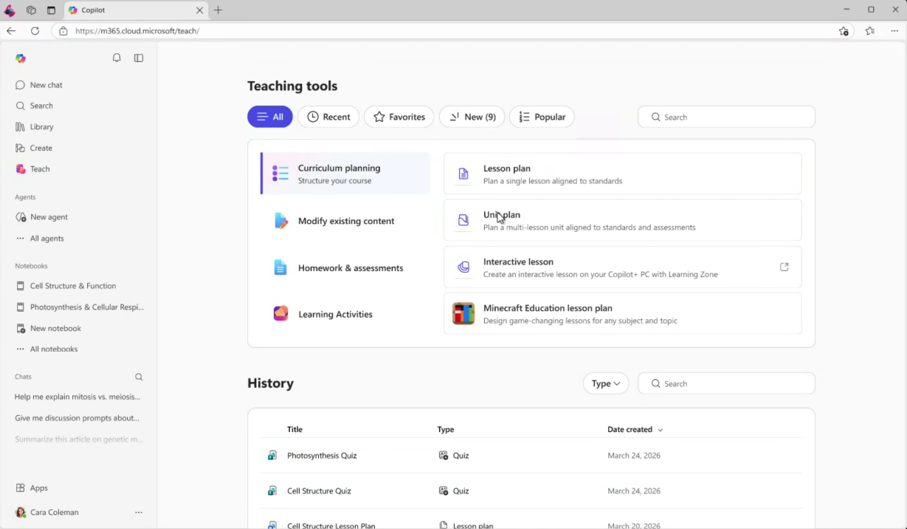
The unit plan tool in Teach helps educators create a comprehensive, multi-lesson unit aligned to standards and assessments. Rather than planning lessons individually, educators describe the unit they want to teach and the tool generates a structured overview organized by week. Each section includes lesson objectives, topic summaries, and built-in assessment checkpoints. From within the unit plan, educators can generate full individual lesson plans and quizzes for each lesson, export the complete plan to Word, and refine any part of the unit as their course evolves.
Unit plan features
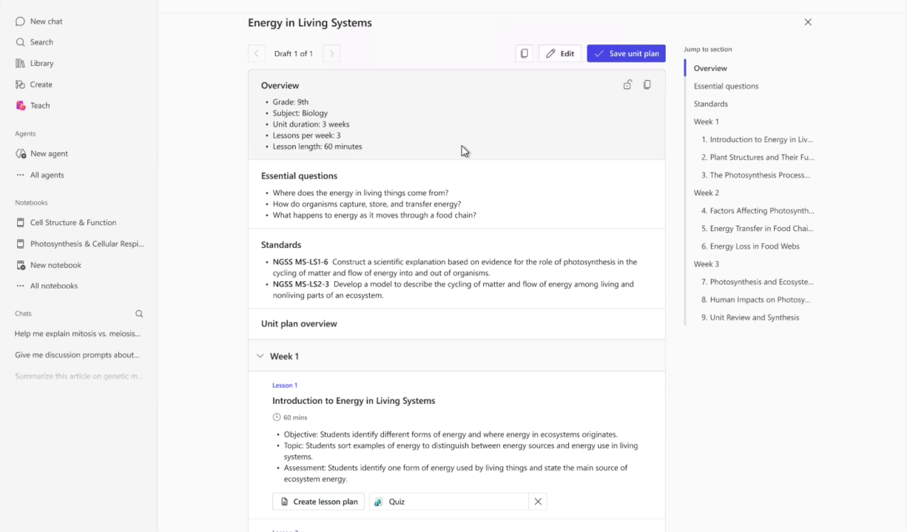
- Multi-lesson unit structure: Organizes a sequence of lessons by week, with each lesson outlining an objective, key topic, and assessment checkpoint. Unit plan keeps an entire unit’s worth of planning in one coherent view.
- Standards alignment: Attach one or more standards to anchor the entire unit using the built-in standards picker, which filters by standard set, subject, grade, and strand.
- Essential questions: Define overarching questions that frame learner inquiry across the unit. These appear in the unit overview and serve as a guiding thread for all lessons.
- Integrated lesson plan creation: Generate a full lesson plan for any lesson directly from within the unit. After reviewing, select Add to unit plan to link it back to the unit automatically.
- Quiz creation: Generate a formative quiz for any lesson. The quiz tool produces assessment questions aligned to that lesson’s objectives and topic.
- Export to Word: Save the complete unit plan as a Word document for sharing with colleagues, printing, or continued editing outside of Teach.
Create a unit plan
Select Unit plan from the Teaching tools menu in Teach under Curriculum planning.
Enter the subject and grade level for your unit.
Enter a unit title and describe the unit: Write a natural-language summary of what the unit covers and what learners should understand or be able to do by the end. Include key topics, themes, and learning goals. The more context provided, the more targeted the output.
Tip
Include as much context as possible in this step. Additional information about your students, goals, and curriculum will further guide the generated plan.
Select Add content to attach supporting curriculum files from OneDrive, SharePoint, or Teams if available.
Set the unit duration, lessons per week, and lesson length using the dropdown menus.
Select Add standards to open the standards picker. Filter by standard set, subject, grade, and strand, then add one or more standards to anchor the unit.
Expand More options to add essential questions or define expected assessments if needed.
Select Generate to produce the unit plan draft. Review the overview, essential questions, standards, and lesson outlines organized by week.
Select Create lesson plan on any lesson to generate a full lesson plan for that lesson. After reviewing, select Add to unit plan to link it back to the unit.
Select Export to Word to save the complete unit plan for sharing or continued editing.
Try these suggested prompts
Try out one of these prompts to get an idea of how the unit plan tool in Teach builds a complete, structured unit from a simple description. Enter any of the descriptions directly into the What’s this unit about? field, choose standards that align to your teaching assignment and learner age, and set the unit duration and lesson frequency that fit your course.
Tip
After generating your unit plan, use the Jump to section panel to navigate quickly between weeks and lessons as the plan grows in length.
| Subject | Description |
|---|---|
| Language Arts | Create a 3-week unit where learners analyze narrative structure across multiple short stories and build toward writing their own original short story. Include a final revision activity as the culminating assessment. |
| Math | Learners need a unit on proportional relationships that builds from ratios to unit rates to graphing proportional relationships. Include formative checkpoints at each stage and a performance task at the end. |
| Science | Learners should explore the water cycle from evaporation through precipitation. Connect the unit to local weather patterns and end with learners explaining the water cycle in their own geographic context. |
| Social Studies | I need a unit on the causes and effects of World War I that builds from background tensions to the war’s global impact. Include primary source analysis and a final synthesis activity. |