Create and configure a child agent
The Fabrikam order management orchestrator is ready to delegate. For that to work, each child agent needs to be created with a clear name and configured with the right invocation approach. This unit walks through creating a child agent, naming it effectively, and configuring how the orchestrator determines when to call it.
Add a child agent to your orchestrator
To create a child agent, open your parent agent in Copilot Studio and navigate to the Agents page. Select Add an agent, then New child agent.
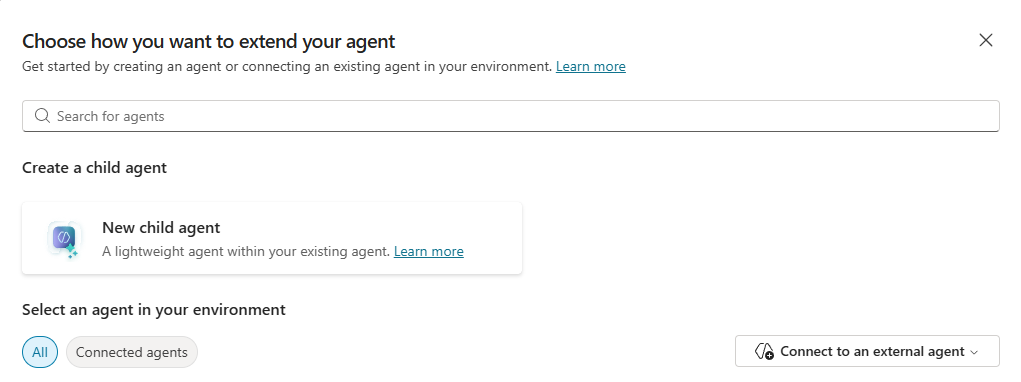
Next, you name the agent and configure when it's invoked. From there, you configure the child agent's instructions, knowledge, tools, inputs, and outputs — all covered in the next unit.
Give your child agent an effective name
Naming deserves more thought than it might seem. A name like "Order Status Agent" reflects a specific, bounded scope: it's clear in orchestration logs, easy to identify when you have multiple child agents, and communicates intent to others on the team. Avoid generic names like "Support Helper" or "Agent 1." When you're debugging a routing issue or reviewing which agent handled a query, a descriptive name saves time and removes ambiguity.
Configure when the agent is used
How the orchestrator decides to invoke a child agent is one of the most important configuration choices you make. Copilot Studio supports two approaches.
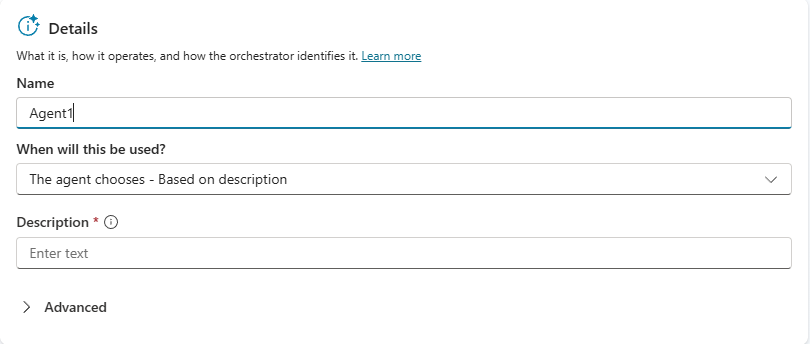
Dynamic routing
Description-based routing is the default. When you select The agent chooses — Based on description, the orchestrator evaluates each incoming user message against child agent descriptions using natural language understanding and selects the best match. This approach handles phrasing variation well — a user asking "Where's my package?" and another asking "Has my order shipped?" are both routed to the "Order Status" child agent if their intent matches the agent's description.
For Fabrikam's "Order Status" child agent, description-based routing is the right fit. Order status queries vary widely in phrasing, and natural language routing handles that variation without extra configuration.
Write an effective description
When you use description-based routing, the description is the signal the orchestrator has to decide whether this child agent should handle an incoming query. A vague description causes the agent to capture queries it shouldn't; an overly narrow one causes it to miss queries it should handle.
A description like "Handles queries about the status, tracking, and estimated delivery of existing orders" works because it anchors on a specific domain (order fulfillment), uses concrete query-type language (status, tracking, delivery), and avoids terms that also apply to adjacent domains, such as "shipment delay," "missing package," or "exchange," which could blur the boundary between the Order Status agent and the Delivery Issues or Returns agents.
Test your description before finalizing it. Ask the orchestrator clearly in-scope and adjacent questions ("Where is my order?" and "What's my return status?") and observe which child agent responds. Refining descriptions during the design phase is far easier than diagnosing routing errors after the solution is live.
Guiding question: Think about the boundary between the "Order Status" agent and the "Delivery Issues" agent in Fabrikam's order management orchestrator. A user asks, "My package hasn't arrived yet. Where is it?" Is that a status inquiry, a delivery issue, or something that could go either way? How would you write the description for each agent to handle edge cases like this in a predictable, non-overlapping way?
Deterministic routing
Explicit trigger events offer deterministic control for specific situations. Instead of relying on natural language matching, you configure the child agent to be triggered when a defined event occurs, such as: when the agent is redirected to from a topic, when the orchestrator's plan completes, when a message of a specific type is received, or when the user is inactive for a set amount of time. Use this approach when routing needs to be predictable regardless of phrasing, or when the child agent handles a system-level event rather than a conversational query.
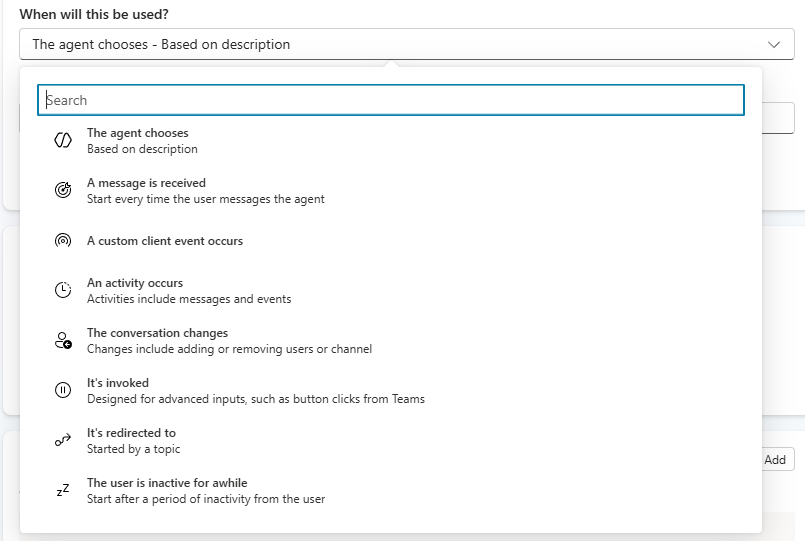
Under When will this be used?, you can configure a child agent to respond to these events:
| Trigger | When to use it |
|---|---|
| An activity occurs | Fires when an activity of any type is received. Use Additional details to limit the response to a specific activity type. |
| A message is received | Fires when the user sends a message. |
| A custom client event occurs | Fires when a named event is received from a custom channel or embedded surface. |
| The conversation changes | Fires on conversation update activities, such as when a user joins a Teams conversation. |
| It's invoked | Fires on invoke activities, most common in Teams message extensions. |
| It's redirected to | Fires when called explicitly from a topic via a redirect node. |
| The user is inactive for a while | Fires after a configurable period of user inactivity, set under Additional details. |
| A plan completes | Fires when the main agent finishes executing all planned steps for a response. |
| An AI-generated response is about to be sent | Fires just before the main agent sends a generative response. |
The inactivity trigger illustrates how child agents extend beyond standard conversation flows. A child agent configured to fire after five minutes of inactivity can send a proactive check-in to ask whether the customer still needs help with their order, without waiting for the user to initiate a message. This kind of behavior isn't achievable through description-based routing alone.
Each child agent also has a Priority field and an optional Condition field, both configured alongside its trigger settings under When will this be used?.
Condition lets you define criteria that must be met before the agent is called. You can use the built-in condition builder for common filters — for example, restricting a child agent to fire only when the conversation is in Microsoft Teams — or switch to the Power Fx formula editor for more complex logic.
Priority becomes relevant when more than one child agent (or a child agent and a topic) is configured to respond to the same event type. Copilot Studio uses a built-in execution order:
- An activity occurs triggers fire first.
- Message received, custom client event, conversation changes, and invoked triggers fire next.
- The agent chooses (description-based routing) fires last.
Within the same tier, agents fire in order of creation (oldest first) unless you set an explicit Priority number. A lower number means higher priority. For solutions with multiple child agents handling related intents, setting explicit priorities gives you predictable, deterministic behavior and removes the ambiguity that can produce subtle routing errors.