Manage solution dependencies and solution layers
More contributors are extending Contoso's equipment-provisioning solution: adding lookup columns to the Request form, or installing a regional approval process on top of the base solution. As they do, the same components start to overlap. This unit shifts your perspective: instead of treating each table, column, and form as an independent piece, you learn how Dataverse tracks the relationships between them. That tracking is what allows multiple installed solutions to safely change at the same time.
Understand why one component's change can block another
Every table, column, form, and process you add to a solution is a solution component, and components rarely stand alone. The Request form in Contoso's solution includes lookup columns that point to the Employee and Device tables. A ribbon button might reference a web resource for its icon. A business rule might reference a column on the Allowance table.
Dataverse doesn't leave these relationships implicit: the solutions framework automatically calculates and records a dependency every time you create, update, or publish a component.
Three dependency types cover how these relationships form:
- Solution internal dependencies, which Dataverse manages entirely, exist when one component can't logically exist without another: delete the Device table, and its columns and relationships go with it.
- Published dependencies form when you relate two components and then publish them. The lookup column on the Request form depends on the table relationship between Request and Device only after you publish that change.
- Unpublished dependencies apply to a component you're actively editing but haven't published yet. Once you publish, an unpublished dependency becomes a published one.
You don't need to memorize every component type that participates in these relationships. What matters is the mental model: Dataverse continuously tracks what requires what, so it always knows whether removing a piece leaves something else broken.
Diagnose and resolve a blocked delete or uninstall
This tracking exists to enforce a few concrete guarantees:
- Dataverse blocks the deletion of a component if another component still depends on it.
- When you export a solution, Dataverse warns you about components the solution references but doesn't include, since those could fail to import somewhere the dependency doesn't already exist.
- Import itself fails outright if a required component is missing from both the solution and the target environment.
- Inside a managed solution, a managed component can only depend on another managed component, which is what lets a managed solution install and uninstall as a clean, predictable unit.
Picture a contributor on the Contoso team who decides the Request-to-Device lookup column is no longer needed and tries to delete it. Dataverse blocks the delete because the Request form still references that lookup column. Rather than guessing why, the contributor selects Show dependencies.
This option is available from the solution page, from Advanced > Show dependencies on the component itself, or when a blocked delete or uninstall opens the dependency details. The resulting list separates components that block the delete from components the selected item uses, so you immediately see what's standing in the way.
Once you know what depends on the component, the fix depends on where that dependent component lives:
| Dependent component belongs to... | How you resolve it |
|---|---|
| An unmanaged (active) solution | Edit the dependent component directly to remove the reference, then publish. |
| A managed solution | Either uninstall that managed solution, or prepare and import an updated version of it that no longer references the required component, then upgrade. |
When several managed layers touch the same component, start with the topmost managed layer. That's the customization currently in effect, and the first place to check when you need to resolve the conflict.
Decide which customization wins when solutions overlap
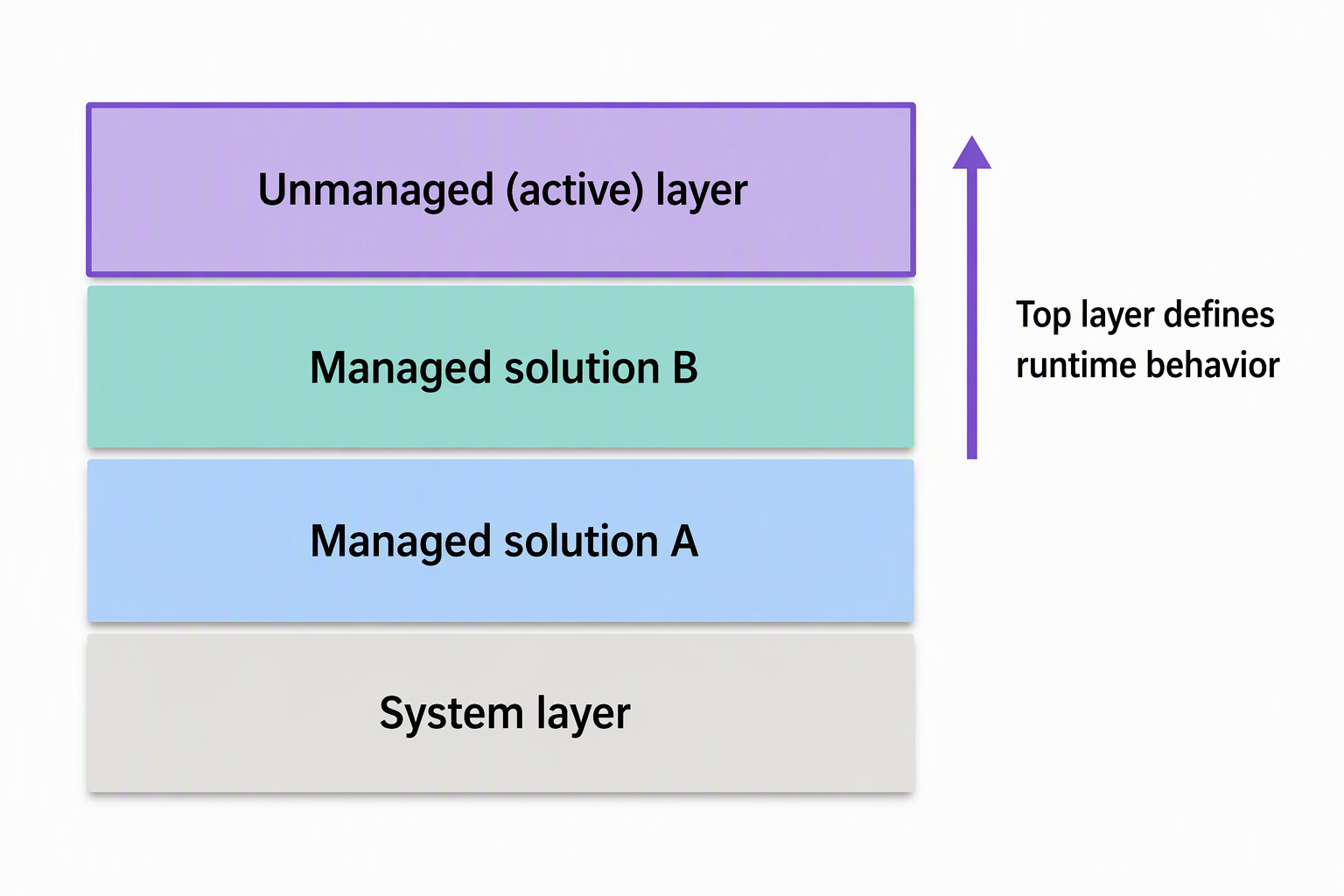
Resolving a single blocked delete is one thing; reasoning about an environment where several solutions touch the same component is another. Dataverse organizes every environment into layers, and understanding them tells you which customization actually governs behavior at runtime.
| Unmanaged layer | Managed layers | |
|---|---|---|
| Who shares it | All unmanaged solutions and ad hoc customizations share one single layer | Each imported managed solution gets its own layer |
| Stacking order | Not applicable: one shared layer | Most recently installed solution sits above earlier ones; the system layer sits at the base |
| Deleting a component | Removes it outright | Depends on how many layers exist and which one you're removing |
When Contoso's regional IT team installs their own managed solution to add region-specific approval logic on top of the base equipment-provisioning solution, that solution becomes its own managed layer. It sits above Contoso's base layer.
A single managed solution can itself contain sub-layers. A base layer carries the publisher and managed properties. Optional patches stack above it, with the newest patch on top. A pending upgrade layer stages above everything else, until it's applied. Applying an upgrade flattens all of this into a new base layer.
On any component, See solution layers shows every layer affecting it, with the most recent layer at the top. If you select the unmanaged layer and choose Remove active customizations, Dataverse removes that layer so the managed layer underneath takes effect again. You can't undo this action, and you can't use it to remove a component's only layer.
For most component types, the topmost layer wins outright—whatever customization sits highest determines runtime behavior. Model-driven apps, forms, and site maps are the exception: Dataverse merges their definitions across layers instead of letting one layer override another.
Guiding question: Suppose Contoso's base solution and the regional team's solution both customize a business rule on the Device table. Which layer determines what happens at runtime, and what would you check first to confirm it?
Apply layering discipline as your solution gains contributors
These mechanics translate directly into decisions you make as Contoso's solution grows past a single contributor. An unplanned delete, such as removing a column because it looks unused, breaks every dependent form, view, or process that references it. That's exactly why Dataverse makes you resolve the dependency first, rather than discovering the break after the fact.
When another team installs a solution on top of yours, layering discipline determines whether their customizations coexist cleanly with yours or silently override behavior you rely on. Designing components so they don't need to be the target of another solution's changes keeps that risk low.
Patches deserve particular caution. Microsoft doesn't recommend them, and each patch adds another layer that you must eventually reconcile. Prefer updating and upgrading your solution directly, over stacking patches on top of it. For guidance on structuring a solution so it coexists safely with whatever else gets installed alongside it, see segmented solutions.
With dependency tracking and layering as your mental model for what can safely change, the next unit turns to environment variables: how Contoso keeps values like the external availability service endpoint portable as the solution moves between environments.