Implement and extend Microsoft Power Platform Pipelines
Contoso's environment variables now carry configuration cleanly from development to production, but something still has to physically move the solution itself between those environments on a controlled schedule. Microsoft Power Platform pipelines are the mechanism that does that: a staged, repeatable deployment process instead of a one-off manual export and import.
This unit shifts your focus from configuring what travels with the solution to implementing the pipeline that moves it, then extending that pipeline with your own approval gates and automation.
Treat deployment as a staged pipeline, not a single export
A Power Platform pipeline moves a solution through a small, fixed set of environments rather than letting anyone export and import wherever they choose. A dedicated host environment stores the pipeline configuration, security, and run history. Microsoft recommends keeping it separate from every environment that actually runs Contoso's equipment-provisioning app, because deleting the host deletes every pipeline and every run record along with it.
One or more development environments are where Contoso's makers build; a pipeline can run from any development environment linked to it. From there, the pipeline deploys through one or more target environments, for example a QA stage and a production stage.
Each stage can name a previous deployment stage it depends on, so production can't receive a deployment until the QA stage already has. Target environments must be enabled as managed environments before they can receive a deployment; the host and development environments carry no such requirement.
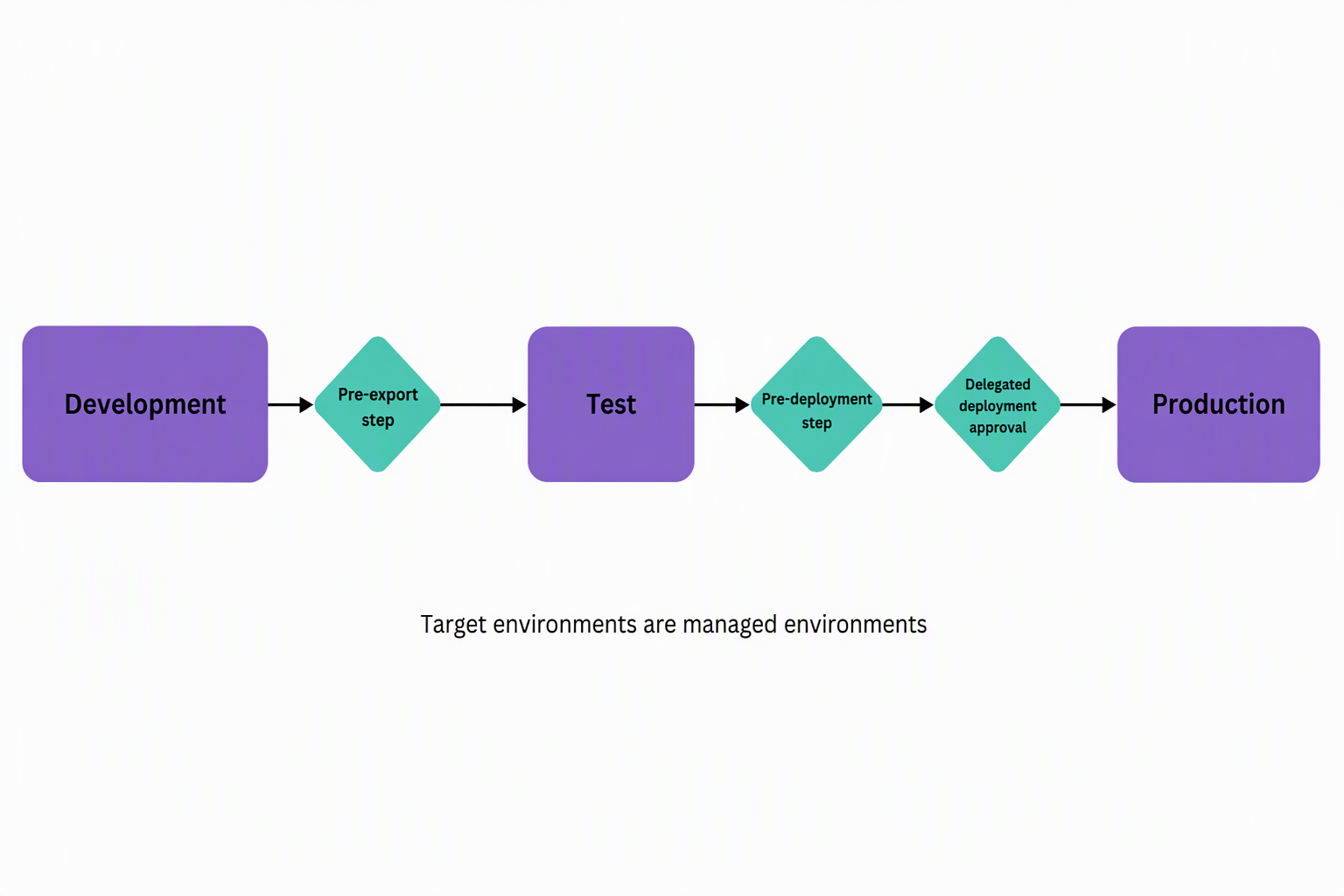
Setting up this structure is mostly administrative: install the Power Platform Pipelines app in the host environment, register each participating environment, then link the development environments and define the stages. Learn more about configuring pipelines with a custom host. The interesting decisions for a developer or solution architect start once that skeleton exists and you decide what happens inside each stage transition.
Choose the gate that matches Contoso's approval and access needs
Power Platform pipelines ship with three gated extensions: optional custom steps you turn on per stage. Microsoft frames the effect well: enabling a gate turns the deployment into your own personal train, where you control where it stops and whether it continues.
- Pre-export step required runs custom validation the moment a maker requests a deployment, before the solution even leaves the development environment. Microsoft recommends enabling it only on the first stage in a pipeline (for Contoso, that's the QA stage). There, you might confirm the solution's components are complete before export even starts.
- Is delegated deployment carries out the deployment using a service principal or the stage owner's identity, instead of the requesting maker's. It also requires approval from an authorized identity before it runs. This extension answers both of Contoso's production concerns at once: a maker can request a production deployment without holding write access to the production environment, and nothing executes until someone authorized approves it.
- Pre-deployment step required inserts a step after approval but before the deployment actually executes: useful for a final check that's independent of the approval itself, such as confirming a change freeze window hasn't started.
Gates are optional and stage-specific, and they combine freely: Contoso could pair pre-export validation on the QA stage with delegated, approved deployment on the production stage, while leaving a single-stage pilot pipeline with no gates at all.
Guiding question: Think about a deployment in your own organization that currently depends on one person's judgment or one person's elevated access. Which of these three gates would you reach for first to make that step a controlled part of the pipeline instead of an informal habit?
Keep in mind that new pipelines extensions roll out gradually by region, and might not be available everywhere yet. Personal pipelines created in Power Apps can't carry these extensions at all.
Let a flow, not a person, decide whether the deployment proceeds
Underneath the "train" metaphor is a concrete mechanism: Dataverse business events. Every step in a deployment's progression raises a real-time event when it starts, and another when it completes. Turning on a gated extension adds the pair of events that correspond to that custom step.
You build the flow that listens for those events as a Power Automate cloud flow inside the pipelines host environment. It uses the Dataverse connector's When an action is performed trigger, with Category set to Power Platform Pipelines.
| Gated extension | Step-started trigger | Step-completed trigger | Completing action |
|---|---|---|---|
| Pre-export step required | OnDeploymentRequested |
N/A | UpdatePreExportStepStatus |
| Is delegated deployment | OnApprovalStarted |
OnDeploymentCompleted |
Flow connects as the configured service principal or stage owner |
| Pre-deployment step required | OnPreDeploymentStarted |
OnPreDeploymentCompleted |
UpdatePreDeploymentStepStatus |
OnDeploymentRequested fires for every deployment, whether or not pre-export validation is enabled, so a trigger condition is what keeps a flow scoped to the stage it's actually built for. An expression matching DeploymentStageName to Contoso's production stage name stops that flow from firing on every QA deployment too.
Once your flow's logic finishes, it reports back by calling the matching unbound action rather than editing anything in the pipeline directly. Pending steps carry status code 10 the moment the step is created, which the system sets automatically. Your flow calls UpdatePreExportStepStatus or UpdatePreDeploymentStepStatus with status 20 to let the deployment continue, or 30 to reject it: a rejection stops the deployment and sets its status to failed, and you can include a maker-visible comment in the run history.
For pre-export and approval logic, admins can also store internal properties that don't surface to makers. Is delegated deployment works a little differently: the flow still calls UpdateApprovalStatus (20 = approved, 30 = rejected), but it uses a Dataverse connection established as the service principal or stage owner, which is what makes the deployment run under that identity.
Learn more about extending pipelines in Power Platform, including the full trigger and action reference.
Apply extensibility without breaking the guarantees pipelines provide
A few practices keep Contoso's extended pipeline trustworthy rather than just complicated. Scope every flow with a trigger condition before you publish it. An unscoped flow listening for OnDeploymentRequested fires for every stage of every pipeline in the host environment, not just the production stage you built it for. That quickly turns into noisy runs and wasted request consumption.
Keep the pre-export check on Contoso's QA stage focused on validation that genuinely belongs before export, like confirming required components are present. Approval and identity concerns belong to the delegated-deployment and pre-deployment gates further down the pipeline, not the first one.
It also helps to trust what the pipeline already guarantees instead of re-implementing it yourself. Once the pipeline exports Contoso's solution, the pipelines host stores that managed artifact and locks it against tampering. The identical artifact (not a fresh export) then deploys to every later stage in sequential order.
That's what makes the delegated-deployment gate on production reliable: nothing reaches production except the exact build that already passed QA and its approval, regardless of who requests the deployment or when.
Finally, there's little reason to write these flows from a blank canvas. Microsoft publishes sample solutions for pipelines extensibility and for delegated deployment specifically that you import into the pipelines host and adapt to Contoso's stage names and approvers: a faster and less error-prone starting point than building the trigger, condition, and action logic from scratch.
With the pipeline itself extended with the right gates, the next unit turns to Power Platform Build Tools. It covers how Contoso wires that same pipeline into an automated CI/CD process, instead of a maker-triggered deployment request.