Configure environment variables and connection references
Solutions become truly portable when they don't contain hard-coded values that break on import. Environment variables and connection references solve this by separating configuration from logic - your apps and flows reference abstract placeholders that resolve to environment-specific values at deployment time.
Understand environment variables
An environment variable stores a parameter key and value that can differ between environments. Instead of hard-coding a SharePoint site URL or an API endpoint directly in your flow, you reference an environment variable. When the solution moves to another environment, you provide the new value - the flow logic stays unchanged.
Supported data types:
| Type | Use case |
|---|---|
| Text | URLs, display strings, configuration keys |
| Decimal number | Thresholds, limits, numeric parameters |
| JSON | Complex configuration objects |
| Two options | Feature flags (Yes/No toggles) |
| Data source | SharePoint sites, Excel files, other data connections |
| Secret | Credentials stored in Azure Key Vault |
Important
The Secret type requires Azure Key Vault integration. Plain text environment variables are not encrypted - never store passwords or API keys in text-type variables.
Create environment variables
- In Power Apps, open your solution.
- Select New > More > Environment variable.
- Enter a display name and select the data type.
- Optionally set a Default value (packaged with the solution) and a Current value (specific to this environment).
- Select Save.
Default value vs. Current value:
- The default value travels with the solution - it's the fallback if no current value is set in the target
- The current value is an unmanaged customization specific to the current environment - it overrides the default
Tip
Before exporting a solution for deployment, remove the current value from environment variables. This ensures the import process prompts for environment-specific values instead of silently using your development values in production.
Reference environment variables in apps and flows
In Power Automate cloud flows, reference environment variables using the dynamic content panel - they appear under Environment variables when your flow is inside a solution.
In canvas apps, use the Environment.Variable("VariableName") function or access them through the data source.
For custom connectors, reference environment variables using the syntax:
@environmentVariables("environmentVariableName")
Understand connection references
A connection in Power Platform is a stored authentication credential for a connector - for example, an OAuth token for SharePoint or credentials for SQL Server. A connection reference is a solution component that points to a connection without embedding the specific credentials.
This separation is critical for portability:
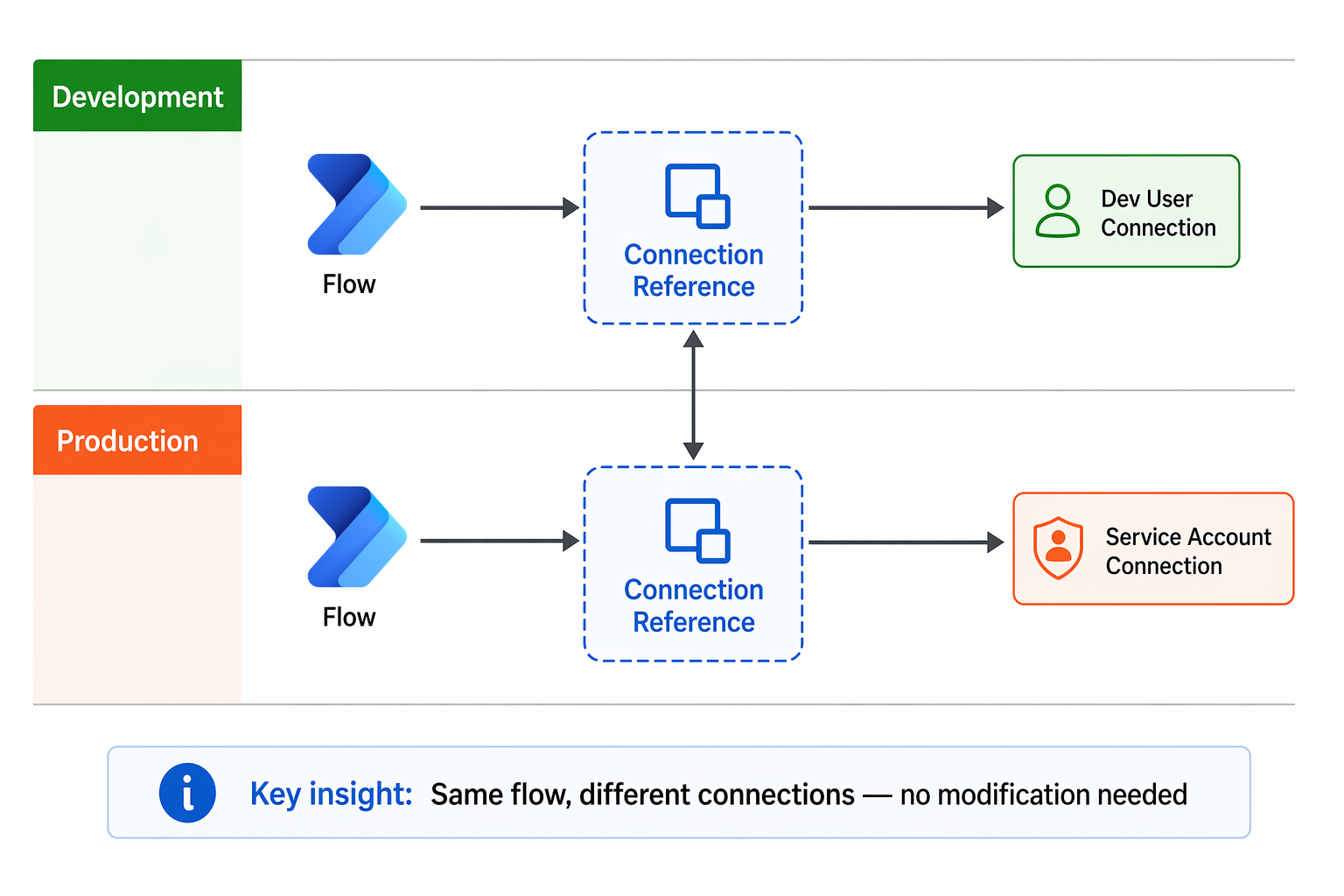
- In development, your flow uses your connection to SharePoint
- In production, the same flow needs to use a service account's connection to SharePoint
- The connection reference lets you swap the underlying connection at import time without modifying the flow
Create connection references
Connection references are created automatically when you build flows inside a solution. You can also create them manually:
- Open your solution.
- Select New > More > Connection Reference.
- Enter a display name.
- Select the connector.
- Choose or create a connection.
- Select Save.
Provide values during deployment
When importing a solution (manually or through pipelines), you're prompted to provide:
- Connection reference values - Select which connection each reference should use in the target environment
- Environment variable values - Enter the target-specific values (URLs, flags, thresholds)
If all connection references have valid connections and all environment variables have values (either default or current), flows are turned on automatically after import. Missing values prevent flows from activating.
Best practices for portable solutions
For environment variables:
- Use descriptive names that indicate purpose:
Zava_SharePointSiteURLrather thanURL1 - Always set a default value for non-sensitive configuration (reduces prompts during import)
- Remove current values before export to force explicit configuration in each target
- Group related variables with a common prefix for easy identification
For connection references:
- Name references descriptively:
ZavaPay_SharePoint_ServiceAccountrather than the auto-generated name - Import custom connector solutions before solutions that reference them
- Share connections with the importing user before deployment to avoid permission errors
- For automated deployments, use deployment settings files generated with
pac solution create-settingsto pre-populate all values
Common gotchas:
- Canvas apps don't automatically recognize connection references on custom connectors after import - you must edit the app and re-add the connection
- Environment variable values in managed solutions aren't visible in the default solution view (by design)
- Copying an environment breaks connection references for custom connectors - you must create new references in the copy
At Zava, the team maintains a deployment checklist that includes verifying all environment variables have appropriate values in each target and confirming that service account connections are shared with the pipeline service principal before running deployments.