Exercise - Embed your app into other Microsoft applications
For more information, see Guidelines and troubleshooting for embedded canvas apps.
Add an app to Microsoft Teams
For this exercise, you'll add your app as a tab to a team's channel.
In Microsoft Teams, select a team and a channel under that team. In this example, it's the General channel under your organization's team.
Select the plus (+) symbol to add a tab.
Select Apps.
In the Add an app dialog, select See all, and then select Power Apps.
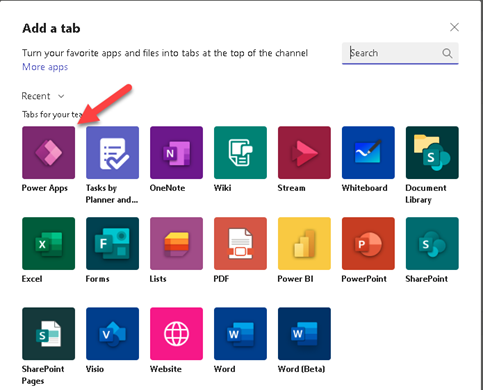
Select the app that you want to add to Microsoft Teams. Now, the app will be available to use in the channel
Known issues
In the desktop app for Microsoft Teams:
Apps must load content, such as images and .pdf files, over a secure (https) connection.
Not all sensors, such as Acceleration, Compass, and Location, are supported.
Only these audio formats are supported: AAC, H264, OGG Vorbis, and WAV.
Clean up resources
To remove the app from the channel, select Product Showcase > Remove.