The Deploy phase
In this phase, your objective is to execute the deployment. You'll do so by performing iterative monitoring and management across six areas of your environment:
- Operations
- Applications
- Infrastructure
- Configurations
- Devices
- Users
Let’s look at each of these areas one by one, outlining the tasks and deliverables that will help you accomplish the objective of this phase. For each deliverable, consider a format that's easy to share with others and collaboratively edit throughout the life of the project.
Tip
In practice, these six areas often require simultaneous or overlapping attention.
Phased or ring-based approach to deploying Windows
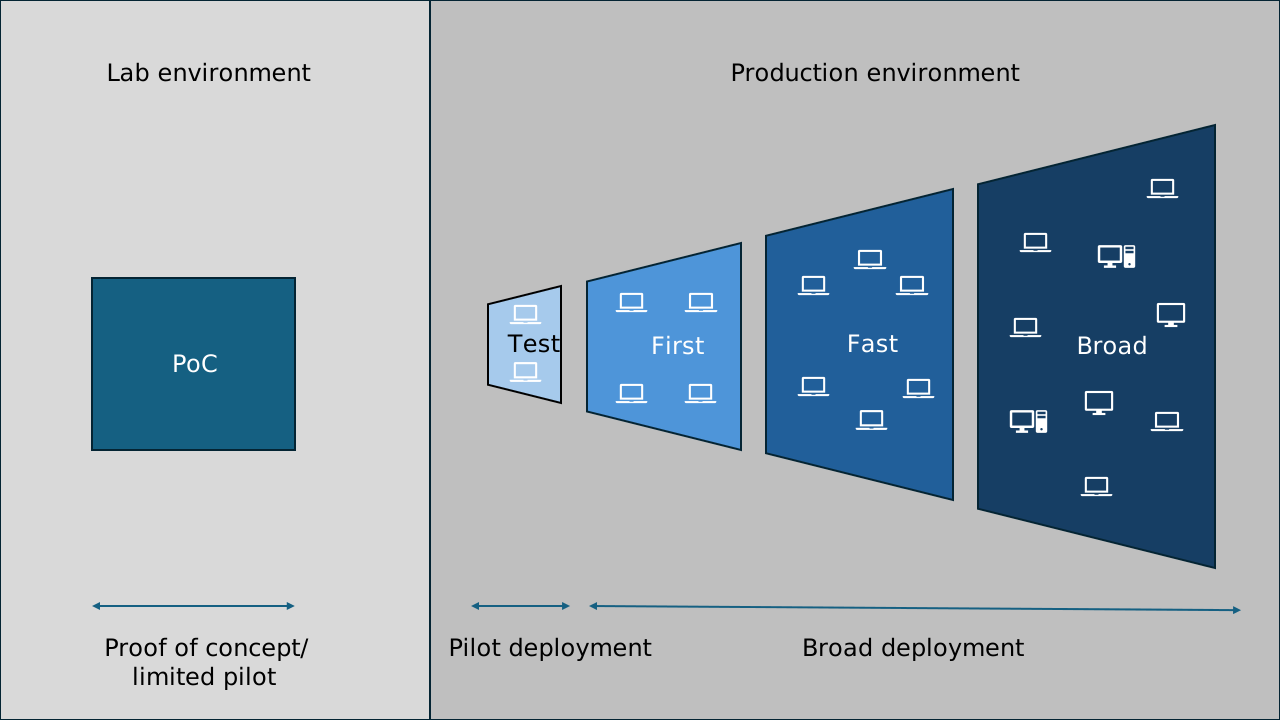
Throughout this module, we refer to deployment rings and various project phases. Some of these terms are often used interchangeably, but for this module, we use the following definitions:
- Proof of Concept (PoC): An optional phase often performed in a lab environment. It’s most helpful in the earliest stages of a project to test basic functionality and assumptions. This phase is sometimes called a limited pilot and is covered in the Prepare phase.
- Pilot: The first phase you perform in the production environment. Use it to test the wider infrastructure, connectivity, and application compatibility.
- Broad deployment: One or more further deployment phases in the production environment, called rings. In Windows Autopatch, these rings are named first, fast, and broad. Eventually they target most of the estate.
For this module, the focus is on the pilot and broad deployment phases.
Helpful reports across the deployment phases
Windows diagnostic data provides the information used in Windows update compatibility reports, so you don’t need to install agents. You can use Microsoft Intune or Microsoft Configuration Manager (as appropriate) to deploy diagnostic data settings to the devices you want to include in reporting.
Important
You might have to modify your diagnostic data settings to fully use the reports referenced throughout this module.
Suggested reports
| Area of use | Report name | Source | Phase |
|---|---|---|---|
| Device readiness | Windows feature update device readiness report | Microsoft Intune | Plan, Prepare |
| Device readiness | Windows feature update compatibility risks report | Microsoft Intune | Prepare |
| Device readiness | Work from anywhere report | Endpoint analytics | Plan |
| Device readiness | Feature updates – device status | Windows Update for Business reports | Plan |
| Application inventory | Discovered apps report | Microsoft Intune | Plan |
| Device provisioning | Work from anywhere report | Endpoint analytics | Plan |
| Device identity | Work from anywhere report | Endpoint analytics | Plan |
| Deployment status | Feature update status report | Windows Autopatch | Deploy |
| Deployment status | Feature update trending report | Windows Autopatch | Deploy |
| Deployment status | Management status report | Windows Autopatch | Deploy |
| Deployment status | Windows quality and feature update reports | Windows Autopatch | Deploy |
| Deployment status | Feature update failures report (Organizational) | Microsoft Intune | Deploy |
| Deployment status | Windows feature update (Organizational) | Microsoft Intune | Deploy |
| Deployment status | Windows feature update report | Microsoft Intune | Deploy |
| Deployment efficiency | Delivery Optimization report | Windows Update for Business reports | Deploy |
Prerequisites for report use
| Report source | Prerequisites |
|---|---|
| Microsoft Intune | • Microsoft Entra joined or Microsoft Entra hybrid joined devices • Devices managed by Microsoft Intune, by Configuration Manager with tenant attach enabled, or co-managed • Windows diagnostic data enabled (minimum level: “Required”). • Enabled diagnostic data in processor • A valid license: Windows 10/11 Enterprise (E3, E5), Windows 10/11 Education (A3, A5), Windows Virtual Desktop Access (E3, E5), or Microsoft 365 Business Premium • Devices running Windows 10, version 1903 or later Use Windows Update for Business reports for Windows Updates in Microsoft Intune. |
| Endpoint analytics | Same prerequisites as Microsoft Intune. For more information, visit What is Endpoint analytics?. |
| Window Update for Business reports (Azure workbook) | • Azure subscription with Microsoft Entra ID • Microsoft Entra joined or Microsoft Entra hybrid joined devices • Log analytics workspace in a supported region • Devices running Windows 10/11 Professional, Education, or Enterprise edition • Windows diagnostic data enabled (minimum level: “Required”) Check out prerequisites for Windows Update for Business reports for more information. |
| Windows Autopatch | Same prerequisites as Microsoft Intune. |
Tip
Are there any steps from the Prepare phase that you haven’t finished or still need help with? Have you addressed all stakeholder feedback for the plan and secured all necessary approvals? Review the checklist and your notes from the Prepare phase before moving forward.