Describe the value of Plan Designer
A distribution company needs to modernize how field coordinators, dispatch managers, and customer service staff track shipments. The current process relies on phone calls, email threads, and a manually updated spreadsheet throughout the day. Power Platform could solve this challenge, but determining which apps to build, which flows to automate, what data model to create, and where to start feels overwhelming.
Plan Designer was built to solve exactly this problem.
What is Plan Designer?
Plan Designer is an AI-powered workspace within Power Apps that turns a description of a business problem into a comprehensive, end-to-end Power Platform solution plan—in minutes. Rather than starting with a blank canvas and figuring out what to build, you start by describing what you need to accomplish in plain language. A team of specialized AI agents works collaboratively to analyze your requirements and propose a complete solution blueprint.
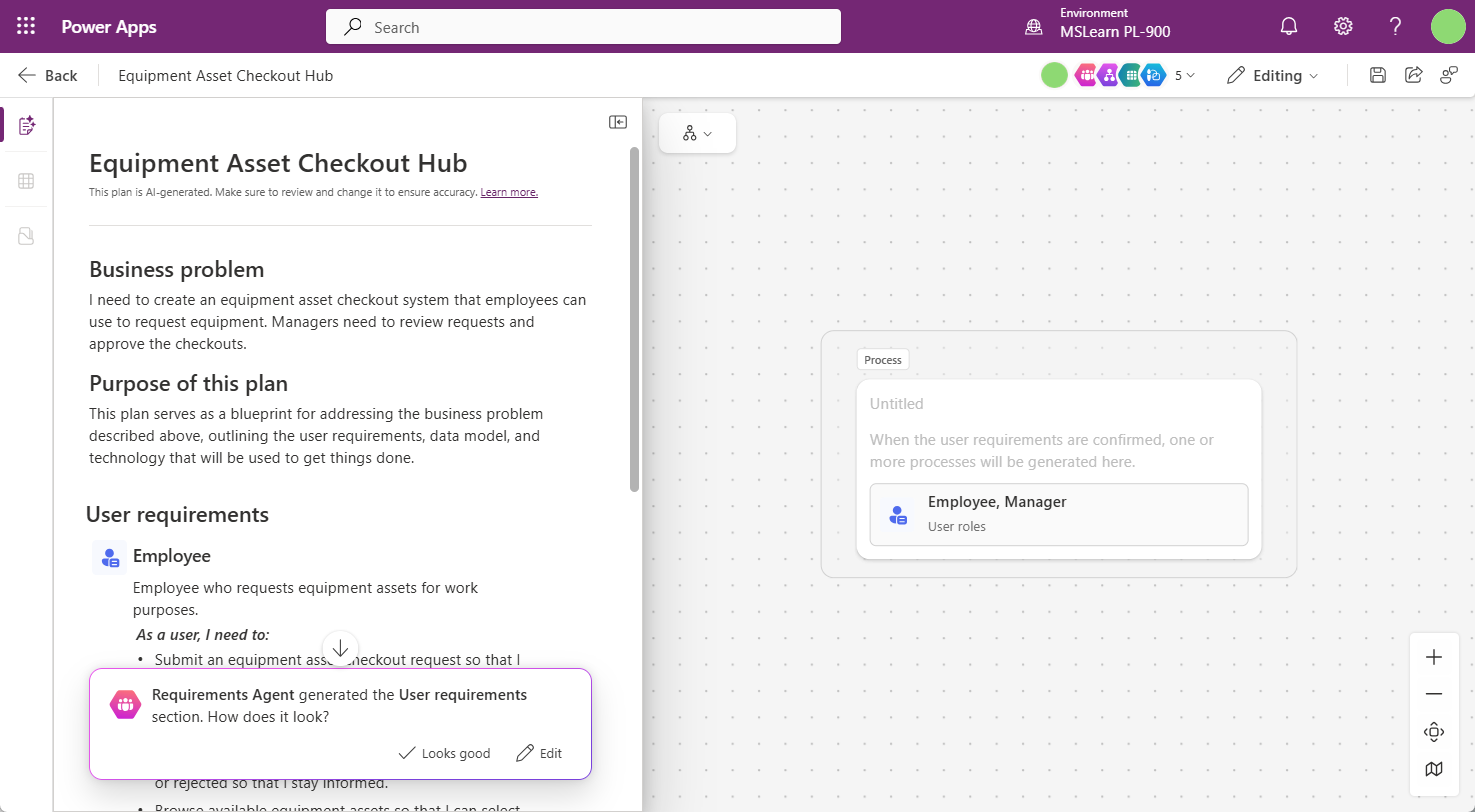
From business problem to solution blueprint
When you describe your business scenario in Plan Designer, the AI agents get to work. You can include details such as who the users are, what processes need to be supported, what data needs to be tracked, and any existing systems that need to be connected. You can even attach a screenshot of a legacy app or a process diagram to give the AI additional context.
The agents collaborate across four key areas of solution design:
- Solution Agent: ties together the entire plan into a coherent, end-to-end Power Platform solution. It considers dependencies between components and ensures the proposed solution is architecturally sound.
- Process Agent: maps out the workflows and processes that the solution needs to support, identifying where Power Automate flows or Copilot Studio agents should be used to automate steps or handle interactions.
- Data Agent: generates a recommended data model—the tables, columns, and relationships in Microsoft Dataverse—that stores and organizes the information your solution requires.
- Experience Agent: proposes the user experiences: which canvas apps or model-driven apps should be built, what screens each app should include, and—where applicable—what Power Pages site or Power BI report would serve each audience.
Supporting items: What gets generated
Once you're satisfied with the plan, Plan Designer can generate the actual Power Platform components—not just the blueprint, but a working starting point for the full solution. Depending on your scenario, the generated items may include:
- Canvas and model-driven apps: Pre-configured with screens, navigation, and connections to the proposed Dataverse tables. Each app is built for the specific user role it serves.
- Power Automate flows: Automating the repetitive steps in your processes—such as notifying a dispatcher when a delivery exception is logged, routing approval requests, or synchronizing records between systems.
- Copilot Studio agents: That can answer questions, guide users through complex processes, or operate autonomously in the background to handle routine tasks without human intervention.
- Power Pages sites: If your scenario requires an external-facing experience—such as a customer tracking portal or a vendor submission form—Plan Designer can propose and generate the site with a pre-configured layout connected to the same Dataverse environment.
- Power BI reports: To give managers and analysts visibility into the data your solution collects. Plan Designer identifies which metrics and dimensions are most relevant to each role and proposes the appropriate visualizations.
- Dataverse tables: The underlying data model that holds everything together. Plan Designer generates the full data schema—tables, columns, data types, and relationships—based on the requirements you described.
Journey: From project plan to working solution
To understand how Plan Designer supports a real project, return to the distribution company scenario. Leadership wants to modernize shipment tracking, reduce manual status updates, and give delivery coordinators, dispatch managers, and customer service representatives a better way to work from the same information.
Describe the business problem. The project team starts by entering a plain-language description: "Create a shipment tracking solution for delivery coordinators, dispatch managers, and customer service representatives. Field users need to update shipment status from mobile devices, managers need to monitor exceptions, and customer service needs to answer status questions quickly." This becomes the starting point for the agents to understand the business outcome, users, process scope, and required data.
The Solution Agent frames the overall approach. The Solution Agent looks across the full request and proposes an end-to-end Power Platform solution—a mobile canvas app for delivery coordinators, a model-driven app for dispatch managers, Dataverse tables for shipments and exceptions, Power Automate flows for notifications, a Power BI report for leadership visibility, and a Copilot Studio agent for status questions.
The Process Agent maps the work. The Process Agent identifies the workflows the solution must support: how a shipment is assigned, how a delivery coordinator updates status, what happens when an exception is logged, how dispatch is notified, and how customer service sees the latest information. This helps the team validate the real workflow before anything is built and reveals where automation can reduce manual handoffs.
The Data Agent designs the Dataverse foundation. Once the process is understood, the Data Agent proposes the tables, columns, and relationships needed to support the solution—for shipment tracking, that might include tables for shipments, customers, routes, delivery coordinators, status updates, delivery exceptions, proof-of-delivery records, and service inquiries. A strong data model reduces rework later in the project.
The Experience Agent proposes the right user experiences. The Experience Agent translates the plan into role-specific experiences. Delivery coordinators may need a mobile canvas app with simple buttons for status updates, photos, notes, and signatures. Dispatch managers may need a model-driven app with views, dashboards, and exception queues. If external customers need direct access, the plan might also propose a Power Pages tracking portal.
Copilot Studio agents are placed where they create the most value. The plan includes agents as recommended components of the solution. An internal shipment status agent could help customer service ask, "What is the latest status for shipment 4821?" and receive an answer grounded in Dataverse. A customer-facing agent on a Power Pages portal could answer common status questions and create a service inquiry when human follow-up is needed.
Automation connects the journey. The Process Agent and Solution Agent identify where Power Automate should move work forward. A flow might notify dispatch when an exception is logged, alert customer service when a high-priority shipment is delayed, create follow-up tasks, or trigger a desktop flow to update a legacy logistics system.
The team reviews, refines, and generates the solution. Business users validate whether the proposed plan matches how work actually happens. IT reviews security, data access, connectors, environment strategy, and governance. Once the plan is approved, Plan Designer can generate working starting points for the recommended apps, flows, tables, pages, reports, and agents.
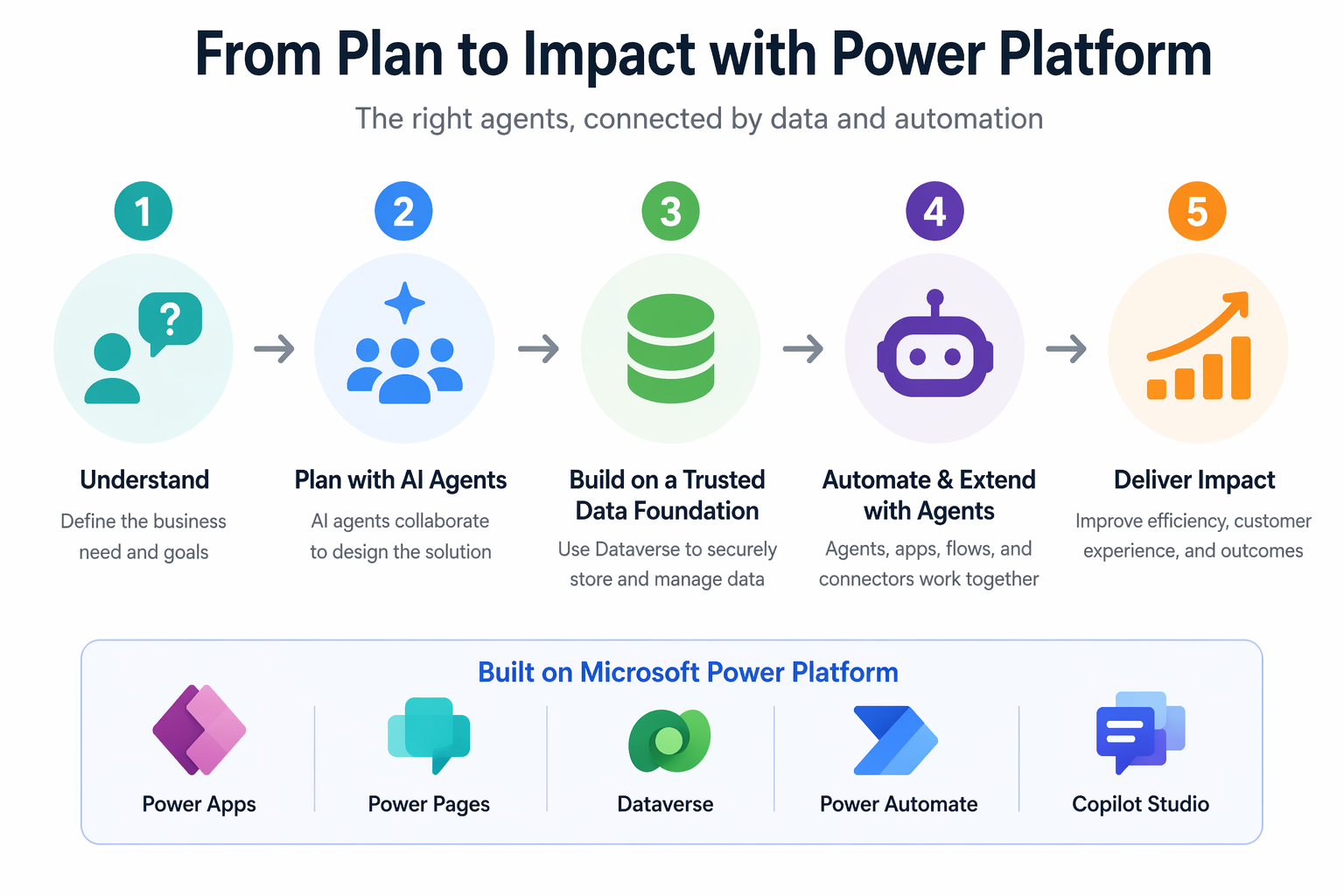
The business value of this journey is speed, alignment, and completeness. Each agent contributes a different perspective: the Solution Agent keeps the architecture connected, the Process Agent validates the work, the Data Agent creates the trusted foundation, and the Experience Agent designs role-based experiences people can actually use.
An iterative, collaborative process
Plan Designer isn't a one-shot generator. The entire process is designed to be iterative. At any stage of the planning process, you can provide feedback, refine the requirements, adjust the user roles, modify the proposed data model, or add new components. You can rate each section of the plan using thumbs-up or thumbs-down feedback, and the AI agents revise their suggestions accordingly.
This collaborative approach means that even complex, multi-team solutions can be designed rapidly—and that the people closest to the business problem are actively involved in shaping the solution from the very beginning.
Note
Plan Designer reached general availability in 2025 and is available within Power Apps. The feature requires an appropriate Power Apps license and may require enabling through your Power Platform administrator.