Describe the procure-to-pay process
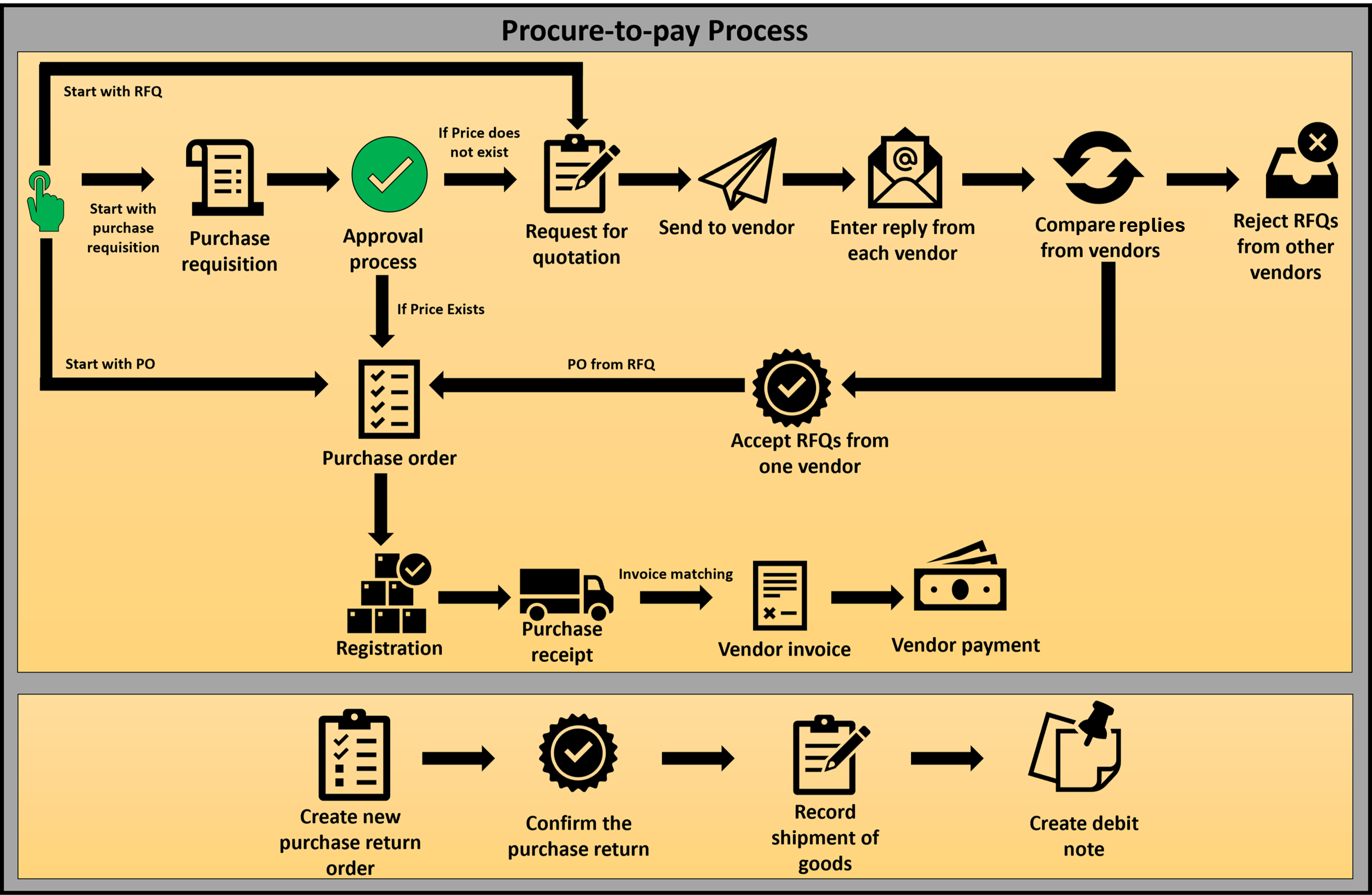
The Procurement and sourcing module in Supply Chain Management manages the procure-to-pay process. This process involves approving the purchase requisition, onboarding vendors, maintaining purchase orders, and confirming product receipts. The process ends after the processing of the purchase invoice.
The major transactions in this process are as follows:
- Purchase requisition
- Request for quotation
- Purchase order
- Purchase receipt
- Purchase invoice
Purchase requisition
The purchasing department uses a purchase requisition as the base document to procure a product or service. Any employee in the organization can create a purchase requisition. The purchase requisition must go through the workflow process based on the defined workflow configuration. When approved, users can refer to the purchase requisition for further processing.
Request for quotation
Organizations issue requests for quotation (RFQs) when they want to receive competitive offers from vendors for items or services they need to purchase. This process includes quoting, traceability, and better collaboration among vendors. Vendors can provide product prices, delivery time, other incidental charges, and a discount as part of the bid. Vendors registered for vendor collaboration can submit the bid directly in the vendor portal. The organization can accept the most suitable bid and proceed with further processing.
Purchase order
A purchase order (PO) is a document that represents an agreement between a company and a vendor to buy goods or services. You can create a purchase order directly from an approved purchase requisition, from an approved RFQ, or from the purchase order page.
A purchase order contains two main sections: Purchase header and Purchase lines.
A purchase header holds the PO number, date, vendor information, and other details applicable to the entire PO. Each PO can have one or more purchase lines. Purchase lines consist of item, unit of measurement, procured quantity, price, and other line-specific information. Discount, tax, and delivery address information is available in both the header and line.
When using the Purchase order preparation workspace in Supply Chain Management, you can set up a default order type for three types of purchase orders, as described in the following table.
| Purchase order type | Description |
|---|---|
| Journal | You can use this type to create a draft order. This type doesn't affect stock quantities or generate inventory transactions. The purchase order journal lines aren't included in master scheduling. |
| Purchase order | You can use this type to create purchase orders when orders are confirmed with a vendor, are processed through receipt, and invoicing before payment is made to the vendor. This type of purchase order is the most common. |
| Returned order (also known as Return to vendor (RTV)) | You can use this type when you return goods to the vendor. This type of order requires you to specify the return material authorization (RMA) number that the vendor provides. You specify the RMA number on the General tab of the purchase order. The order lines must have negative quantities. |
Purchase orders include the following status fields that indicate the progress of an order: open, received, invoiced, and canceled.
Purchase receipt
A product receipt involves documenting the receipt of ordered items. When products are preregistered, you must complete other procedures before acknowledging receipt. The registration process ensures the storage and tracking dimension of the product before processing the receipt. Typically, the product is received when the Product receipt option is processed after registration is complete. In some situations, products might go through other processes, such as quality management, before they're marked as Received.
Purchase invoice
When you review a purchase order, you can process the purchase lines for invoicing. Invoicing a purchase order increases the open vendor balance and the financial value of inventory. It posts the transaction to the appropriate ledger book. Before you post the invoice, it must go through the invoice matching process to ensure consistency among the vendor invoice, purchase order, and product receipt information.
Purchase return
Create a return purchase order when you need to return items purchased from a vendor. You can create a purchase return by using the Credit note action to copy lines from a vendor invoice document and create a new PO for return. The return PO follows the same confirmation process as a regular purchase order. You can then process a shipment to send the items back to the vendor.
Interactive simulation
Now that you understand the procure-to-pay process, the following interactive simulation walks you through a realistic scenario in Dynamics 365 Supply Chain Management where you navigate the process from purchase requisition through invoicing.
In this simulation, you reviewed the end-to-end procure-to-pay process, including how to create a purchase order, process a product receipt, and generate a purchase invoice in Dynamics 365 Supply Chain Management.