Describe Copilot support in procurement scenarios
With the integration of Copilot, you experience enhanced support throughout procurement processes. The following scenarios illustrate how Copilot provides actionable insights in typical procurement activities.
Vendor
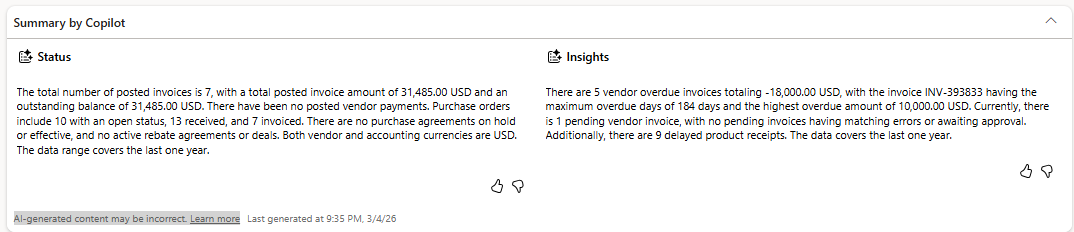
The Summary by Copilot FastTab on the Vendor page gives you a quick, AI-generated snapshot of a vendor's performance, financials, and risks without requiring you to dig through multiple tabs. Copilot analyzes the vendor's master and transaction data, including purchase orders, invoices, and payments, and generates a clear summary using natural language. Copilot can summarize and present the following information:
Vendor overview
- Vendor name and account
- Vendor group/category
- Active/inactive status
Financial status
- Outstanding payable balance
- Payment history (on-time or delayed)
- Invoice volumes and trends
Procurement activity
- Recent purchase orders
- Frequently purchased items
- Order value trends
Delivery performance
- On-time or delayed deliveries
- Lead times
- Delivery reliability
Risks and alerts
- Overdue invoices
- Vendor on hold or blocked
- Price discrepancies or agreements
- Frequent delivery delays
Insights and opportunities
- High-dependency vendors
- Cost trends
- Alternate sourcing considerations
Purchase order
The Summary by Copilot FastTab on the Purchase order page gives you a quick, AI-generated overview of the purchase order so that you don't have to open every FastTab or line. Copilot reads the entire purchase order and generates a clear summary using natural language. Copilot can summarize and present the following information:
Vendor and order overview
- Vendor name and account
- Total PO amount
- Number of lines/items
Product details
- Key items being purchased
- Quantities and units
- High-value or critical items
Delivery information
- Delivery dates (requested or confirmed)
- Delivery address or warehouse
- Mode of delivery
Financial insights
- Prices and totals
- Discounts applied
- Charges (freight, handling, etc.)
Risks and exceptions
- Late delivery risks
- Missing confirmations
- Price discrepancies or agreements
- Inventory impact (shortages or overstock)
