Explore the AI-first Power Platform
Not long ago, AI was an optional add-on. You could add a chatbot here or automate a document there, but the core experience of building and using Power Platform apps was manual.
Today, that's no longer true. Microsoft redesigned Power Platform around an AI-first philosophy. AI isn't bolted onto existing features; it's built into the foundation. Every component puts intelligent assistance at the center of both the creation experience and the day-to-day user experience. If you've been building solutions for a while, this shift changes how you approach every new project.
The platform and its data foundation
Power Platform consists of six components: Power Apps, Power Automate, Power Pages, Microsoft Copilot Studio, AI Builder, and Power BI. Together, they cover the full spectrum of business application needs, from custom apps and automated workflows to external portals, conversational agents, and data-driven insights.
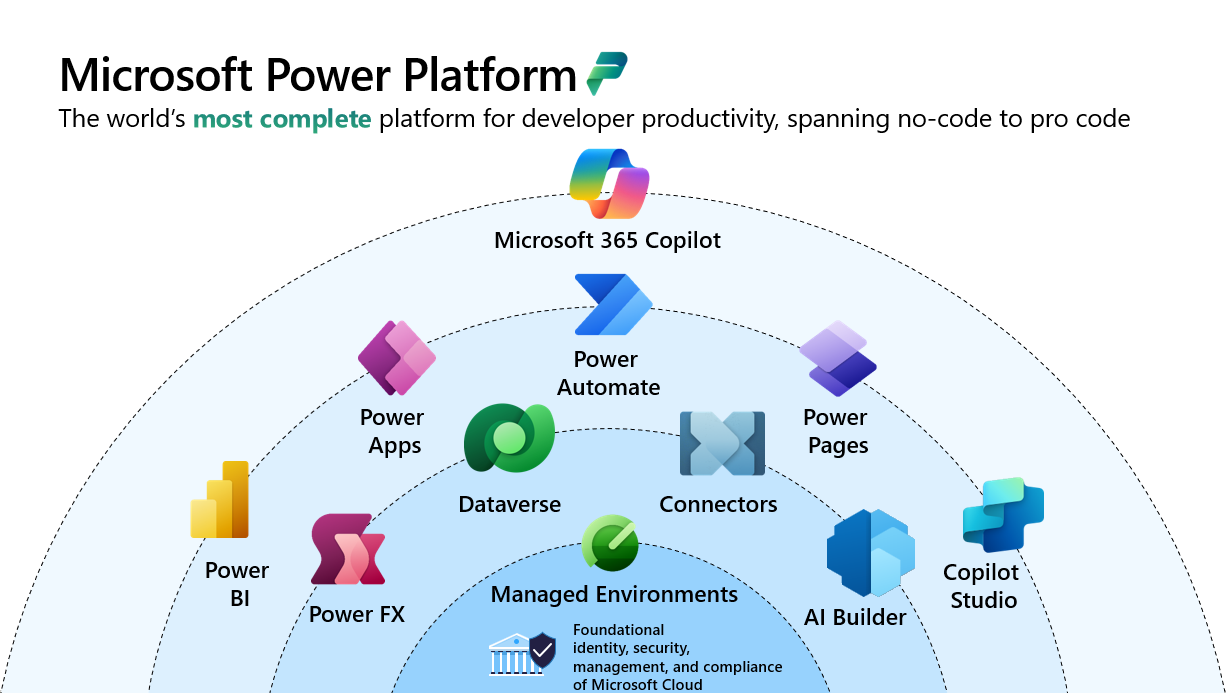
Dataverse sits at the heart of this architecture. It's the platform's unified data layer: a governed, enterprise-grade foundation that AI capabilities are grounded in. When an agent needs to look up a customer record, a prompt needs business context, or a model-driven app needs to surface smart suggestions, it reaches into Dataverse. Understanding the centrality of Dataverse helps you see why AI-first design is as much about data architecture as it is about choosing the right AI feature.
AI that helps you build
When you open any Power Platform maker studio today (Power Apps, Power Automate, Power Pages, Copilot Studio, or AI Hub), you encounter AI at every step of the creation process.
In Power Apps, Plans lets you describe a business problem in plain language. Behind the scenes, a team of coordinating agents builds a full application: Dataverse tables, app screens, user roles, and a solution plan. You review and refine their outputs. Rather than starting with a blank screen, you're starting with a working skeleton.
In Power Automate, Copilot is embedded directly in the flow designer. Describe what you want your flow to do, and Copilot generates the logic, suggests connectors, and helps you iterate through conversation. For complex scenarios, generative actions let flows dynamically decide at runtime which plugins to call, rather than requiring you to hardcode every branch.
In Microsoft Copilot Studio, makers can describe agent behavior in natural language. Topics can be created by explaining what you want the agent to handle, generative answers automatically respond from linked knowledge sources, and agent flows can be built through conversation or a visual designer, without writing code.
In AI Hub (accessible from both Power Apps and Power Automate), the Prompt Builder gives you a graphical interface to create, test, and deploy generative AI prompts that work across your apps, flows, Copilot Studio agents, and Dataverse. You can even connect models you've trained or fine-tuned in Azure AI Foundry, bringing them into the same low-code environment.
AI that helps your users
The other half of the AI-first story plays out in the hands of the people who use your solutions every day. Power Platform surfaces AI to end users in ways that feel natural. Rather than requiring users to learn new tools, AI is embedded in the experiences they already work in.
In Power Apps, a Copilot control added to a canvas app gives users a natural language chat interface connected to the app's data. Users can ask questions, navigate records, and take actions through conversation rather than menu navigation. In model-driven apps, Microsoft 365 Copilot is embedded as the standard experience—letting users explore data, ask questions, and get summaries without switching context.
In Power Pages, external users benefit from Web Agents that engage with customers across email, Teams, and WhatsApp. AI-assisted form filling helps users complete complex forms faster, and AI-generated search summaries give users relevant answers without scrolling through results.
This video shows how AI is integrated throughout the Power Platform:
Together, these maker and user experiences represent a fundamental shift: from building apps that replace manual steps to building solutions where AI handles routine work, escalates to humans at the right moment, and improves continuously based on usage.
What this means for your approach
Recognizing the AI-first nature of the platform changes how you approach requirement gathering and solution design. Instead of asking "which Power Platform tool builds this feature?", you ask "what should a human do, what should an agent do, and how should they hand off to each other?"
In the next unit, you'll apply a structured framework for translating specific business requirements into component recommendations. Contoso has identified four priority areas to tackle first: automating invoice processing, modernizing call center support, enabling client self-service online, and fixing how approval notifications reach the right people. You'll work through each one to determine which components to recommend and why.