Denormalize and preaggregate for performance
Tip
See the Text and images tab for more details!
The model from the previous unit is normalized in spirit: every fact lives in exactly one place. A relational database can assemble those facts with joins, whose cost depends on the data, indexes, and query plan. In Azure Cosmos DB, where a join across containers doesn't exist, separate lookups add requests on the busiest screen in the application. In this unit, you trade write complexity for read efficiency by copying values where they're read and storing answers you'd otherwise compute.
Count the requests the product page costs
Rendering one category page against the current model takes three rounds of queries:
- Query
productfor the products in the category. - Query
productCategoryfor the category's display name. - Query
productTagfor the name of every tag identifier on every product returned.
The third one is the problem. The cost increases when a page contains more products or when each product has more tags. As the catalog grows, the page becomes slower and more expensive.
Denormalize the values the read path needs
Denormalizing means to store a copy of a value alongside the data that reads it. Here, the category name and each tag's name move onto the product item:
{
  "id": "C0000000-0000-0000-0000-000000000002",
  "categoryId": "C0000000-0000-0000-0000-000000000003",
  "categoryName": "Components, Saddles",
  "sku": "SE-R581",
  "name": "LL Road Seat/Saddle",
  "price": 27.12,
  "tags": [
    { "id": "C0000000-0000-0000-0000-000000000004", "name": "Tag-113" },
    { "id": "C0000000-0000-0000-0000-000000000005", "name": "Tag-5" }
  ]
}
The three rounds collapse into one query. The category page now reads from a single container and returns display-ready items.
Category and Tag remain separate aggregate roots and authoritative sources. Copying categoryName and tag names onto Product doesn’t transfer ownership of those values to Product. The copied values are read-optimized projections that must be synchronized when their authoritative sources change.
Not every value is a good candidate. The ones that pay off share three traits: they're read constantly, they change rarely, and they're small. A category name qualifies. A product's current inventory count doesn't, because a value that changes every few seconds turns one write into hundreds.
Keep the copies honest with the change feed
Copying a value creates a synchronization obligation. The design must identify the authoritative source, the items that contain projections, and the acceptable consistency window. When a Category is renamed, Product items carrying the previous categoryName remain temporarily stale until the projections are updated.
The change feed closes that gap. Its default latest-version mode exposes item creations and updates, but multiple changes to one item between reads can appear as only the latest version. The records are ordered within each logical partition key value, but not across different values. A listener reads the records and responds to the changes. This default mode doesn't surface deletes; a separate all-versions-and-deletes mode captures those deletes and time-to-live expirations, at the cost of requiring continuous backup. Renames are updates, so the default latest-version mode is sufficient for propagating these projection changes. The listener watches the container that owns the value and writes the copies:
- A category is renamed in
productCategory. - The change feed surfaces the updated category item.
- The listener queries
productfor thatcategoryId, which reads a narrow slice of the container rather than all of it. - The listener writes the new
categoryNameonto each product it finds.
A second listener does the same for tag renames. Both use a lease container, an ordinary container that records each listener's progress, so processing resumes after a restart instead of starting over.
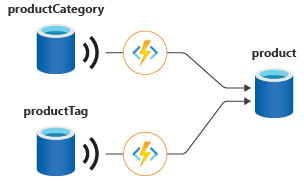
Two consequences shape the design. The copies are eventually consistent. For a short window after a rename, some products carry the old name. This delay is acceptable for a category label but not for an account balance. And the write cost of a rename is now proportional to how many items carry the copy, which is the concrete form of the trade you're making.
Try it yourself: Take one value your application currently fetches with a second query and estimate the denormalized cost before you commit to it. Count how many items would carry a copy, how often the source value changes, and multiply. Compare that result against the number of extra requests the current design pays per day. The comparison, not intuition, tells you whether the copy is worth maintaining.
Preaggregate answers you can't query for
Ranking customers by order count is a different shape of problem. In a container partitioned by customer identifier, ranking all customers remains a cross-partition query. Copying an existing value doesn't help, because the count must first be computed.
Preaggregating stores the computed answer instead. A salesOrderCount property on the customer item turns the ranking into an ordinary query with a sort:
{
  "id": "C0000000-0000-0000-0000-000000000001",
  "type": "customer",
  "customerId": "C0000000-0000-0000-0000-000000000001",
  "firstName": "Dalton",
  "lastName": "Perez",
  "salesOrderCount": 28
}
For Contoso's counter to match the orders immediately, every new order must increment the counter in the same transaction as the insert. Separate writes can leave the count wrong if one succeeds and the other fails. When eventual consistency is acceptable, a change-feed processor can instead maintain the aggregate with idempotent processing and recovery logic.
Azure Cosmos DB guarantees atomicity for multiple item operations within a single logical partition, through transactional batch in an SDK or a stored procedure. A batch holds up to 100 operations and a total request payload of 2 megabytes (MB). The order insert and counter update must fit within both limits. For this atomic design, the order and its customer must share a logical partition in the same container, which is a modeling constraint, not an implementation detail.
Customer and SalesOrder remain separate aggregate roots and separate items. Colocating them doesn’t merge their ownership or lifecycle boundaries. It places them within the same Azure Cosmos DB transaction boundary so the order insert and counter update can participate in one transactional batch.
To make the transaction possible, combine entity types
Look at where the customer and its orders sit. The customer container is keyed on the customer identifier, and the salesOrder container is keyed on customerId. The two containers use the same value as their partition key, and the same customer always accesses both. Separate item types are candidates to share a container when they use the same partitioning strategy, need related queries or transactions, and have compatible throughput, indexing, time-to-live, and change-feed requirements.
Merging them takes two changes. Every customer item gains a customerId property equal to its own id, so both entity types carry the partition key path. And both gain the type discriminator you saw with categories and tags, holding customer or salesOrder.
{
  "id": "C0000000-0000-0000-0000-000000000008",
  "type": "salesOrder",
  "customerId": "C0000000-0000-0000-0000-000000000001",
  "orderDate": "2014-03-30T00:00:00",
  "details": [
    { "sku": "TI-R982", "name": "HL Road Tire", "price": 32.6, "quantity": 1 }
  ]
}
Now a customer and every order they placed occupy one logical partition. Listing a customer's orders is a single-partition query filtered on both c.customerId = @customerId and c.type = "salesOrder", and inserting an order while incrementing salesOrderCount runs as one atomic batch.
The same reasoning applies to the two reference lists. productCategory and productTag already share a partition key path and an access pattern, so they merge into one container, conventionally named productMeta, holding both entity types. That merge has a second benefit: one change-feed listener on one container now maintains referential integrity for both, routing each change by inspecting its type.
Where the model lands
Nine relational tables are now three containers:
| Container | Holds | Answers |
|---|---|---|
customer |
Customer and sales order items | Sign-in, order history, order creation, customer ranking |
product |
Products with embedded tags and category name | Category browsing, product page |
productMeta |
Categories and tags | Reference lists, source of truth for denormalized names |
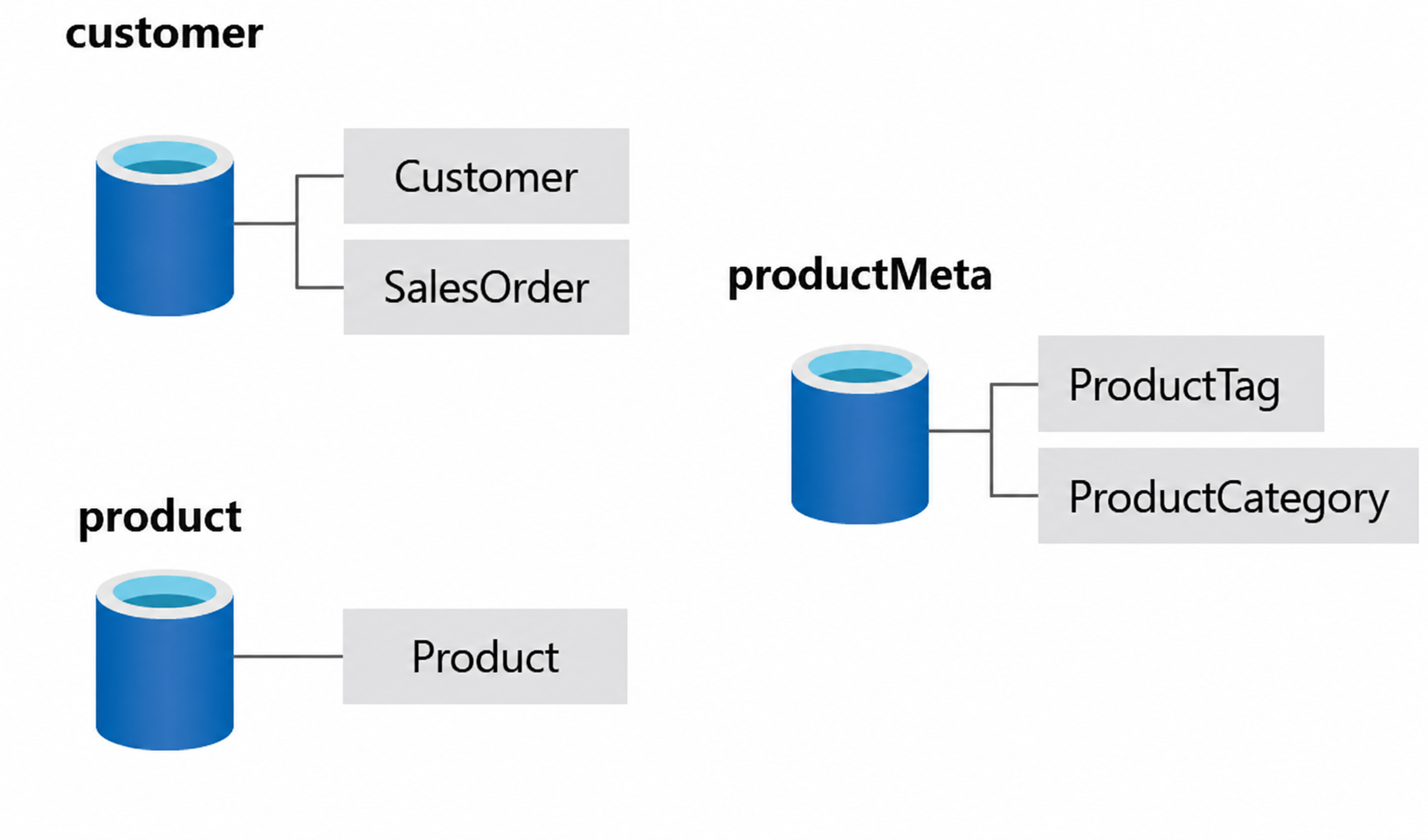
Each read operation in the access-pattern inventory now uses an item read or a query against one container, without separate lookups to assemble related data. Queries can still require multiple page requests. Order creation uses an atomic batch for the insert and counter update. What the model doesn't yet have is a considered partition key for each container, which is where the rest of the module goes.