Choose managed vs external tables
When you create tables in Azure Databricks, you face a fundamental decision that affects data lifecycle management, governance, and operational flexibility. Understanding the differences between managed tables and external tables (sometimes called unmanaged tables) helps you choose the right approach for each scenario in your data platform.
In this unit, you learn how to distinguish between managed and external tables, and explore the factors that guide your choice.
Understand managed tables
Managed tables are fully controlled by Unity Catalog. This means Unity Catalog manages both the table metadata and the underlying data files in cloud storage. When you create a managed table without specifying a storage location, Azure Databricks automatically stores the data in a managed storage location associated with the containing schema, catalog, or metastore.
Because Unity Catalog has full control over managed tables, it can automatically optimize them for performance and cost. Several features are available exclusively for managed tables:
- Predictive optimization runs maintenance operations like compaction and vacuuming automatically
- Automatic liquid clustering intelligently selects and updates clustering keys based on query patterns
- Metadata caching provides faster query performance through in-memory caching
- Automatic file cleanup removes data files 8 days after you drop a table
Managed tables always use Delta Lake or Apache Iceberg format, ensuring ACID transactions and advanced data management capabilities.
Understand external tables
External tables (also called unmanaged tables) take a different approach. Unity Catalog manages only the table metadata, while you maintain control over the data files and their storage location. When you create an external table, you explicitly specify where the data resides using a LOCATION clause that points to an external location registered in Unity Catalog.
This separation means that when you drop an external table, Unity Catalog removes the metadata but leaves the data files intact in your storage location. You remain responsible for managing those files directly through your cloud provider.
External tables support a broader range of file formats beyond Delta Lake and Iceberg, including CSV, JSON, Avro, Parquet, ORC, and text files.
Compare key characteristics
The following table summarizes the key differences between managed and external tables:
| Characteristic | Managed tables | External tables |
|---|---|---|
| Data storage location | Unity Catalog managed location | User-specified external location |
| Metadata management | Unity Catalog | Unity Catalog |
| Data file management | Unity Catalog | User managed |
| Supported formats | Delta Lake, Apache Iceberg | Delta, CSV, JSON, Avro, Parquet, ORC, text |
| Automatic optimization | Yes (predictive optimization) | No |
| Behavior on DROP TABLE | Files deleted after 8 days | Files remain in storage |
| UNDROP TABLE support | Yes (within 8 days) | No |
Evaluate decision criteria
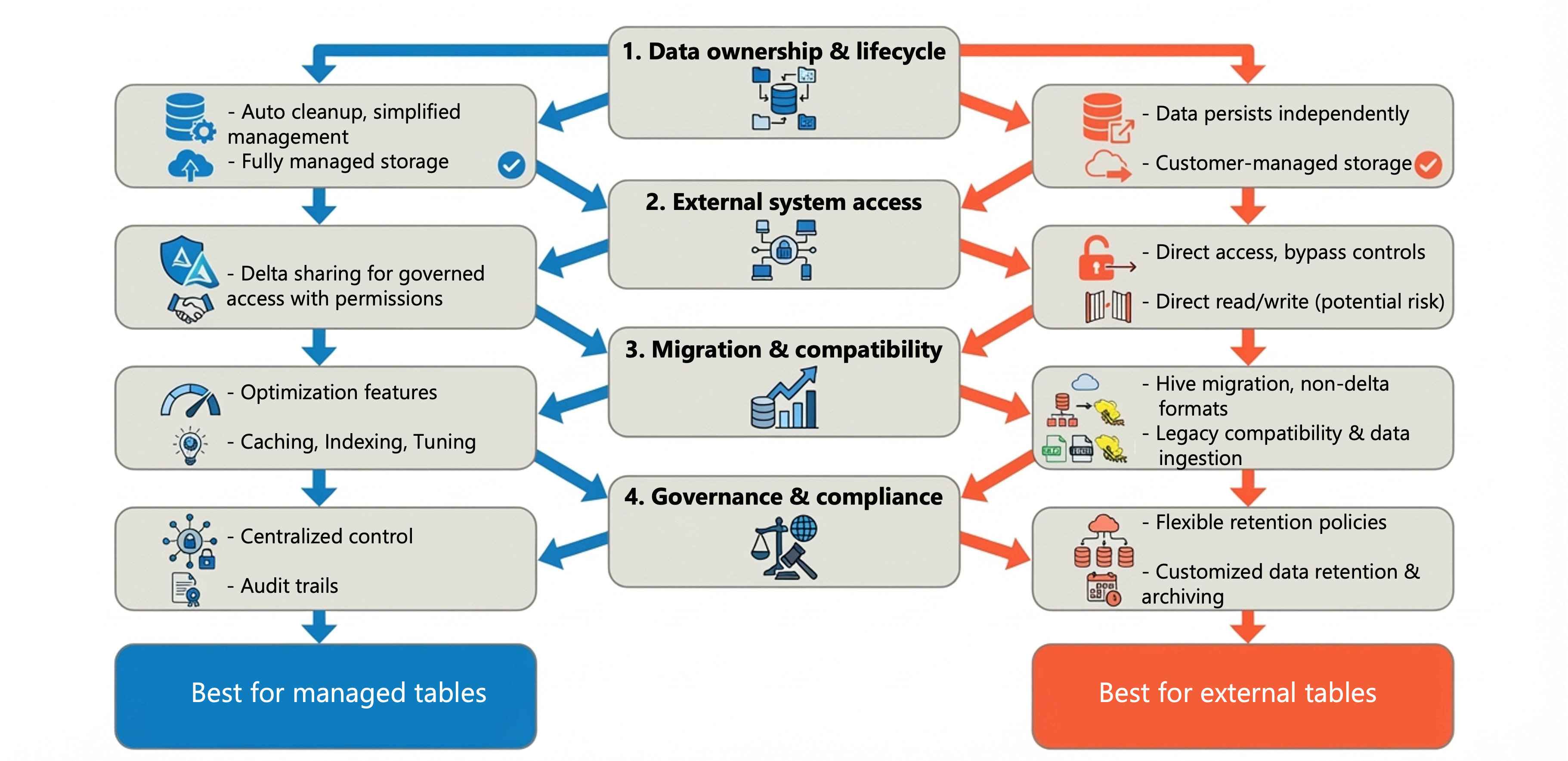
Choosing between managed and external tables depends on your specific requirements. Consider the following factors when making your decision.
Data ownership and lifecycle
If Azure Databricks should fully control the data lifecycle, including automatic cleanup when tables are dropped, use a managed table. This approach simplifies data management and reduces storage costs over time.
If the data must persist independently of the Azure Databricks workspace, or if you need to retain data after removing the table definition, use an external table. The data files remain available for other purposes even after the table is dropped.
External system access
When other tools or systems outside Azure Databricks need to read or write the data directly, external tables provide the necessary flexibility. However, consider that direct external access bypasses Unity Catalog access controls and auditing.
For sharing data across regions, cloud providers, or with external partners, Delta Sharing offers a governed approach that maintains security controls even with managed tables.
Migration and compatibility
External tables provide a practical path when migrating from Hive metastore to Unity Catalog. You can register existing data without moving files, allowing a quick upgrade. After migration, you can convert external tables to managed tables to take advantage of optimization features.
If you need to support non-Delta and non-Iceberg formats, external tables are your only option within Unity Catalog.
Governance and compliance
Consider your organization's data retention and compliance requirements. Managed tables offer stronger governance through centralized control, while external tables give you flexibility to manage data according to specific regulatory requirements or storage policies defined outside Azure Databricks.
Important
Avoid registering the same table as an external table in multiple metastores. This practice can lead to consistency issues because changes in one metastore don't automatically propagate to others.
Apply best practices
Databricks recommends managed tables for most use cases because they provide the best combination of governance, performance, and operational simplicity. Use external tables when your requirements specifically call for them.
When you do use external tables:
- Limit external access to reads when possible, with all writes happening through Azure Databricks
- Consider creating one external location per schema for clearer organization
- Plan to migrate external tables to managed tables when their original use case no longer applies
With this understanding of managed and external tables, you can make informed decisions that balance governance requirements, operational needs, and performance considerations for your data platform.