Design ingestion logic and data source configuration
Designing ingestion logic requires you to make critical decisions about how data moves from source systems into Azure Databricks. These decisions affect data freshness, processing efficiency, and system reliability. Before you select tools or write code, you need to understand the characteristics of your data sources and define extraction strategies that align with your business requirements.
In this unit, you explore the key design considerations for data ingestion logic and data source configuration in Azure Databricks. The focus here is on conceptual logic and design patterns—specific tool selection and implementation details are covered in later units.
Understand extraction types
Extraction type determines how you capture data from source systems and impacts both the timeliness and efficiency of your data pipeline. Azure Databricks supports three primary extraction patterns, each suited to different scenarios.
Full extraction
Full extraction reads the entire dataset from the source system during each ingestion run.

This approach works well when:
- Source systems don't support change tracking
- Data volumes are small enough to reprocess efficiently
- You need to rebuild destination tables from scratch periodically
- Data relationships are complex and incremental logic would be error-prone
Full extraction becomes impractical as data volumes grow. Reprocessing millions of records when only a few thousand changed wastes compute resources and delays downstream consumers.
Incremental extraction
Incremental extraction processes only new or changed records since the last ingestion run. The engine tracks what data has been processed and queries only for updates.

This pattern requires:
- A reliable change indicator in the source data (timestamp, sequence number, or version column)
- State management to track the last processed position
- Logic to handle late-arriving or out-of-order records
Incremental extraction significantly improves efficiency for large datasets. Instead of reading millions of rows, you might process only thousands of changes per run.
Streaming extraction
Streaming extraction provides near real-time data capture through continuous processing. Rather than running on a schedule, streaming jobs remain active and process records as they arrive.

Consider streaming when:
- Business processes require data freshness measured in seconds or minutes
- Source systems publish events to message buses or change feeds
- You need to react to events as they occur
Streaming extraction requires always-on infrastructure but delivers the lowest latency for data availability.
Design for change data capture
Change data capture (CDC) is a specialized extraction pattern that captures individual row-level changes, including inserts, updates, and deletes. CDC differs from simple incremental extraction because it preserves the operation type for each change.
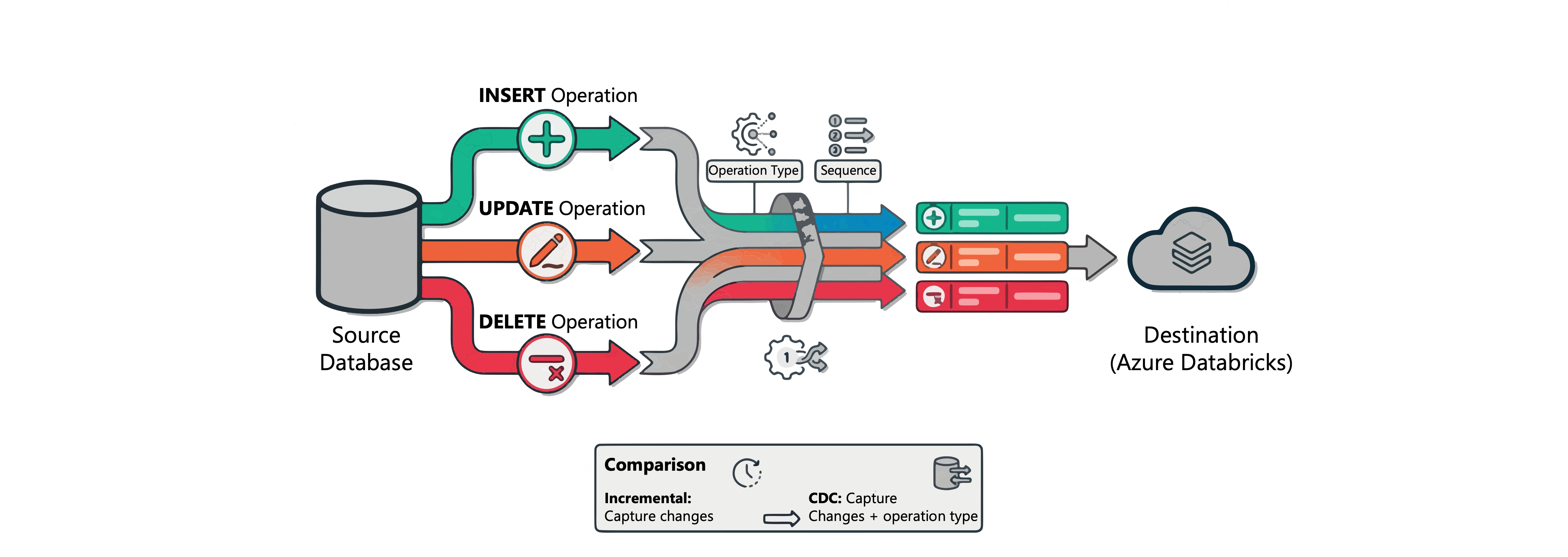
When designing for CDC, consider how your source system produces change records:
- Database transaction logs: Databases like SQL Server can expose row-level changes using its transaction log–based CDC feature. Downstream systems such as Azure Databricks can then read these changes and process them as part of the ingestion pipeline.
- Change data feeds: Delta tables and some databases like Azure Cosmos DB provide built-in change tracking that surfaces row changes with metadata.
- Periodic snapshots: Some systems don't support continuous CDC, requiring you to compare snapshots to determine changes.
CDC enables use cases that simple incremental extraction can't support. You can accurately replicate deletes, maintain audit trails, and process updates that modify key columns.
Note
CDC requires sequencing information to handle out-of-order events correctly. Your source data needs a column (such as a timestamp or sequence number) that establishes the correct order of changes.
Identify source file type characteristics
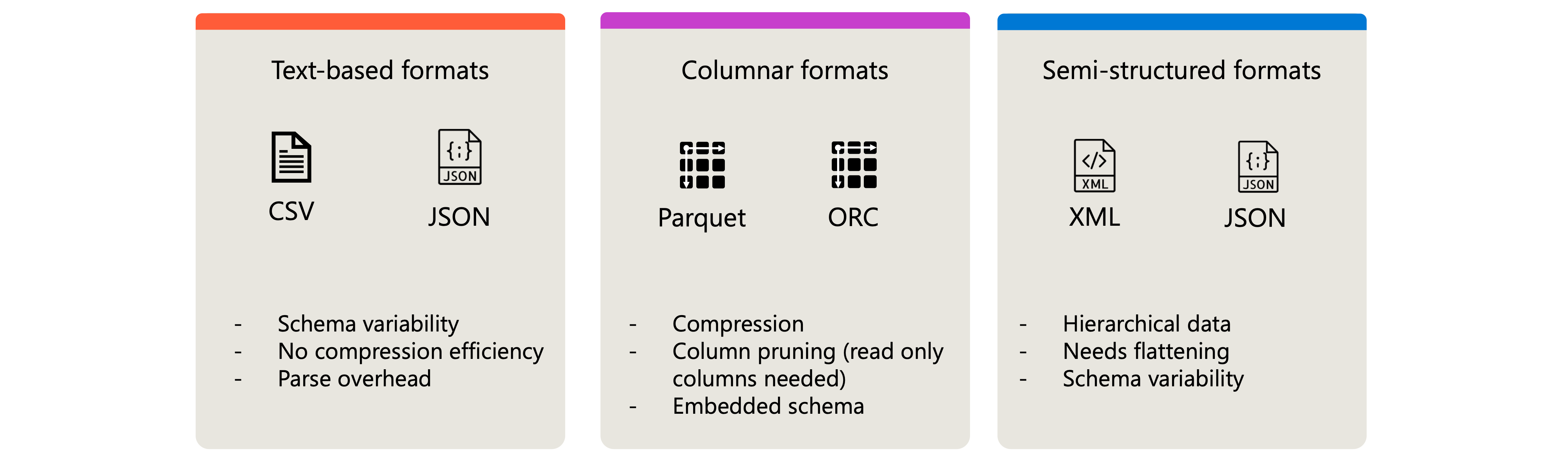
When data arrives as files rather than from transactional systems, the file format influences your ingestion design. Each format has distinct characteristics that affect processing.
Text-based formats
CSV and JSON files are common source formats because they're human-readable and widely supported. However, they present challenges for efficient processing:
- Schema variability: Files might have inconsistent column orders, missing fields, or data type variations
- No compression efficiency: Text formats typically consume more storage than binary alternatives
- Parse overhead: Every value requires text-to-type conversion during reads
Use text-based formats when source systems can only produce these formats or when data volumes are small enough that efficiency concerns don't apply.
Columnar formats
Parquet and ORC files store data in columnar format, enabling efficient analytical queries. These formats offer:
- Compression: Columnar storage achieves better compression ratios by grouping similar values
- Column pruning: Queries read only the columns they need, reducing I/O
- Embedded schema: The file contains metadata describing column names and types
Design your ingestion to favor columnar source formats when you have control over how upstream systems export data.
Semi-structured formats
XML and nested JSON files represent hierarchical data that doesn't fit a flat tabular structure. When ingesting semi-structured data:
- Plan for schema extraction or definition.
- Determine whether to flatten the structure or preserve nesting.
- Account for varying document structures within the same source.
Data source connection considerations
Data source configuration defines how Azure Databricks connects to and authenticates with source systems. Your design must address connection security, credential management, and access patterns.
Cloud object storage sources
Cloud storage (Azure Data Lake Storage, Amazon S3, or Google Cloud Storage) serves as the most common landing zone for ingestion. When configuring storage connections:
- Use Unity Catalog external locations to govern access to storage paths.
- Configure appropriate authentication methods (managed identity, service principals, or storage credentials).
- Design folder structures that support efficient incremental processing.
Folder structure significantly impacts how efficiently Azure Databricks can identify and process new files. Consider these patterns:
Date-based partitioning: Organize files by date hierarchy to enable partition pruning during incremental reads:
/data/sales/year=2025/month=11/day=28/
/data/sales/year=2025/month=11/day=29/
This structure allows queries to scan only relevant date partitions rather than listing all files.
Source-based organization: When ingesting from multiple sources, separate data by source system to simplify processing logic:
/landing/erp/orders/
/landing/crm/customers/
/landing/web/clickstream/
Processing state folders: Use separate folders to track file processing status:
/incoming/     # New files arrive here
/processing/   # Files currently being processed
/archive/      # Successfully processed files
/failed/       # Files that failed processing
When designing folder structures, consider:
- File discovery overhead: Flat structures with thousands of files slow down listing operations. Partitioned structures reduce the files Azure Databricks must enumerate.
- Auto Loader compatibility: Azure Databricks Auto Loader efficiently tracks new files in cloud storage. Structure folders to align with how Auto Loader discovers and checkpoints files.
- Partition column extraction: Use Hive-style partitioning (
key=value) so Azure Databricks can automatically extract partition values as columns without parsing file contents.
Database sources
Connecting to transactional databases requires different considerations than cloud storage:
- Network connectivity between Azure Databricks and the database server.
- Authentication credentials stored securely (using secrets rather than hardcoded values).
- Connection pooling and query pushdown capabilities.
- Impact on source system performance during extraction.
Streaming sources
Message buses and event streams (such as Azure Event Hubs or other common messaging platforms) require:
- Broker connection details and authentication.
- Consumer group configuration for parallel processing.
- Offset management to track consumption position.
- Schema registry integration for message format validation.
SaaS application sources
Enterprise applications like Salesforce, ServiceNow, or SAP expose data through APIs with unique characteristics:
- API rate limits that constrain extraction throughput.
- Pagination strategies for large result sets.
- Authentication flows (OAuth, API keys, or certificate-based).
- Available change tracking or webhook capabilities.
Apply a requirements-driven design framework
Effective ingestion design starts with analyzing requirements before selecting extraction types or file formats. Use the following repeatable framework to guide your design decisions.
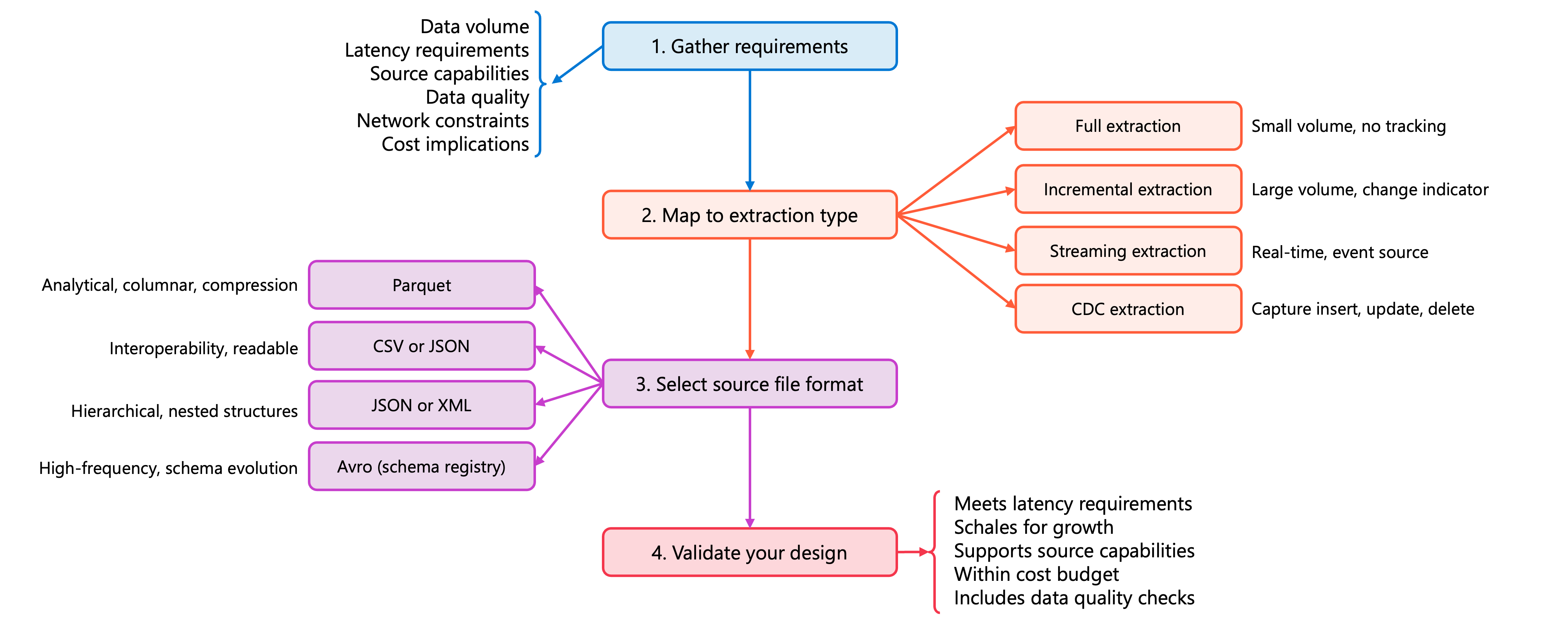
Step 1: Gather requirements
Before making any technical decisions, answer these key questions:
| Requirement Category | Questions to Answer |
|---|---|
| Data volume | How much data exists in the source? How much changes between runs? What's the growth rate? |
| Latency requirements | How fresh must data be for downstream consumers? Are there SLAs to meet? |
| Source capabilities | Does the source support change tracking, CDC, or only full extraction? What file formats can it produce? |
| Data quality | How reliable is the source data? What validation or cleansing is needed? |
| Network constraints | What bandwidth exists between source and Azure Databricks? Are there firewall or VPN requirements? |
| Cost implications | What are the compute, storage, and data transfer costs of different approaches? |
Step 2: Map requirements to extraction type
Use your requirements analysis to select the appropriate extraction pattern:
| If your requirements indicate... | Then choose... |
|---|---|
| Small data volume (< 100K rows), no change tracking available, simple rebuild acceptable | Full extraction |
| Large data volume, reliable change indicator exists (timestamp/sequence), hourly or daily freshness sufficient | Incremental extraction |
| Real-time or near real-time freshness required, source publishes events, streaming infrastructure available | Streaming extraction |
| Need to capture deletes and operation types, audit trail required, source supports transaction log capture | CDC extraction |
Step 3: Select source file format
When you control the source format or need to choose a landing zone format, match the format to your needs:
| If your scenario involves... | Then prefer... |
|---|---|
| Large analytical datasets, columnar queries, need compression | Parquet |
| Interoperability with many systems, human readability needed | CSV or JSON |
| Hierarchical or nested data structures | JSON or XML |
| High-frequency streaming with schema evolution | Avro with schema registry |
Step 4: Validate your design
Before implementing, verify your design addresses these concerns:
The extraction type meets latency requirements. If not, downstream consumers receive stale data, potentially causing incorrect business decisions or SLA violations.
The approach scales to handle projected data growth. If not, pipelines that work today may fail or become prohibitively slow as data volumes increase.
Source system capabilities support your chosen pattern. If not, the pipeline fails at runtime or requires costly workarounds that add complexity.
Cost estimates are within budget constraints. If not, the solution may be technically sound but financially unsustainable for production use.
Data quality checks are planned for the pipeline. If not, invalid or corrupted data propagates to downstream systems, causing errors or incorrect analytics.
Apply the framework: A practical example
An e-commerce platform needs to ingest order data. Orders are stored in a PostgreSQL database, and the business requires hourly reporting.
Step 1 - Gather requirements:
- Volume: 50,000 new orders daily, 2 million total rows, 15% annual growth.
- Latency: One-hour freshness acceptable for reporting.
- Source: PostgreSQL supports timestamp-based queries but no native CDC.
- Quality: Source data is validated at entry; minimal cleansing needed.
- Network: Direct connectivity via Azure Private Link.
- Cost: Minimize compute usage; storage costs are secondary.
Step 2 - Map to extraction type:
Large volume with reliable timestamp column and hourly latency requirement → Incremental extraction.
Why not the others?
- Full extraction: Reprocessing 2 million rows hourly wastes compute when only ~2,000 orders change per hour.
- Streaming: One-hour latency doesn't justify the cost of always-on streaming infrastructure.
- CDC: PostgreSQL doesn't expose native transaction log CDC, and the use case doesn't require tracking deletes or operation types.
Step 3 - Select file format:
Data lands in Azure Data Lake Storage for processing → Parquet for efficient columnar storage. Date-partitioned layout for incremental discovery → /landing/orders/year=2025/month=11/day=28/.
Why not the others?
- CSV/JSON: Larger file sizes, no compression benefits, and slower query performance for analytical workloads.
- Avro: Better suited for streaming with schema evolution; batch ingestion doesn't need its streaming-oriented features.
- XML: Adds parsing complexity without benefits for structured tabular order data.
Step 4 - Validate design:
- ✓ Hourly incremental meets one-hour latency requirement.
- ✓ Processing only changes scales efficiently with growth.
- ✓ PostgreSQL
order_updated_atcolumn enables incremental queries. - ✓ Processing thousands vs. millions of rows reduces compute costs.
Final decision: Incremental extraction using the order_updated_at timestamp column, scheduled hourly, landing data as Parquet files in Azure Data Lake Storage.
Tip
Document your design decisions and the rationale behind them. When requirements change or issues arise, this documentation helps you understand why the current approach was chosen and what tradeoffs were made. Consider creating a design decision record for each major pipeline.
Building on this requirements-driven foundation, you're ready to evaluate the specific tools and loading methods that implement your ingestion design.