Choose a data ingestion tool
When you design data pipelines in Azure Databricks, selecting the right ingestion tool directly impacts pipeline reliability, maintenance effort, and long-term costs. Each tool addresses different scenarios, data sources, and operational requirements. Understanding these differences helps you make informed decisions that align with your organization's needs.
Understand the ingestion tool landscape
Azure Databricks provides multiple ingestion options that span a spectrum from fully managed services to highly customizable frameworks. The tools you choose depend on factors such as your data source type, latency requirements, and how much control you need over the ingestion process.

At the most managed end, Lakeflow Connect offers turnkey connectors for enterprise applications and databases. These connectors handle authentication, change tracking, error recovery, and schema evolution automatically. At the customizable end, Spark Structured Streaming gives you complete control over how data flows through your pipeline, though it requires more development and maintenance effort.
Between these extremes, you find tools like Auto Loader for cloud storage files, COPY INTO for SQL-based batch loading, and notebook-based approaches using JDBC/ODBC connections. Additionally, Azure Data Factory serves as an orchestration layer that can coordinate data movement into Azure Databricks from the broader Azure ecosystem.
Lakeflow Connect
Lakeflow Connect represents the modern approach to data ingestion in Azure Databricks. It offers both fully managed connectors and standard connectors that integrate with Lakeflow Spark Declarative Pipelines for a streamlined experience.
Managed connectors are organized into three types:
SaaS connectors provide out-of-the-box integration with enterprise applications such as Salesforce, ServiceNow, SharePoint, HubSpot, Jira, Microsoft Dynamics 365, Workday, Zendesk, and many others. These connectors handle source-specific authentication, incremental reads, API rate limiting, schema evolution, and automated retries. They run on serverless compute and write to streaming tables governed by Unity Catalog.
Database connectors ingest data from relational databases including MySQL, PostgreSQL, and SQL Server using change data capture (CDC). Because CDC-based connectors read from database transaction logs rather than querying tables directly, they require an ingestion gateway deployed in your network and a staging storage volume to buffer captured changes.
Community connectors are open-source connectors built and maintained by the community. They extend Lakeflow Connect to sources that don't yet have a managed connector. You can use an existing community connector or contribute your own.
Note
The connector ecosystem is growing rapidly. See the managed connectors documentation for the current full list of supported sources.
Standard connectors extend Lakeflow Connect to cloud object storage and message buses. You can ingest data from Amazon S3, Azure Data Lake Storage, or Google Cloud Storage using Auto Loader. For real-time data, standard connectors support Apache Kafka, Google Pub/Sub, and Apache Pulsar.
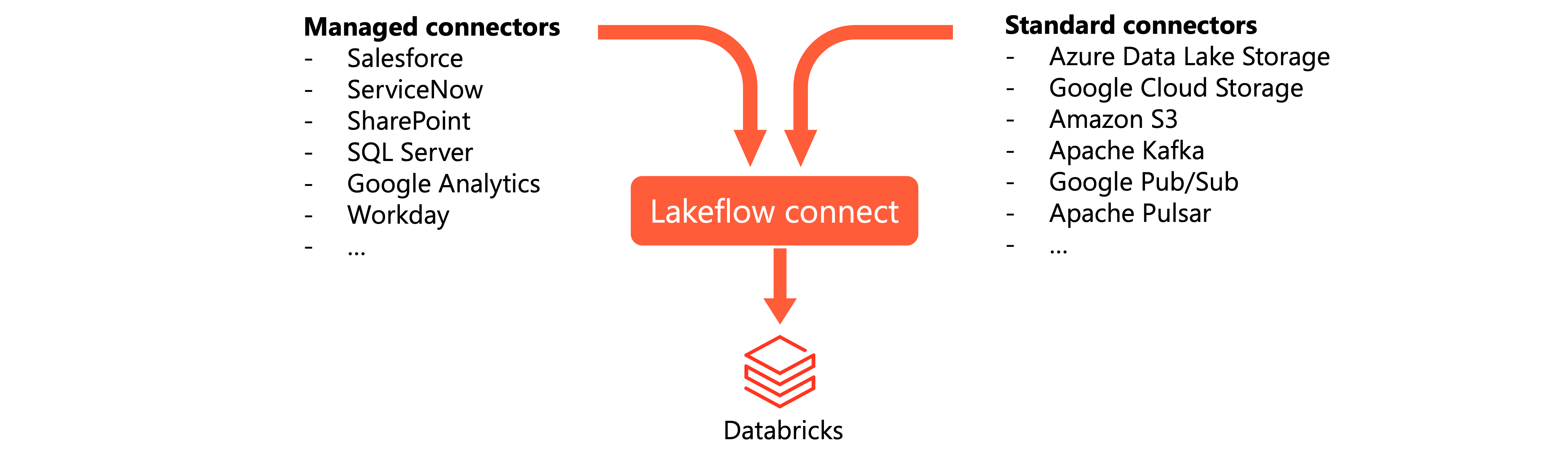
Consider Lakeflow Connect when you need reliable, low-maintenance ingestion from supported sources. The managed connectors significantly reduce development time and ongoing maintenance compared to custom solutions. However, if your data source isn't supported or you need highly specialized ingestion logic, you might need to explore other options.
Lakeflow Connect supports both scheduled ingestion (hourly, daily, weekly) and on-demand triggers, making it suitable for regular data refresh cycles and ad hoc loading scenarios.
Query-based connectors
Query-based connectors are a lightweight alternative to CDC database connectors for scheduled ingestion from relational databases. Instead of reading transaction logs, they query the source table directly using a cursor column — a monotonically increasing timestamp or integer that tracks which rows are new or updated since the last pipeline run.
Because they query the source directly, query-based connectors don't require an ingestion gateway or staging storage. On each scheduled run, the connector retrieves all rows with a cursor column value greater than the high-water mark from the previous run, then writes results to streaming tables in Unity Catalog.
Supported sources include Oracle, Teradata, SQL Server, MySQL, MariaDB, PostgreSQL, and all Lakehouse Federation data sources.
Query-based connectors support three history tracking modes for destination tables:
- SCD Type 1: Overwrites the existing row with the latest source row. No history is preserved.
- SCD Type 2: Preserves the full history by adding new rows with version metadata.
- Append-only: Appends every ingested row without merging or overwriting.
Choose query-based connectors over CDC database connectors when CDC or binlog infrastructure isn't available but a reliable cursor column exists in the source. Choose CDC connectors when you need every intermediate row state between pipeline runs or when soft-delete tracking is critical. The trade-off is that query-based connectors place more load directly on source tables compared to CDC connectors, which read from the binlog.
Auto Loader
Auto Loader provides incremental file processing for data arriving in cloud storage. Rather than scanning entire directories to find new files, Auto Loader efficiently tracks which files have been processed and ingests only new arrivals.
Auto Loader works by maintaining state in a checkpoint location that tracks processed files. When new files land in your cloud storage, Auto Loader discovers them through either directory listing or file notification mode. Directory listing periodically scans for new files, while file notification mode uses cloud-native events for immediate detection.
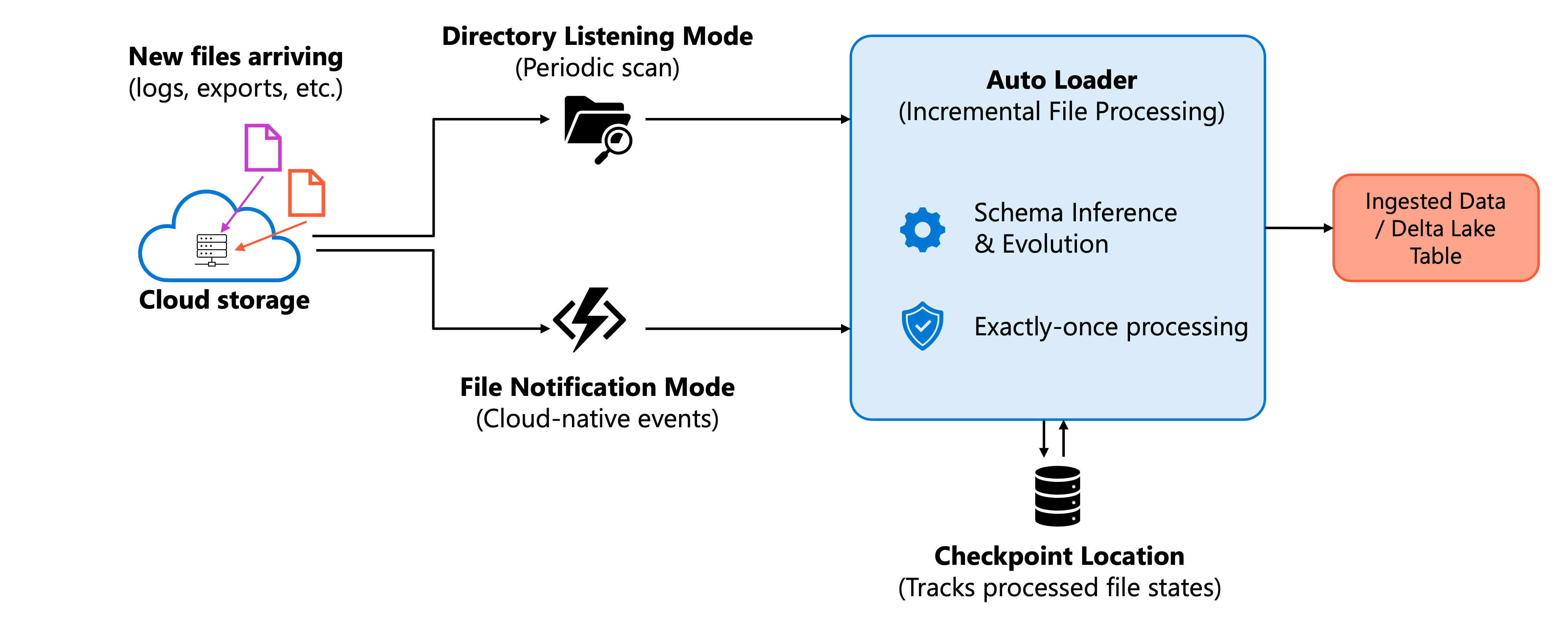
Key capabilities of Auto Loader include:
- Schema inference and evolution: Automatically detects the schema of incoming files and handles schema changes gracefully.
- Exactly-once processing: Guarantees each file is processed once, even across failures and restarts.
- Scalability: Efficiently handles billions of files for backfills or migrations.
- Format support: Processes JSON, CSV, Parquet, Avro, ORC, XML, text, and binary files.
Auto Loader fits scenarios where data arrives as files in cloud storage—common patterns include log files, exports from upstream systems, and data landing zones. You can use Auto Loader with Lakeflow Spark Declarative Pipelines for a managed experience or with Structured Streaming for more control.
COPY INTO
The COPY INTO SQL command loads data from cloud storage into Delta tables. Unlike Auto Loader, which runs continuously as a stream, COPY INTO executes as a batch operation that you schedule or trigger manually.
COPY INTO tracks which files it has already processed, making the operation idempotent. Running the same command multiple times doesn't duplicate data because previously loaded files are skipped. This characteristic makes COPY INTO useful for scheduled batch jobs where you want predictable, repeatable behavior.
Note
The tracking metadata is stored as part of the Delta table's transaction log (the _delta_log directory)
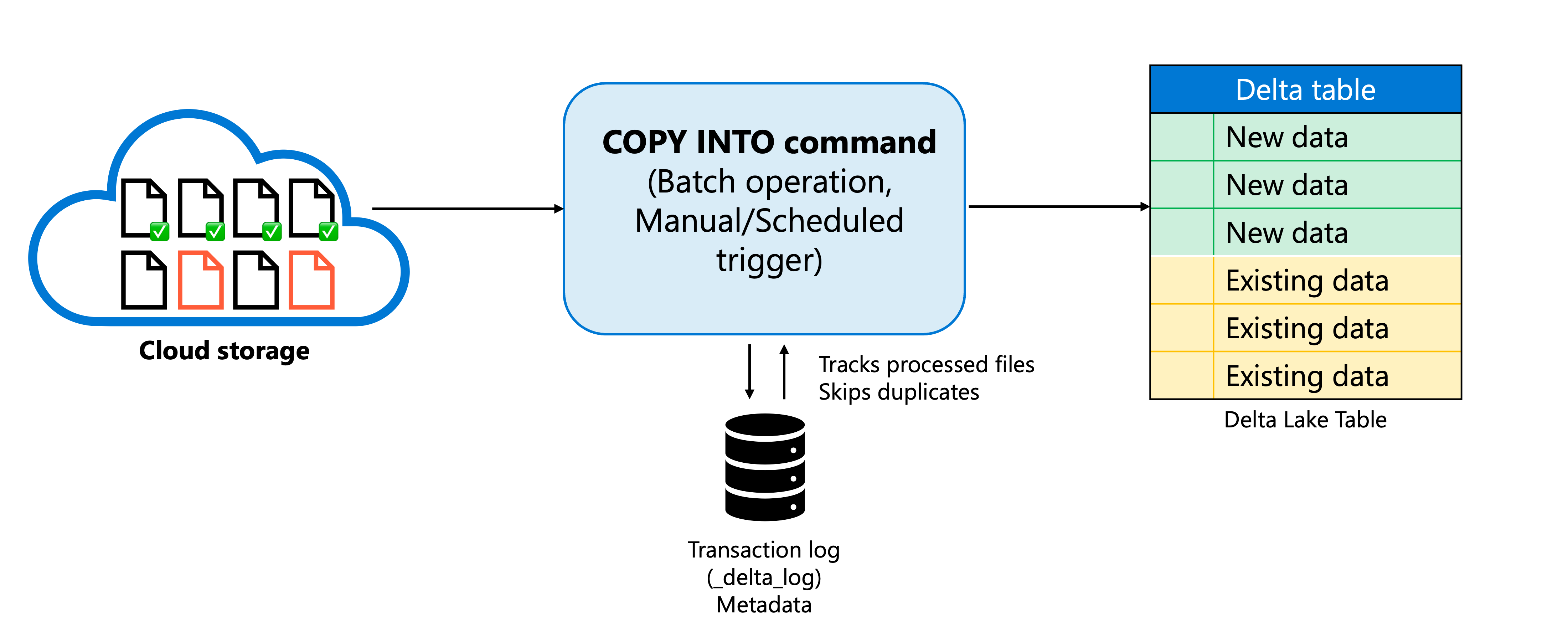
Common scenarios for COPY INTO include one-time data migrations, scheduled batch loads from landing zones, and SQL-first workflows where you prefer declarative syntax over streaming APIs.
Choose COPY INTO over Auto Loader when you're performing a one-time batch load of a large dataset. COPY INTO provides a simpler configuration model without requiring streaming infrastructure, making it ideal for loading hundreds of gigabytes or even terabytes of data in a single operation. Auto Loader's continuous processing model and checkpoint management add unnecessary complexity when you only need to load data once.
However, for ongoing incremental ingestion at scale, Auto Loader provides better performance and more robust file discovery.
Spark Structured Streaming
Spark Structured Streaming provides the foundation for real-time data processing in Azure Databricks. It enables continuous ingestion from various streaming sources with exactly-once processing guarantees.
Streaming sources supported include:
- Apache Kafka and Azure Event Hubs: For event-driven architectures and message queue processing.
- Delta Lake change feeds: For propagating changes between Delta tables.
- Cloud storage via Auto Loader: For file-based streaming ingestion.
- Socket and custom sources: For specialized ingestion scenarios.
Choose Structured Streaming when you need fine-grained control over streaming behavior, custom watermarking or windowing logic, or when working with sources not supported by higher-level abstractions.
JDBC and ODBC connections
Notebook-based ingestion using JDBC or ODBC remains a practical approach for extracting data from relational databases. You write code that connects directly to source databases, executes queries, and loads results into Delta tables.
This approach supports virtually any database with a JDBC or ODBC driver: SQL Server, Oracle, PostgreSQL, MySQL, and many others. You implement full or incremental loads by writing appropriate queries, often using watermark columns to track extraction progress.
While Lakeflow Connect managed connectors are replacing JDBC/ODBC for many scenarios, notebook-based connections remain valuable when:
- Your database isn't supported by Lakeflow Connect managed connectors.
- You need custom extraction logic that managed connectors can't accommodate.
- You're maintaining existing pipelines that use this pattern.
- You require specific query pushdown optimizations for large tables.
When using JDBC/ODBC, store credentials securely using Databricks secrets rather than hardcoding them in notebooks. Consider the performance impact on source systems and implement appropriate throttling or scheduling to avoid overwhelming transactional databases.
For on-premises databases, additional network infrastructure is required—either Azure ExpressRoute/VPN for direct JDBC connectivity from Databricks, or Azure Data Factory with a Self-Hosted Integration Runtime to land data in cloud storage first.
Azure Data Factory
Azure Data Factory (ADF) serves as an orchestration and data movement platform within the Azure ecosystem. It excels at coordinating workflows that span multiple services and landing data from diverse sources into cloud storage where Azure Databricks can process it.
ADF integrates extensively with Microsoft services like Dynamics 365, Azure SQL Database, and Microsoft Fabric. When your data originates from these sources, ADF provides straightforward connectivity and can land data in Azure Data Lake Storage for subsequent Databricks processing.
Understanding ADF's appropriate role is important. Use ADF for:
- Orchestration: Coordinating workflows that involve multiple Azure services.
- Initial data landing: Moving data from Azure sources to cloud storage.
- Enterprise integration: When company policy mandates ADF for data movement.
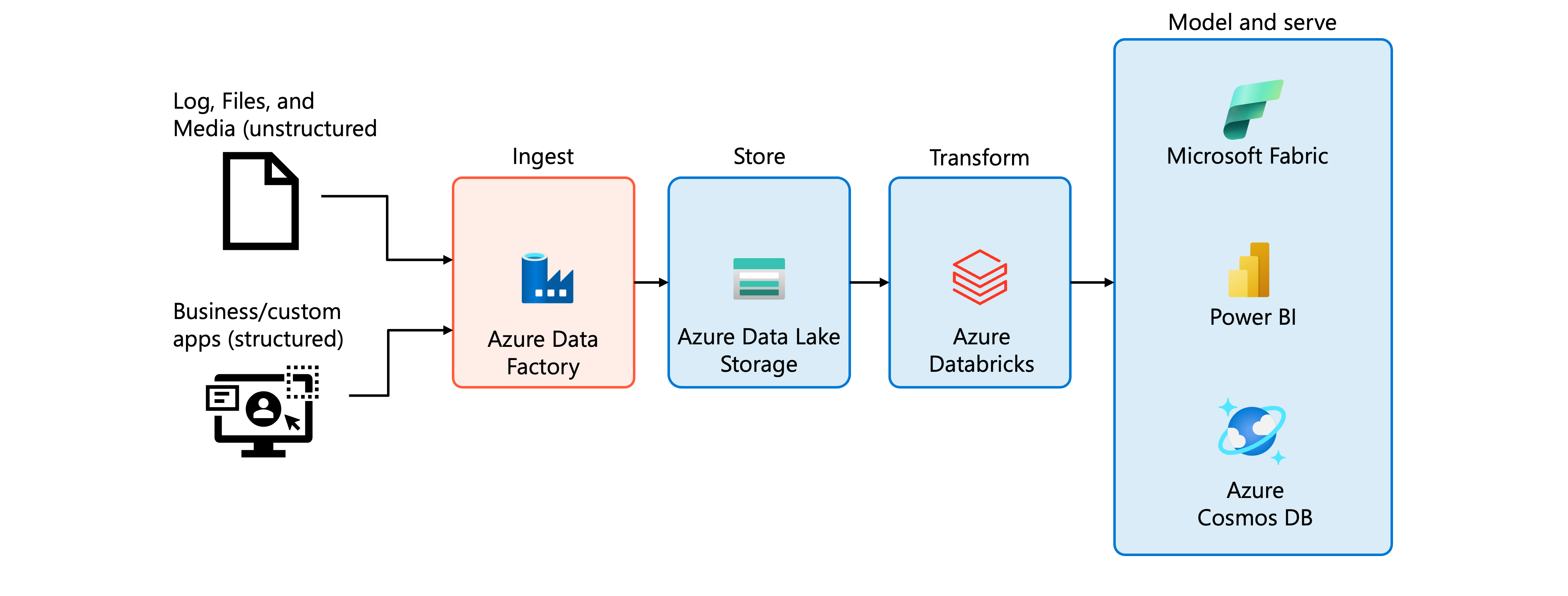
Avoid using ADF for core ETL transformations inside Databricks. Running transformations through ADF activities introduces unnecessary complexity and performs less efficiently than Databricks-native processing. Let ADF handle data movement into your lakehouse, then use Azure Databricks tools for transformation logic.
Apply a decision framework
Selecting an ingestion tool becomes clearer when you evaluate your scenario against key decision criteria.
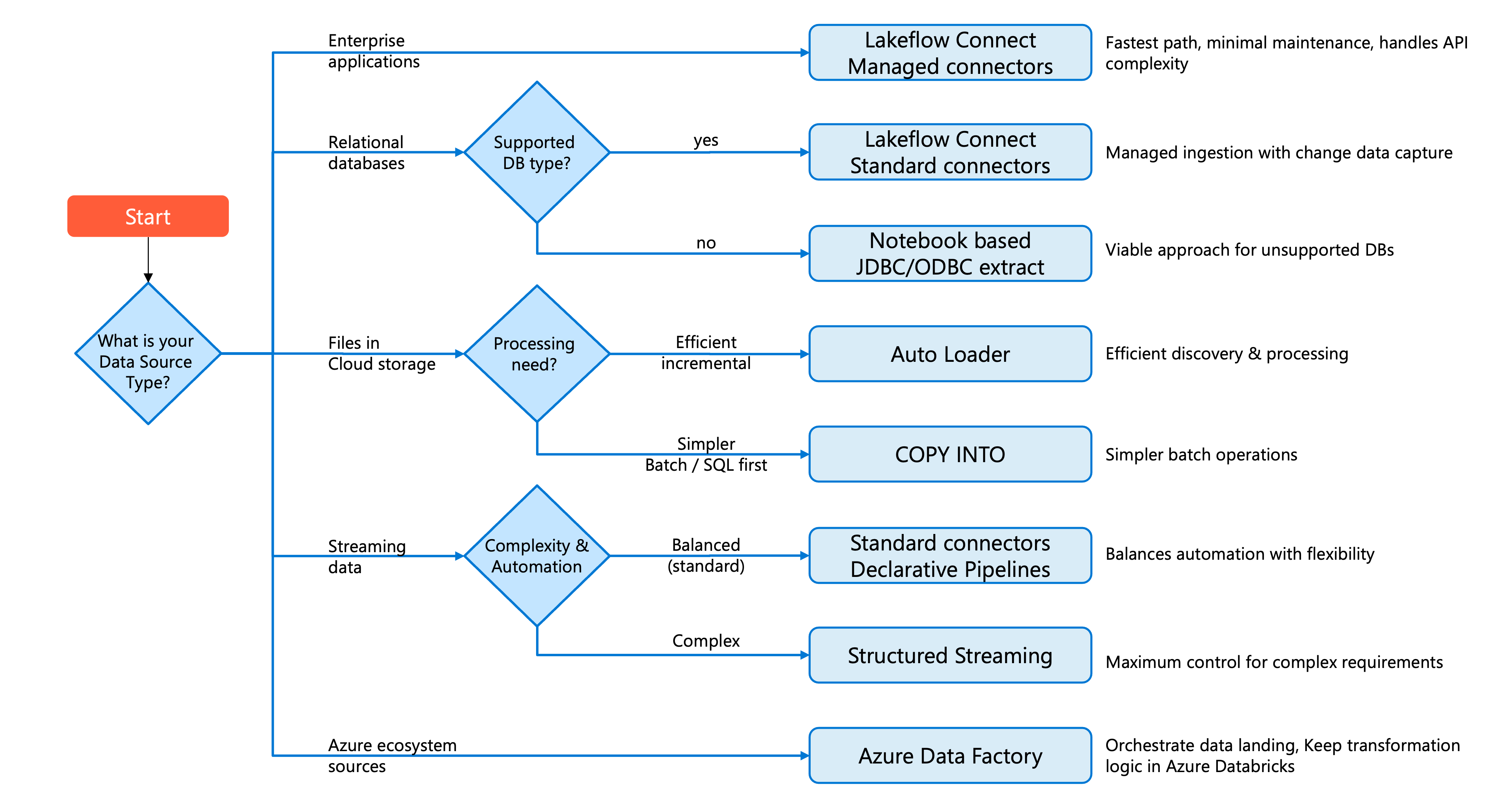
Start by identifying your data source type, then consider operational requirements and organizational context.
For enterprise applications (Salesforce, ServiceNow, SharePoint), Lakeflow Connect managed connectors offer the fastest path to production with minimal maintenance. These connectors handle the complexity of API integration, rate limiting, and change tracking.
For relational databases with supported types, Lakeflow Connect offers two managed paths: database connectors (CDC-based, requires gateway) for continuous change capture, and query-based connectors for simpler scheduled ingestion using a cursor column. For unsupported databases, notebook-based JDBC/ODBC extraction remains a viable approach.
For files in cloud storage, Auto Loader provides efficient incremental discovery and processing. Use COPY INTO for simpler batch scenarios or when you prefer SQL-first workflows.
For streaming data from message buses (Kafka, Event Hubs, Pub/Sub), standard connectors with Lakeflow Spark Declarative Pipelines balance automation with flexibility. For complex streaming requirements, Structured Streaming offers maximum control.
For Azure ecosystem sources requiring coordination with other services, Azure Data Factory can orchestrate data landing into your lakehouse. Keep transformation logic within Azure Databricks rather than in ADF data flows.
Tip
Start with the most managed option that meets your requirements. Managed connectors reduce development time and maintenance burden. Only move to more customizable approaches when specific requirements can't be met by higher-level abstractions.
Your choice also depends on team skills and organizational standards. Document your decisions and the reasoning behind them to help future team members understand the pipeline architecture.