Choose a data table format
Data engineers face a critical decision early in every data pipeline: which table format should store your data? This choice affects query performance, transaction reliability, interoperability with other platforms, and long-term maintenance of your lakehouse architecture.
Azure Databricks supports multiple storage formats, each designed for different scenarios. Understanding their differences helps you select the right format for your specific requirements.
Understand file formats versus table formats
Before comparing options, it's important to distinguish between file formats and table formats. A file format like Parquet, CSV, or JSON defines how data is physically stored on disk. A table format like Delta Lake or Apache Iceberg builds on top of file formats by adding a metadata layer that tracks transactions, schema changes, and data file locations.

Both Delta Lake and Apache Iceberg use Parquet as their underlying file format. The key difference lies in the metadata layer that enables advanced features like ACID transactions, time travel, and schema evolution.
How Parquet stores data differently
Parquet uses columnar storage rather than row-based storage. This fundamental difference significantly impacts analytical query performance.
In row-based formats like CSV, data is organized by record. Reading a single column requires scanning every row in the file. In columnar formats like Parquet, data for each column is stored together. When a query needs only specific columns, Parquet reads just those columns and skips the rest entirely.
Parquet organizes data into row groups, each containing column chunks. Every column chunk stores statistics including minimum and maximum values for that data segment. When you execute a query with a filter condition, the query engine checks these statistics first. If the filter value falls outside the min/max range of a row group, the engine skips reading that entire section.
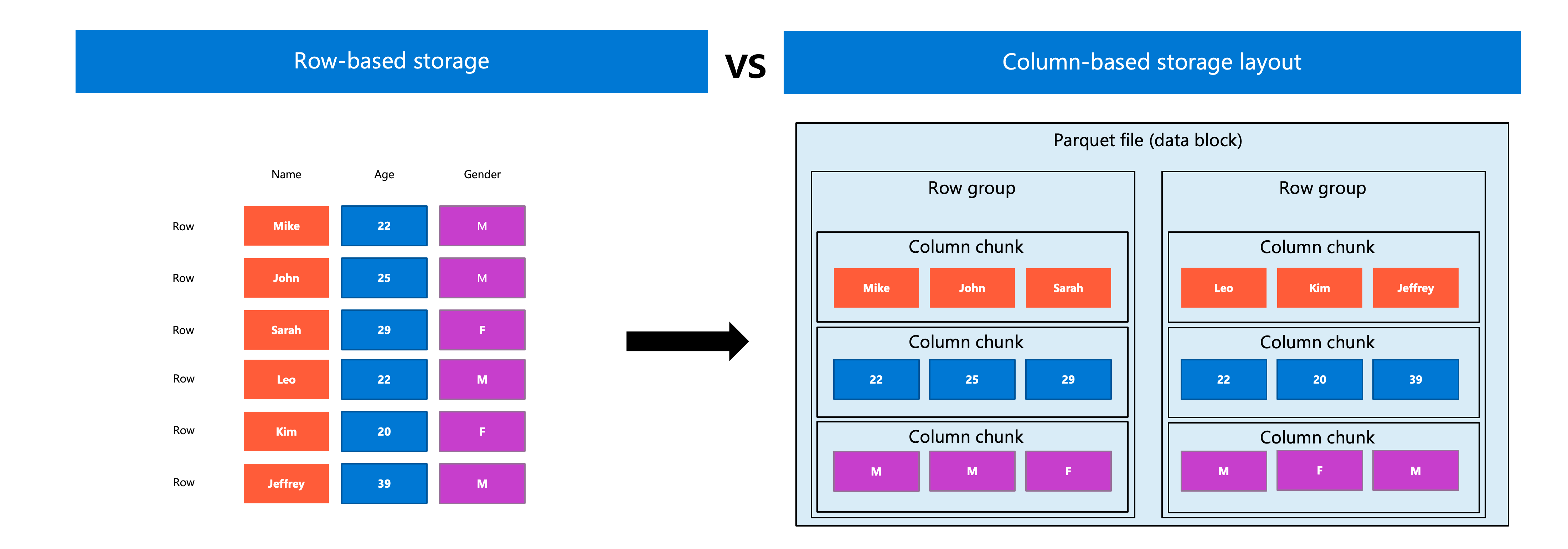
This columnar approach provides two optimization techniques that dramatically improve analytics performance:
- Column pruning: The engine reads only the columns your query references, reducing I/O substantially.
- Predicate pushdown: Filter conditions are evaluated against column statistics before reading data, skipping irrelevant row groups entirely.
For analytical workloads that typically access a subset of columns across many rows, Parquet substantially outperforms row-based formats.
Delta Lake as the default format
Delta Lake is the default storage format for all tables in Azure Databricks. When you create a table without specifying a format, Azure Databricks automatically uses Delta Lake.
Delta Lake extends Parquet files with a transaction log that records every change to your table. This log enables several capabilities that Parquet alone doesn't provide:
ACID transactions: Multiple concurrent readers and writers can access the same table without data corruption. Each transaction either completes entirely or has no effect.
Time travel: Query previous versions of your table using timestamps or version numbers. Roll back changes if needed.
Schema enforcement and evolution: The table validates incoming data against its defined schema, preventing corrupt or incompatible data from entering your lakehouse. When requirements change, you can add new columns, modify data types, or rename columns without rewriting existing data.
Unified batch and streaming: Use the same table as both a batch source and a streaming source or sink.
Delta Lake integrates deeply with the Azure Databricks platform. Features like liquid clustering and predictive optimization are available for both Delta Lake and managed Apache Iceberg tables in Unity Catalog. Change data feed, however, is specific to Delta Lake and relies on its transaction log.
For most scenarios in Azure Databricks, Delta Lake is the recommended choice. It provides the performance benefits of Parquet with transactional guarantees that production data systems require.
Apache Iceberg for cross-platform scenarios
Apache Iceberg is an alternative open table format that Azure Databricks supports for managed and foreign tables. Like Delta Lake, Iceberg provides ACID transactions, schema evolution, and time travel capabilities built on top of Parquet files.
Iceberg's hierarchical and well-defined logical structure makes it highly flexible, supporting scalability and advanced optimizations. It supports manifest pruning, file-Level statistics, hidden partitioning and partition evolution.
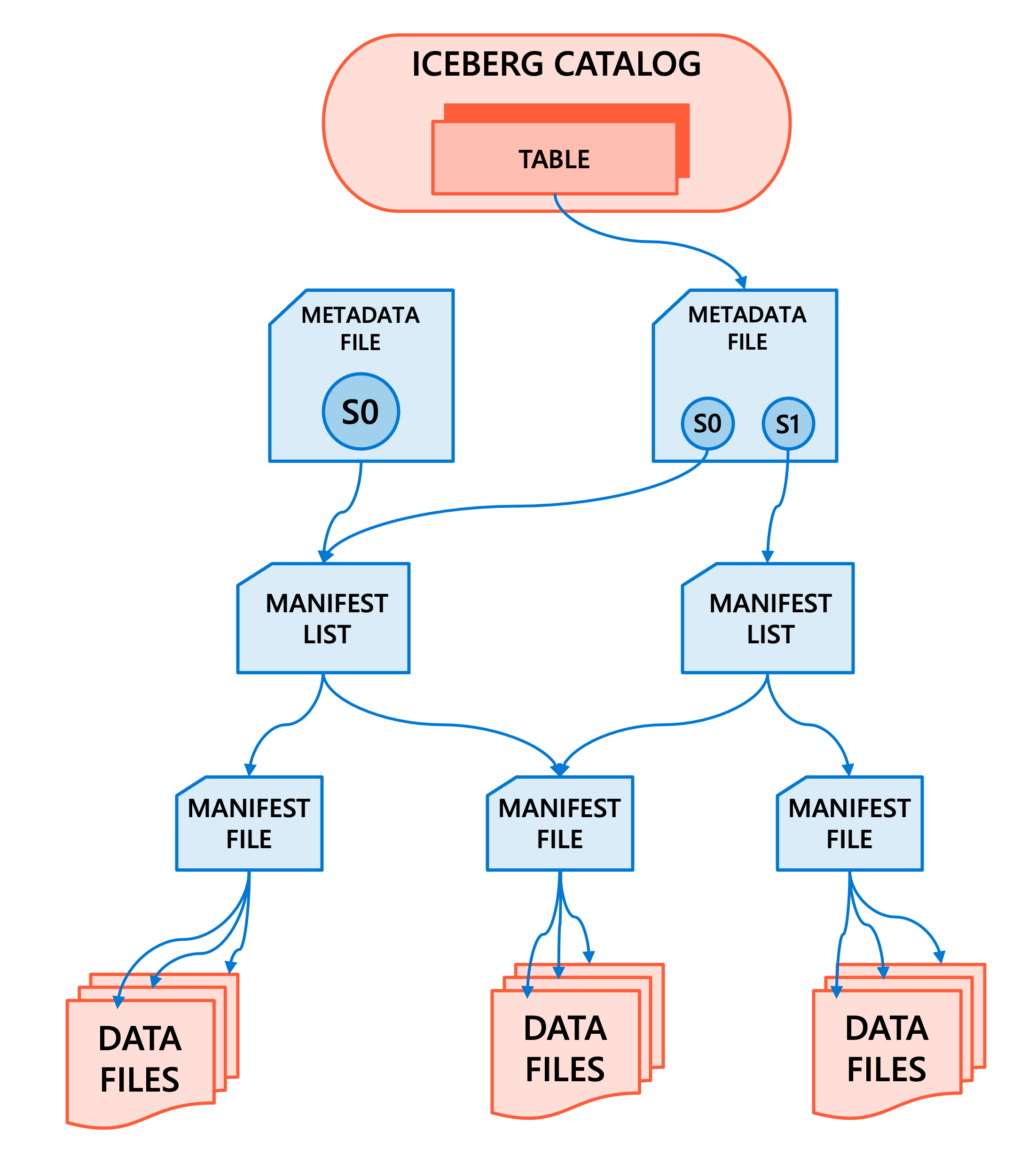
The primary reason to choose Iceberg is interoperability. Iceberg is widely adopted across the data ecosystem, including platforms like Snowflake, Amazon Athena, Trino, Apache Spark, and Apache Flink. If your organization runs workloads across multiple platforms that need to read and write the same tables, Iceberg provides a common format all platforms understand.
Unity Catalog can manage Iceberg tables directly, allowing Azure Databricks to serve as an Iceberg catalog for external engines. You can also read Iceberg tables managed by other catalogs like AWS Glue or Snowflake Horizon Catalog through foreign table connections.
Consider Iceberg when:
- Your data needs to be accessed by multiple processing engines outside Azure Databricks.
- Your organization has standardized on Iceberg for cross-platform data sharing.
- You're integrating with systems that don't support Delta Lake.
For workloads that run primarily within Azure Databricks, Delta Lake remains the recommended format due to its deeper platform integration and optimization features.
When row-based formats apply
CSV and JSON remain valid choices for specific scenarios, even though they're less efficient for large-scale analytics.
Use CSV or JSON when:
- You're receiving data from external systems in these formats as an initial landing zone.
- You need human-readable data for debugging or quick inspection.
- You're integrating with systems that only support text-based formats.
- Data volumes are small enough that performance differences are negligible.
For persistent storage of analytical data, convert incoming CSV or JSON files to Delta Lake tables during ingestion. This conversion captures the efficiency gains of columnar storage while adding transactional guarantees.
Apply decision criteria
Selecting a table format depends on your specific requirements. Start with Delta Lake as your default choice, then evaluate alternatives only when specific constraints require them.
| Consideration | Delta Lake | Apache Iceberg | CSV/JSON |
|---|---|---|---|
| Analytics performance | Excellent | Excellent | Poor |
| ACID transactions | Yes | Yes | No |
| Time travel | Yes | Yes | No |
| Azure Databricks integration | Deep | Supported | Basic |
| Cross-platform compatibility | Growing | Wide | Universal |
| Recommended for production | Yes | Yes (when interop required) | No (landing zone only) |
Your choice also depends on organizational standards. If your architecture team has established conventions for table formats, align with those decisions to maintain consistency across your data platform.