Choose granularity on a column or table based on requirements
Granularity is one of the most critical design decisions you make when building a data model. It defines the level of detail captured in your tables and directly affects storage costs, query performance, and the analytical questions you can answer. As a data engineer, understanding granularity helps you design tables that meet business requirements while maintaining efficient operations.
This unit explains what granularity means in the context of dimensional modeling and how to evaluate different granularity options based on your organization's requirements.
Understand what granularity represents
Granularity, sometimes called "grain," describes the level of detail that each row in a table represents. In a fact table, the grain determines what business event or measurement each row captures. In a dimension table, the grain determines how entities are represented and versioned.
Consider an IoT sensor data scenario. You could design your fact table at different levels of granularity:
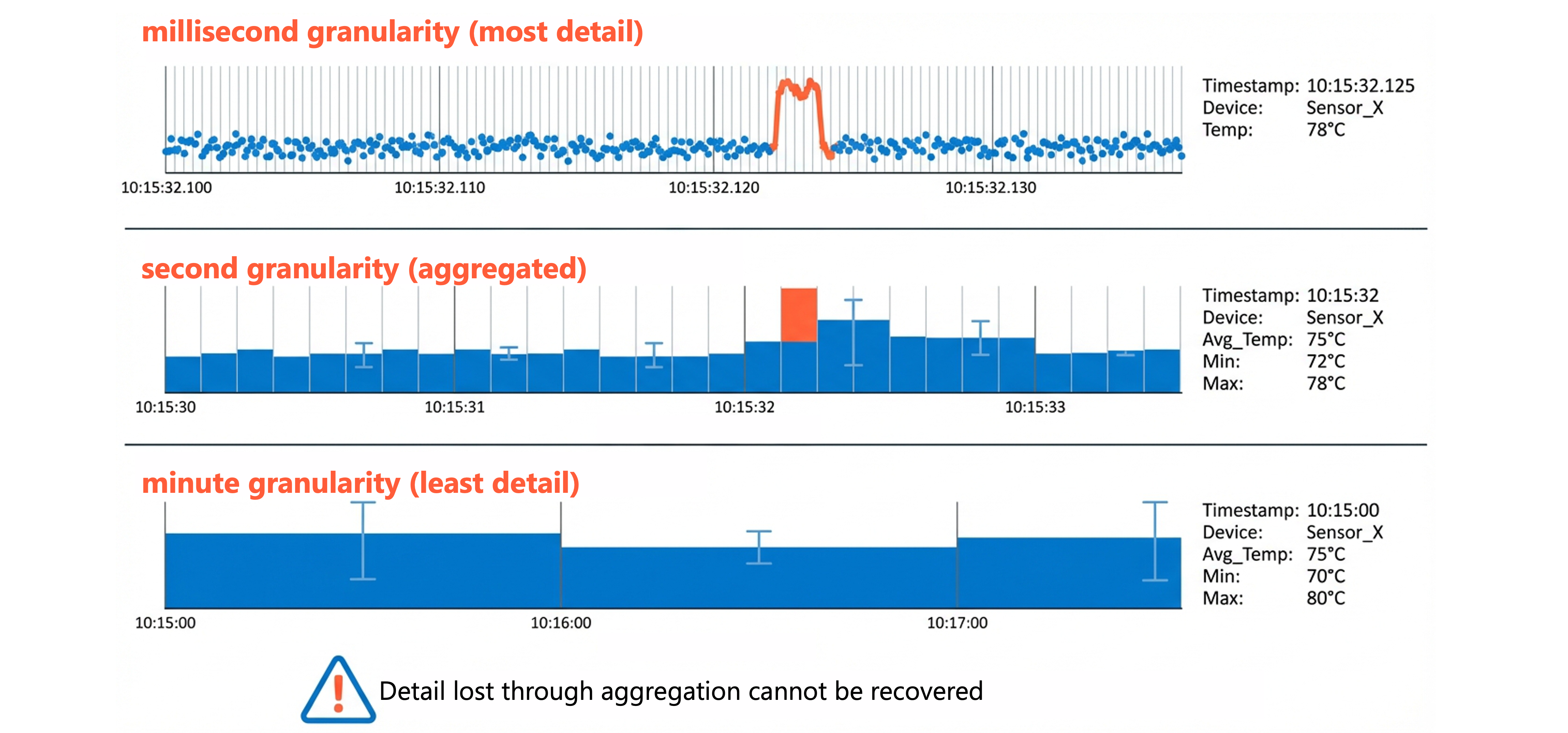
Millisecond-level granularity: Each row represents a single sensor reading captured at the millisecond level. This captures the most detailed information, including precise timestamps, sensor values, and device identifiers for each measurement.
Second aggregated granularity: Each row represents the average, minimum, or maximum sensor value for a device per second. Individual readings are summarized into per-second statistics.
Minute aggregated granularity: Each row represents aggregated sensor statistics for a device during an entire minute. This provides the least detail but requires the least storage.
The grain you choose affects everything downstream. Once you lose detail through aggregation, you can't recover it. If your minute-aggregated table shows that sensor X had an average temperature of 75°C during a specific minute, you can't determine which milliseconds had temperature spikes or identify the exact moment an anomaly occurred.
Evaluate factors that influence granularity decisions
Choosing the appropriate granularity requires balancing multiple competing concerns. The right choice depends on your specific business context and technical constraints.
Business requirements drive the grain
The analytical questions your organization needs to answer should be the primary factor in determining granularity. Ask yourself: what's the most detailed level of analysis required?
If operations engineers need to detect equipment anomalies at the millisecond level, per-minute aggregates won't suffice. If management only needs hourly utilization summaries by production line, storing every sensor reading wastes resources.
Consider these scenarios:
| Business requirement | Minimum granularity needed |
|---|---|
| Detect equipment vibration anomalies in real-time | Millisecond event level |
| Analyze temperature trends for predictive maintenance | Second aggregate level |
| Monitor hourly energy consumption per device | Minute aggregate level |
| Report daily production metrics by facility | Hourly aggregate level |
Query patterns shape performance
The way users query your data influences the optimal granularity. When queries typically filter and aggregate to higher levels, storing overly fine-grained data creates unnecessary processing overhead. Each query must scan and aggregate more rows than necessary.
At the same time, storing data at too coarse a granularity prevents users from drilling down to answer detailed questions. Finding the balance requires understanding both current and anticipated query patterns.
Storage and compute costs accumulate
Finer granularity means more rows, which increases storage costs. It also increases compute costs because queries must process more data. In Azure Databricks, these costs compound over time as historical data accumulates.
A manufacturing facility with thousands of sensors capturing readings at millisecond intervals might generate billions of rows daily at the finest granularity. Aggregating to per-second or per-minute statistics could reduce row counts by 99% or more, translating directly to lower storage and query costs.
Compliance and audit requirements matter
Regulatory requirements sometimes mandate specific granularity levels. Financial services organizations often must retain transaction-level detail for audit purposes, regardless of storage costs. Healthcare organizations might need to track individual patient interactions for compliance reasons.
When compliance drives your granularity decision, document the requirements clearly. This justification helps when stakeholders question why you're storing more detail than analytical needs alone would require.
Apply granularity to fact tables
Fact tables benefit most from careful granularity decisions because they typically contain the largest volumes of data. The grain of a fact table is determined by the combination of its dimension keys.
A sales fact table with dimension keys for date, product, customer, and store has a grain of "one row per product per customer per store per day." Every unique combination of these dimension values creates a distinct row. Adding a time dimension key at the hour level would change the grain to "one row per product per customer per store per hour," significantly increasing row counts.

Important
Declare your fact table grain explicitly before adding any columns. The grain statement serves as a contract that guides all subsequent design decisions. For example: "This fact table contains one row per sales order line item."
When designing fact tables, consider whether you need:
Atomic grain: The most detailed level captured in the source system. Choosing atomic grain provides maximum analytical flexibility because you can always aggregate up, but never disaggregate down.
Aggregate grain: Pre-summarized data at a higher level than the source. Aggregate fact tables improve query performance for common analytical patterns but limit the questions users can answer.
Many organizations maintain both atomic and aggregate fact tables, using aggregate tables as performance optimization while preserving atomic detail for ad-hoc analysis. In Azure Databricks, materialized views can automatically maintain these aggregate tables, refreshing them as the underlying atomic data changes.
Apply granularity to dimension tables
Dimension tables also have a grain, though it works differently than fact table grain. The dimension grain determines how you represent and version your business entities.
For a customer dimension, you might choose:
- One row per customer: The current state of each customer, updated in place when attributes change (SCD Type 1).
- One row per customer per version: A new row for each significant change, preserving historical states (SCD Type 2).
- One row per customer per time period: Periodic snapshots capturing customer attributes at regular intervals.
The dimension grain you choose must align with your fact table grain. If your fact table tracks individual transactions with surrogate keys to customer dimension, your customer dimension grain must support that relationship. A transaction referencing customer version 5 must be able to find that specific version in the dimension table.
Balance trade-offs when selecting granularity
No single granularity choice is universally correct. Each decision involves trade-offs that you must evaluate against your specific requirements.
| Consideration | Fine granularity | Coarse granularity |
|---|---|---|
| Analytical flexibility | High - can answer detailed questions | Low - limited to aggregate analysis |
| Storage costs | Higher - more rows to store | Lower - fewer rows |
| Query performance | Slower for aggregate queries | Faster for common patterns |
| Historical analysis | Supports point-in-time analysis | May lose historical detail |
| Compliance support | Better for audit requirements | May not meet regulations |
When you're uncertain, starting with finer granularity is often safer. You can always create aggregate tables later for performance optimization, but you can't recover detail that was never captured. However, this guidance assumes you have the budget and infrastructure to support finer-grained storage initially.
Understanding how to choose appropriate granularity enables you to design data models that support your organization's analytical needs while managing costs effectively. The implementation details for building and loading tables at your chosen granularity in Azure Databricks are covered in later units.