Understand your SQL server-based platform choices
Tip
See the Text and images tab for more details!
Microsoft's SQL platforms serve different scenarios, and the database objects you design must align with your platform's capabilities and use cases. Understanding the control and management trade-offs between Infrastructure-as-a-Service (IaaS) and Platform-as-a-Service (PaaS) helps determine which platform best supports your database design requirements.
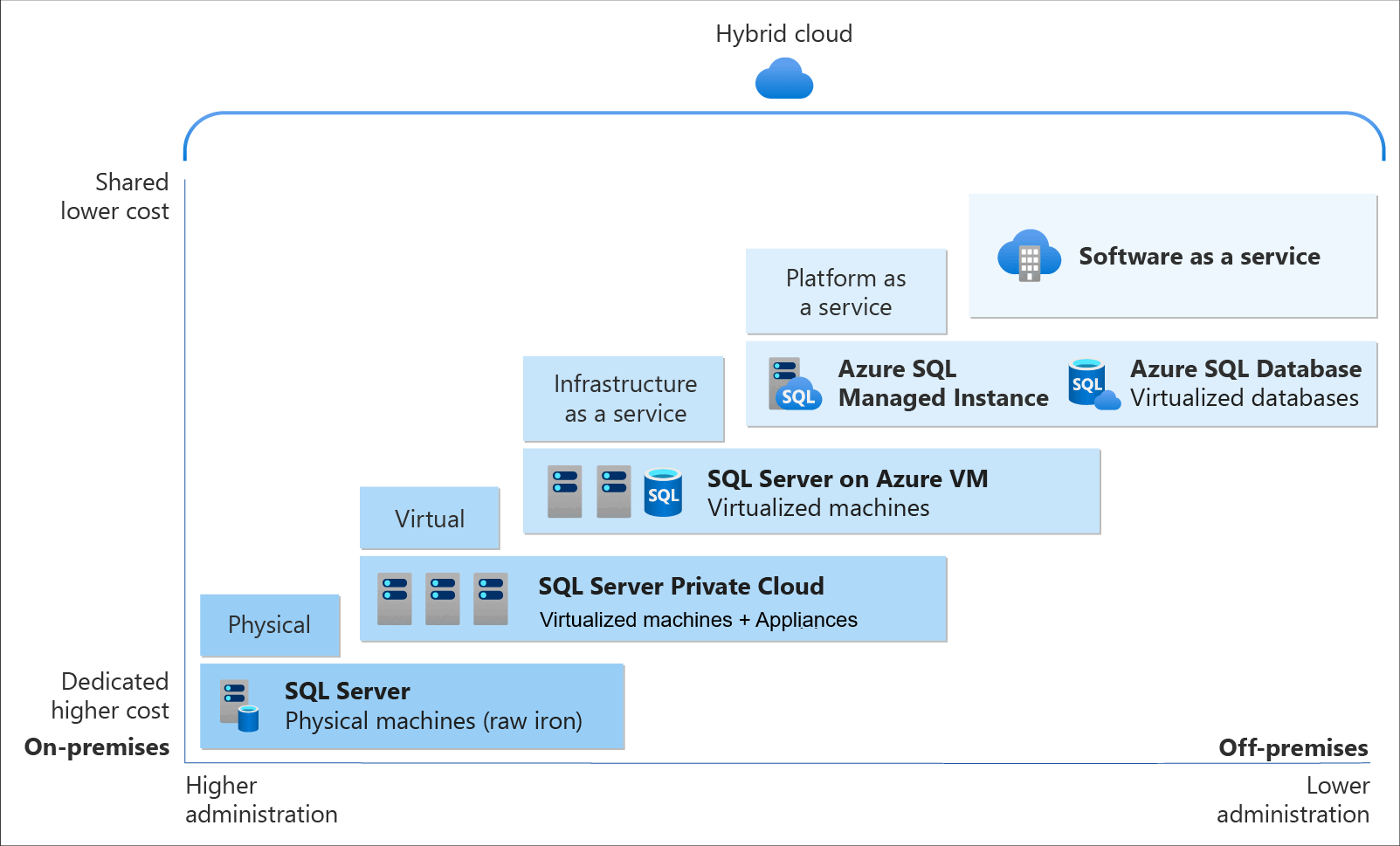
The diagram shows how PaaS platforms divide responsibilities: Azure manages everything below the database layer—physical servers, networking, operating system patches, and engine updates—while you control what matters most to your application: tables, indexes, constraints, and data. This separation lets you invest your time in database design rather than infrastructure maintenance.
Develop using Azure SQL Database
Azure SQL Database is a fully managed PaaS database that provides enterprise-grade performance and availability without infrastructure management. Multiple service tiers support different workload patterns, each influencing how you architect your data layer.
The Hyperscale service tier eliminates many of the practical limitations traditionally associated with cloud databases. The resources of a single node constrain most databases, but Hyperscale databases have no such restrictions. With its flexible storage architecture, storage expands as needed, and there's no predefined maximum size. You're billed only for the capacity you use. For read-intensive workloads, Hyperscale offers rapid scale-out by provisioning more replicas to handle read operations.
The serverless compute tier automatically scales compute based on workload demand and pauses when idle—you pay only for storage during inactive periods. When a connection request is made, the database resumes automatically.
Note
We recommend you design your application with connection retry logic to handle resume delays, and avoid long-running transactions that prevent autopause.
Intelligent query processing and automatic tuning analyze workload patterns to recommend or automatically create indexes. Automatic plan correction detects and fixes query regressions when proper indexing and statistics are in place.
Built-in high availability with a 99.99% uptime Service Level Agreement (SLA) means you can focus on performance and data integrity rather than replication topology.
Migrate for Azure SQL Managed Instance
Azure SQL Managed Instance provides near 100% compatibility with the latest SQL Server Enterprise Edition, always running the most recent database engine version with automatic patching. Native virtual network integration provides security isolation, while PaaS capabilities handle backups, high availability, and maintenance.
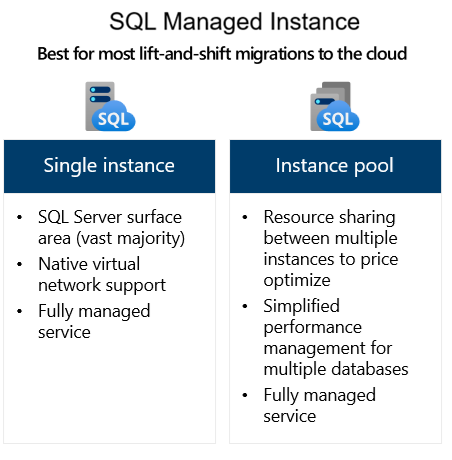
Instance-level features include SQL Server Agent, Service Broker, linked servers, cross-database queries with three-part naming, and database mail. The Managed Instance link uses distributed availability groups to synchronize data from SQL Server to Azure in near real-time—enabling hybrid scenarios, read offloading, disaster recovery, and minimal-downtime migrations.
In-Memory OLTP in the Business Critical tier enables memory-optimized tables and natively compiled stored procedures for latency-sensitive workloads.
Use SQL Server on Azure Virtual Machines
SQL Server on Azure Virtual Machines provides Infrastructure-as-a-Service (IaaS) deployment where you control the SQL Server instance, database engine configuration, and underlying Windows or Linux operating system. This deployment option offers maximum compatibility and customization for applications requiring specific SQL Server versions, OS-level access, or configurations not available in PaaS offerings.
The SQL IaaS Agent extension unlocks management capabilities including automated backups, automatic patching during maintenance windows, Azure Key Vault integration, and tempdb configuration through the Azure portal. The SQL best practices assessment validates your configuration against recommended settings, while I/O performance analysis helps identify storage bottlenecks. For high availability, you can configure Always On availability groups or failover cluster instances with full control over replica placement and failover behavior.
Design for SQL Database in Microsoft Fabric
SQL database in Microsoft Fabric is a developer-friendly transactional database built on Azure SQL Database technology that automatically integrates with Fabric's analytics ecosystem. The platform uses the same SQL Database Engine as Azure SQL Database, combining OLTP capabilities with built-in analytics integration and eliminating the traditional separation between operational and analytical data stores.
Automatic mirroring replicates changes from your operational tables into OneLake as Delta Parquet files. As you insert, update, and delete data, Fabric automatically synchronizes those changes without requiring ETL pipelines, triggers, or extra configuration. This means every table you create instantly becomes available for analytics through the SQL analytics endpoint, which provides a read-only analytical view of your data. You can query across multiple data sources using familiar three-part naming syntax to join your SQL database with other Fabric warehouses, lakehouses, and even other SQL databases in cross-database queries. The key benefit: your analytical queries run against the Delta Parquet copies rather than your live operational tables, so heavy reporting workloads never slow down your transaction processing.
Intelligent performance features work automatically in the background, including automatic index creation that monitors query patterns and creates indexes without manual intervention. The platform also supports AI development with semantic search and retrieval-augmented generation (RAG). Database portability is supported through SqlPackage for .bacpac/.dacpac operations, Fabric source control for git integration, and GraphQL APIs for modern API interfaces.
Throughout this module, you'll learn techniques applicable across all platforms, with callouts for platform-specific capabilities.