Evaluate identity and security constraints
Unit 3 settles where business logic and data live: business rules and a plug-in handle the eligibility and cost checks, and a plug-in or flow calls the external inventory service through a connector. None of that placement matters if anyone with access can see or change any record, or if the inventory integration runs with more power than the task needs.
This unit evaluates the identity and security requirements around those components: who proves their identity, what that identity is allowed to do, and which rows it can reach. You apply the approved model and route organization-level policy decisions to their owners.
Apply approved authentication patterns to people and services
Authentication proves who or what is acting. Authorization decides what that identity can then do. Treating them as one decision can lead to over-privileged accounts. Evaluate them separately for every component, apply the approved identity model, and route identity-strategy or tenant-policy changes to the responsible owner.
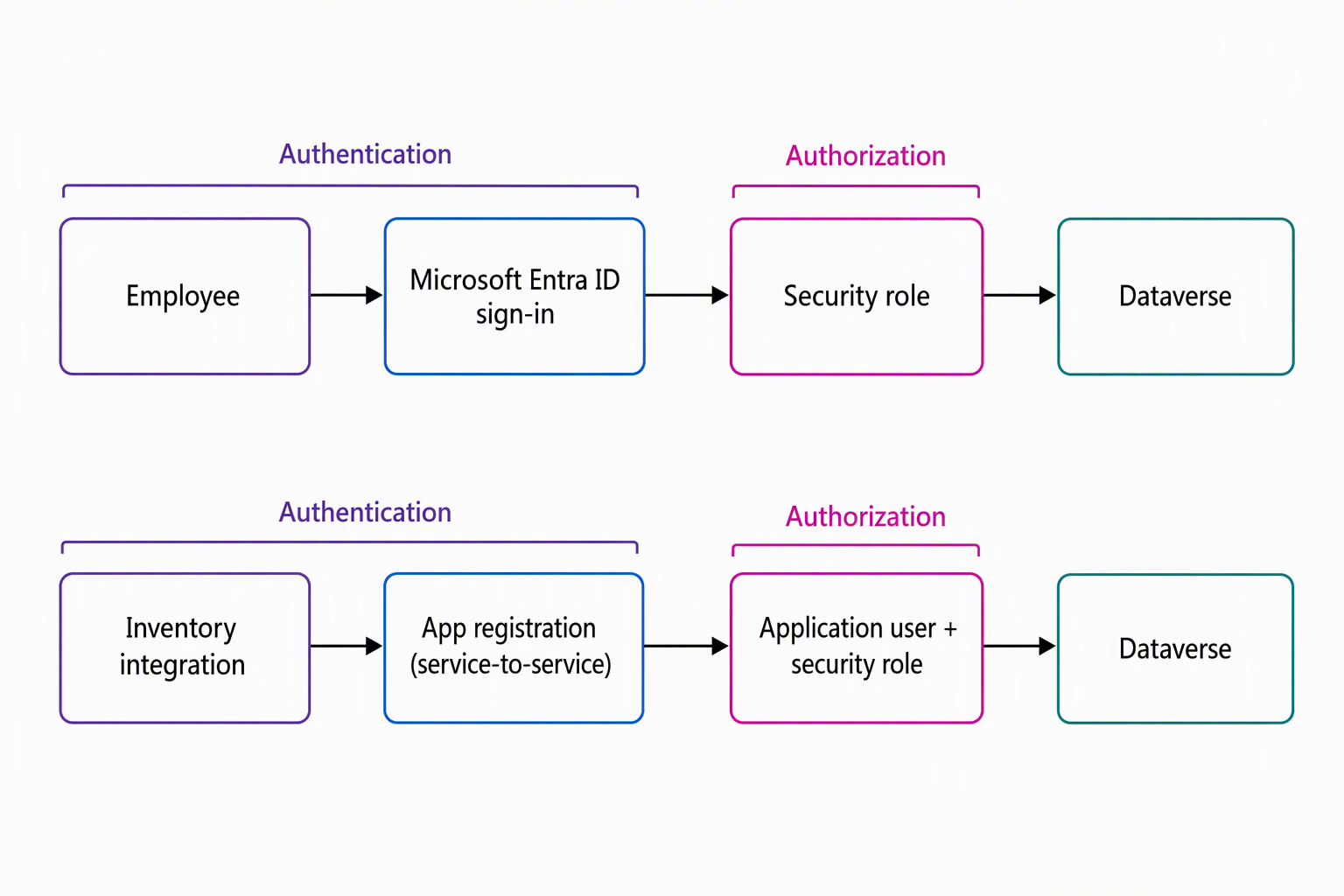
An employee submitting a request is an interactive identity: a person signs in through Microsoft Entra ID, and Dataverse authenticates that sign-in. Authorization follows as a separate step, through the security role Dataverse assigns to that user. That role determines whether they can create a Request, read their own Allowance, or see anyone else's records.
The plug-in or flow that calls the external inventory service is different. No person is present when that call happens, so it needs a non-interactive, service-to-service identity instead. You register the integration as an application in Microsoft Entra ID, then create a corresponding Dataverse application user tied to that registration. The application user authenticates through the registered application's credentials, and like any Dataverse user, it needs a security role to do anything at all.
Specify the least-privilege table access the integration requires, such as read access to Device records. Apply it within the approved role model, and request elevated or new role permissions from the responsible owner. Narrow privileges limit the effect of a compromised or misconfigured integration account.
The equipment-provisioning solution ends up with two authentication stories that both need an authorization decision behind them: how an employee signs in and what their role lets them touch, and how the inventory integration authenticates and what its application user can do. Neither is complete without the other.
Learn more about managing application users.
Evaluate environment and connector policies as implementation constraints
Identity and role choices operate within the boundaries set by an environment and its connector policies. Managed environments are a set of premium governance capabilities available for any environment type. They affect what a production environment can do before any app or flow inside it runs, including sharing limits, usage insights, and controls over who can access the environment.
Check whether the target equipment-provisioning environment is managed and record how its settings constrain the solution. The environment owner decides whether to enable managed-environment capabilities.
Data policies (also called data loss prevention policies) work at a different layer: they classify every connector, including custom ones, into a Business, Non-Business, or Blocked data group, and you can't combine connectors from different groups in the same app or flow. That classification is directly relevant to the custom connector behind the external inventory call.
Suppose an admin leaves it in the default Non-Business group, while the Request and Allowance data flow through connectors classified as Business. In that case, a data policy blocks the two from working together in the same flow. The integration breaks at run time rather than at design time.
Check the inventory connector's approved data-policy classification with the policy owner. If it conflicts with the flow's other connectors, document the constraint and request an approved classification change or adjust the implementation approach.
Advanced connector policies offer a newer, allowlist-based model that blocks all connectors by default unless you explicitly allow them. They currently cover certified and Model Context Protocol (MCP) connectors, not yet custom or HTTP connectors. They also become generally available one maker portal at a time, as design-time enforcement rolls out, enforcing only at run time until then. Connector endpoint filtering (preview) lets you restrict HTTP-based and SQL Server connectors to specific endpoints within a data policy.
Learn more about data policies and connector classification.
Apply row-level access patterns within the approved Dataverse model
Once identity and environment-level controls are known, identify which rows each component identity needs to reach. Dataverse provides four mechanisms, each with a different purpose.
| Mechanism | What it does | Design signal |
|---|---|---|
| Security role | Grants privileges (create, read, write, and so on) per table; when a user or team holds more than one role, the broadest privilege across all of them wins | Default mechanism for defining what a job function can do |
| Business unit | A logical security boundary that groups users and records | Use the existing organizational or regional boundary when the approved model defines one |
| Team | Groups users to simplify role assignment, and can own records on members' behalf | Use to assign one role to a group instead of repeating the assignment per user |
| Row sharing | Grants access to one specific record, outside the role and ownership model | Use sparingly, for exceptions the role and ownership model doesn't already cover |
Guiding question: Given an approved regional business-unit model, a regional IT manager needs to see every pending Request in their region, but not requests from other regions. Which existing mechanism fits best: a security role, a business unit, a team, or row sharing?
Use the existing business-unit-scoped role in the approved model. If the organization doesn't have a regional business-unit model, document the access requirement and escalate it to the security owner instead of creating an organizational boundary.
Row sharing solves a narrower problem, one record at a time, so it doesn't scale to an entire region. A team alone doesn't add the regional boundary either. It groups users who still need a role to see anything.
Map the equipment-provisioning components' access needs to the approved roles, teams, business units, and sharing model. Employees might need a role scoped to records they own, while coordinators might need read and update access across Request records. Use the existing business-unit scope if the organization already authorizes regional separation.
A team can simplify role assignment when several coordinators share identical access and the approved model allows that approach. Row sharing can cover a single-record exception, such as a backup coordinator who needs temporary access to a specific pending Request while the usual coordinator is away, without a permanent role change for either person.
You now have the component-level identity and access requirements documented for implementation, with organization-level policy decisions routed to their owners. The next unit shifts back to the front end: choosing how people and agents interact with the solution.