Design Power Apps and Dataverse code components
In the previous unit, you survey the menu of extensibility options available for the equipment-provisioning solution. This unit narrows the focus to the request-intake experience: the Power Apps surface where an employee submits a request, and the Dataverse logic that enforces eligibility the moment someone creates or updates that request.
Choose the right Power Apps component for request intake
An employee who needs a replacement laptop interacts with a form, and that form is where the request-intake experience either feels effortless or gets in the way. Power Apps gives you three distinct ways to shape that experience, each solving a different kind of problem.
Generative pages are an AI-driven experience in model-driven apps where you describe the page you want in natural language. An app agent then generates a fully functional page bound to a Dataverse table. Beyond Dataverse tables, a generative page can also use Power Platform connectors and Dataverse custom APIs as data sources (preview).
For the request-intake page, or for a coordinator triage page that lists open requests, a generative page gives you a working first draft in minutes instead of a blank canvas. You still refine the generated page afterward, so treat it as an accelerator for the first draft, not a replacement for your own design judgment.
The Power Apps component framework (PCF) lets you build custom code components out of HTML, CSS, and TypeScript. You bundle them into a solution, and reuse them across forms and tables in both model-driven and canvas apps.
Reach for PCF when the user experience you need exceeds what a standard control offers. A visual device-availability picker on the Request form, for example, might show device images, stock levels, and depot location in a single interactive control instead of a plain lookup field.
One licensing nuance matters. A PCF component that calls an external service directly from the browser, bypassing a connector, makes the entire app premium. A component that stays inside Dataverse connectors keeps the app on standard licensing.
Client scripting attaches JavaScript to form and grid events such as OnLoad, OnSave, and OnChange, giving you lightweight business logic without a full component build. On the Request form, a client script might show or hide the "reason for request" field based on the device type the employee selects.
Or it might warn the employee before submitting a request that's obviously incomplete. These scripts run entirely in the browser, so they respond instantly, making them ideal for small, immediate UX touches.
The decision comes down to scope and stakes.
- Use client scripting for field-level behavior that only affects what the employee sees on screen.
- Use PCF when the interaction needs a richer UI than native controls provide.
- Use a generative page to scaffold a first draft you then refine, rather than hand-build.
One caution applies to all three: client-side logic is a UX convenience, never an enforcement mechanism. A client script can hide a field or show a warning. But it can't reliably stop Dataverse from saving an ineligible request, because a user can bypass the browser and call the Dataverse API directly. That gap is why eligibility enforcement belongs on the server, where Dataverse code components take over.
Learn more about generative pages and the Power Apps component framework.
Design a plug-in to enforce eligibility at the data layer
A plug-in is custom code that runs in response to a specific Dataverse event, such as someone creating or updating a Request record. You register a plug-in against one or more stages of the event pipeline, and the stage you choose determines what the plug-in can safely do.
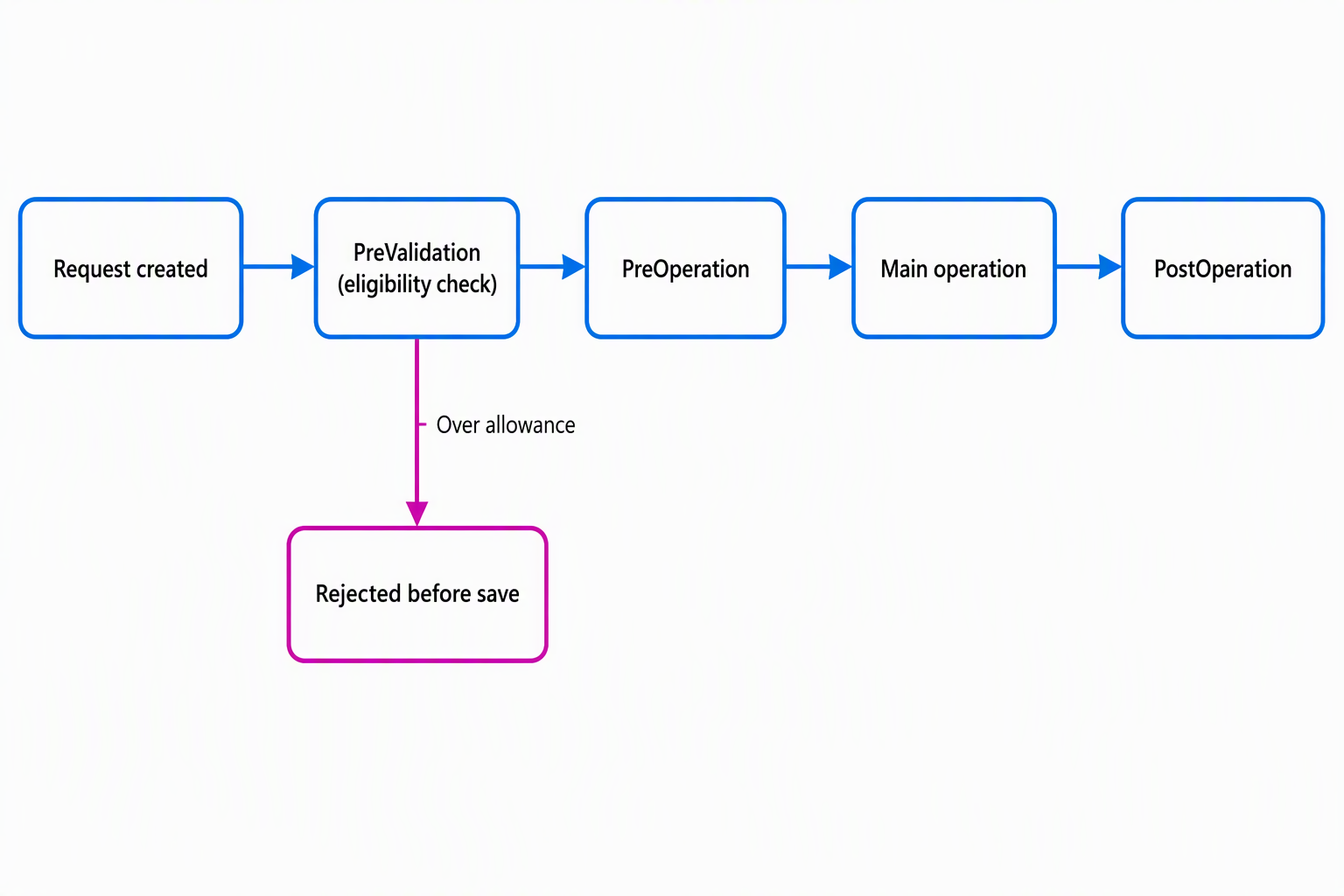
The PreValidation stage runs before the main operation and before Dataverse checks the user's permissions, which makes it the right place to reject an operation outright. For the equipment-provisioning scenario, a synchronous plug-in registered in PreValidation reads the employee's refresh allowance from the Allowance table and compares it against the request the employee is submitting.
Suppose the employee already used their allowance for this device category. The plug-in throws an exception, the save fails, and the employee sees a clear message before anything reaches the database. This logic runs synchronously, in the same thread as the save operation, so it can block the operation entirely, something client scripting can never guarantee.
Not every piece of logic needs that same urgency. The PostOperation stage runs after the main operation completes, and you can register a PostOperation step to run asynchronously through Dataverse's first-in, first-out queue instead of inline. Asynchronous execution suits work that doesn't need to block the employee, such as notifying the external depot system that a request now needs fulfillment.
You explore that scenario further in the next unit. Running that notification asynchronously keeps the employee's save fast, because the employee doesn't wait on a round trip to an external system to submit a request.
Remember this pattern: use synchronous plug-ins to validate or block an operation before it completes, and asynchronous plug-ins when the work matters but doesn't belong on the user's critical path.
Learn more about the Dataverse event execution pipeline and the asynchronous service.
Expose eligibility logic through a reusable custom API
A plug-in registered directly on the Request table solves the immediate problem, but it ties your eligibility logic to one table and one event. A custom API gives that same logic a stable, reusable contract: a named Dataverse message, either an action or a function, with typed request and response parameters, usually backed by a plug-in that implements the logic.
Suppose you package the allowance check as a custom API named CheckEquipmentEligibility. It accepts an employee reference and a device category, and returns whether the request is eligible along with a reason if it isn't. That logic becomes callable from more than one place. The request form calls it before the employee submits. A cloud flow calls it when a coordinator reprocesses pending requests. An external system can call it too, all without duplicating the rule in three places.
If the organization later adjusts how often employees can refresh a monitor, you update the logic once, behind one contract, instead of hunting through forms and flows for every copy.
That reusability is the deciding factor between a custom API and a plug-in registered directly on a table event. Register a plug-in directly on the table when the logic must always run as part of that specific operation. Build a custom API when the logic needs to be callable on demand from multiple surfaces.
Learn more about creating and using custom APIs.
Match each component to the job it's built for
Five components, five different jobs. The table below collects the decision points from this unit so you can transfer them to a new scenario.
| Component | Where it runs | Best for | Pitfall to avoid |
|---|---|---|---|
| Generative page | Model-driven app, server-rendered | Scaffolding a first-draft page from a natural-language description | Treating the generated page as final instead of refining it |
| Code component (PCF) | Browser, bundled in a solution | UI needs beyond standard controls, reused across forms | Calling external services directly from the browser, which makes the app premium |
| Client script | Browser, tied to form/grid events | Lightweight, immediate UX behavior | Relying on it to enforce a business rule it can't guarantee |
| Plug-in | Dataverse server, registered on table events | Logic that must always run for a specific operation | Choosing synchronous execution for work that doesn't need to block the user |
| Custom API | Dataverse server, callable on demand | Reusable logic called from multiple surfaces | Duplicating the same rule across several plug-ins instead of consolidating it |
Guiding question: Think about the request-intake experience you designed. Suppose the organization later asks you to let a manager pre-check an employee's eligibility before the employee even opens the Request form. Which component in the table above would you reach for, and why?
Request intake and eligibility enforcement now have a design: a Power Apps surface that guides the employee, and Dataverse code components that validate and expose that validation as a reusable contract. The next unit builds on this foundation by connecting that request to systems outside Dataverse, starting with the external depot system that checks device availability.