Explore Data API Builder for Azure SQL Database
In today's data-driven world, the ability to efficiently access and manipulate data is crucial for businesses and developers alike. Data API Builder (DAB) offers a powerful solution for creating modern REST and GraphQL endpoints for your Azure SQL Database, replacing custom APIs that perform CRUD (Create, Read, Update, Delete) operations against a database.
Azure Data API Builder is an open-source tool, designed for developers, to simplify the process of exposing your database objects as endpoints. It supports many databases, including but not limited to Azure SQL, SQL Server, PostgreSQL, MySQL, and Azure Cosmos DB. With DAB, you can create secure, scalable, and high-performance APIs at no extra cost, without writing any code.
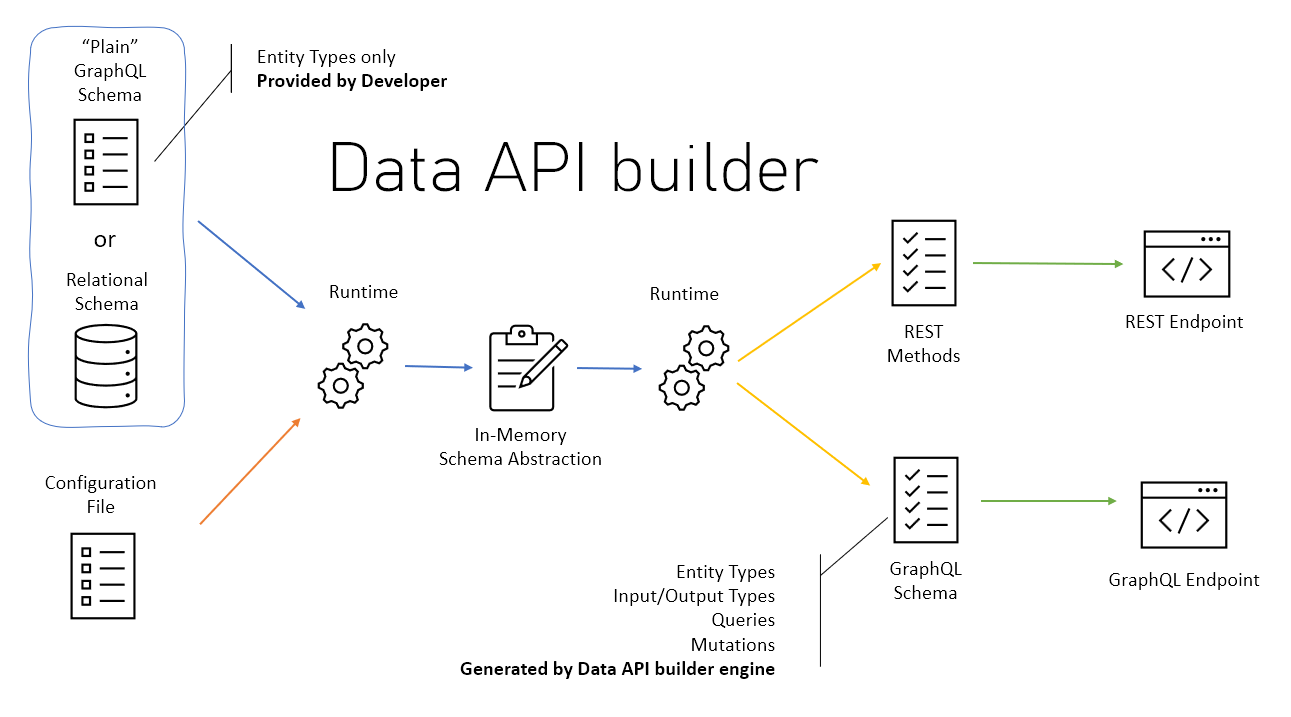
Discover key features
Using DAB in your development process offers many benefits. Here are some key advantages that can help you determine how well it aligns with your project requirements.
- Cross-platform compatibility: DAB is cross-platform and can run on any cloud or on-premises environment. It supports multiple backend data sources, including relational and NoSQL databases.
- Security and authentication: DAB integrates with multiple authentication providers, including Microsoft Entra ID (
EntraID), App Service EasyAuth (AppService), Static Web Apps authentication (StaticWebApps), custom JWT providers (Custom), and aSimulatormode for local development. It also supports role-based authorization and granular security controls. This means you can expose your data while maintaining control over who can access it and what they can do with it. - Ease of use: With a single configuration file, you can define your API endpoints, making the setup process straightforward and efficient.
- Integration with Azure services: DAB seamlessly integrates with Azure Static Web Apps, Azure Container Apps, and other Azure services, enhancing its functionality and scalability.
To see a list of feature available for Data API builder, see Feature availability for Data API builder.
Use Data API Builder
To get started with Azure Data API Builder, ensure you have an Azure subscription and the necessary tools installed, such as .NET 8 or later and the Azure Developer CLI.
Install the DAB CLI: Install the
Microsoft.DataApiBuilderNuGet package as a global .NET tool.dotnet tool install --global Microsoft.DataApiBuilderInitialize a configuration file: Use
dab initto create the basedab-config.jsonfile, referencing your connection string via an environment variable.dab init --database-type "mssql" --connection-string "@env('SQL_CONNECTION_STRING')"Define API Endpoints: Add the database entities to the configuration file to define your REST or GraphQL endpoints. This step specifies the database objects to expose and the operations allowed. For example, you can run the following command to add an entity to the configuration file.
dab add "Address" --source "dbo.Address" --permissions "anonymous:*"
Review a configuration file
Here’s a simple example of a configuration file for exposing a table in your Azure SQL Database.
{
  "$schema": "https://github.com/Azure/data-api-builder/releases/latest/download/dab.draft.schema.json",
  "data-source": {
    "database-type": "mssql",
    "connection-string": "@env('SQL_CONNECTION_STRING')"
  },
  "entities": {
    "Address": {
      "source": "dbo.Address",
      "rest": true,
      "graphql": true,
      "permissions": [
        {
          "role": "anonymous",
          "actions": ["read"]
        }
      ]
    }
  }
}
This configuration exposes the Address table as both REST and GraphQL endpoints, allowing read access to anonymous users. The connection string is read from the SQL_CONNECTION_STRING environment variable at runtime instead of being stored in the config file.