Boost developer productivity with AI

In this unit, we'll explore how GitHub Copilot streamlines development workflows, allowing developers to focus on solving complex problems rather than getting bogged down in routine coding tasks.
By the end of this unit, you'll be able to:
- Understand how AI-powered tools like GitHub Copilot can reduce repetitive coding efforts.
- Identify key areas in your workflow where GitHub Copilot can make the biggest impact.
Common AI use cases for streamlining developer productivity
GitHub Copilot offers numerous ways to accelerate and simplify common development tasks. Let's examine some key areas where GitHub Copilot proves particularly beneficial:
Accelerate learning new programming languages and frameworks
Learning new programming languages or frameworks can be challenging, but GitHub Copilot makes this process smoother and faster, enabling developers to quickly grasp new concepts and apply them in practice. GitHub Copilot helps bridge the gap between learning and actual implementation through:
- Code suggestions: Offers context-aware code snippets suggestions that illustrate the usage of unfamiliar functions and libraries, guiding developers on proper usage and implementation when working with new frameworks.
- Language support: Supports a wide range of languages, helping you transition smoothly from one language to another.
- Documentation integration: By providing inline suggestions related to API usage and function parameters, GitHub Copilot reduces the need to constantly refer to external documentation.
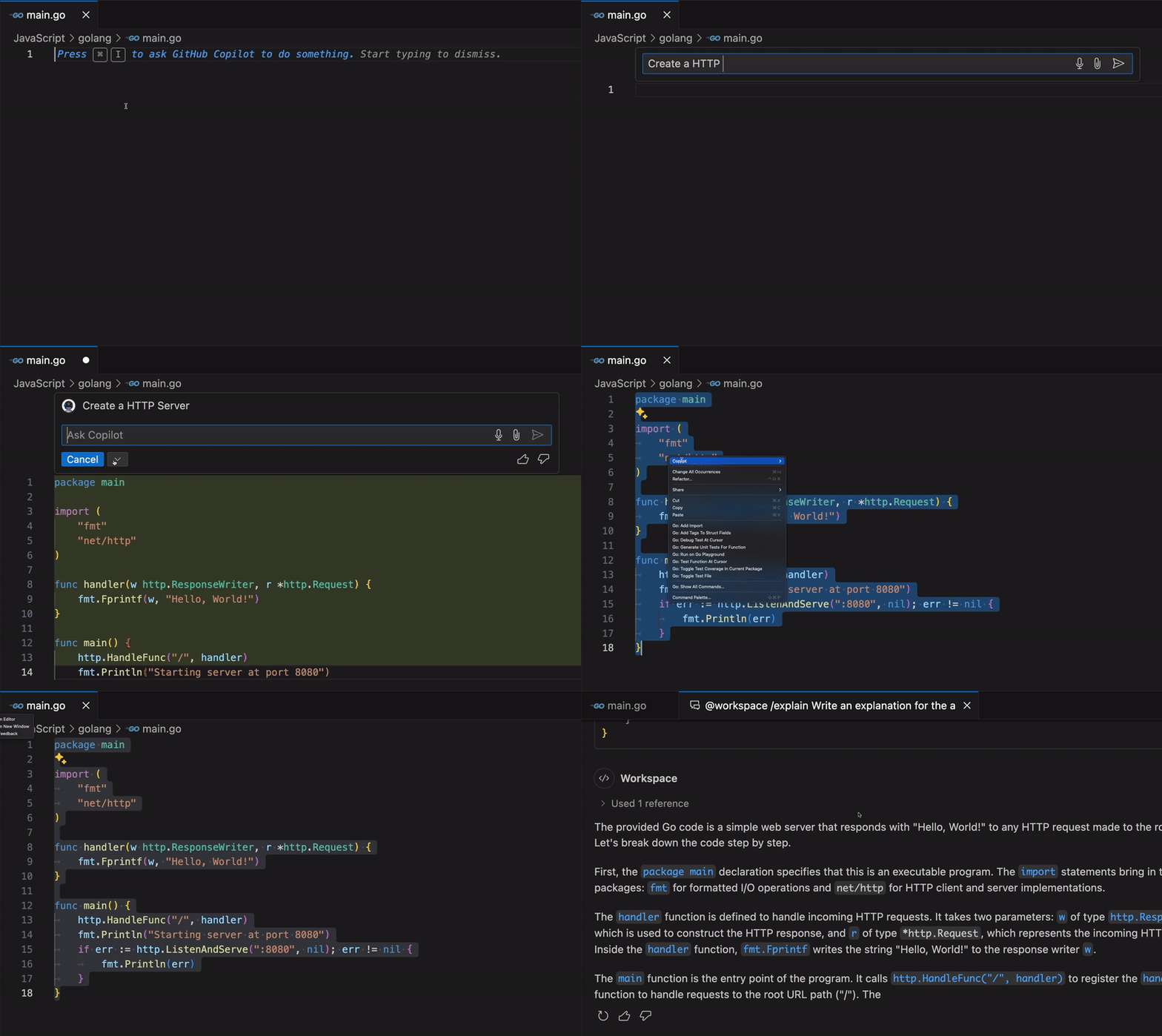
Let’s take a look at an example. Imagine working on a Golang project in a language you're unfamiliar with. GitHub Copilot can generate the code for you. You can then use the "Explain this" option in the context menu to explain what the code does.
Minimizing context switching
Context switching is a significant productivity drain for developers and can disrupt your workflow and reduce focus. GitHub Copilot helps maintain focus by providing relevant code suggestions within your current context, allowing you to concentrate on solving complex problems. The following are ways GitHub Copilot help to achieve this:
- In-editor assistance: GitHub Copilot provides code suggestions directly in the IDE, minimizing the need to search for solutions online.
- Quick references: When working with APIs or libraries, GitHub Copilot can suggest correct method calls and parameters, reducing the need to consult documentation.
- Code completion: By autocompleting repetitive code patterns, GitHub Copilot allows developers to maintain their train of thought without interruption.
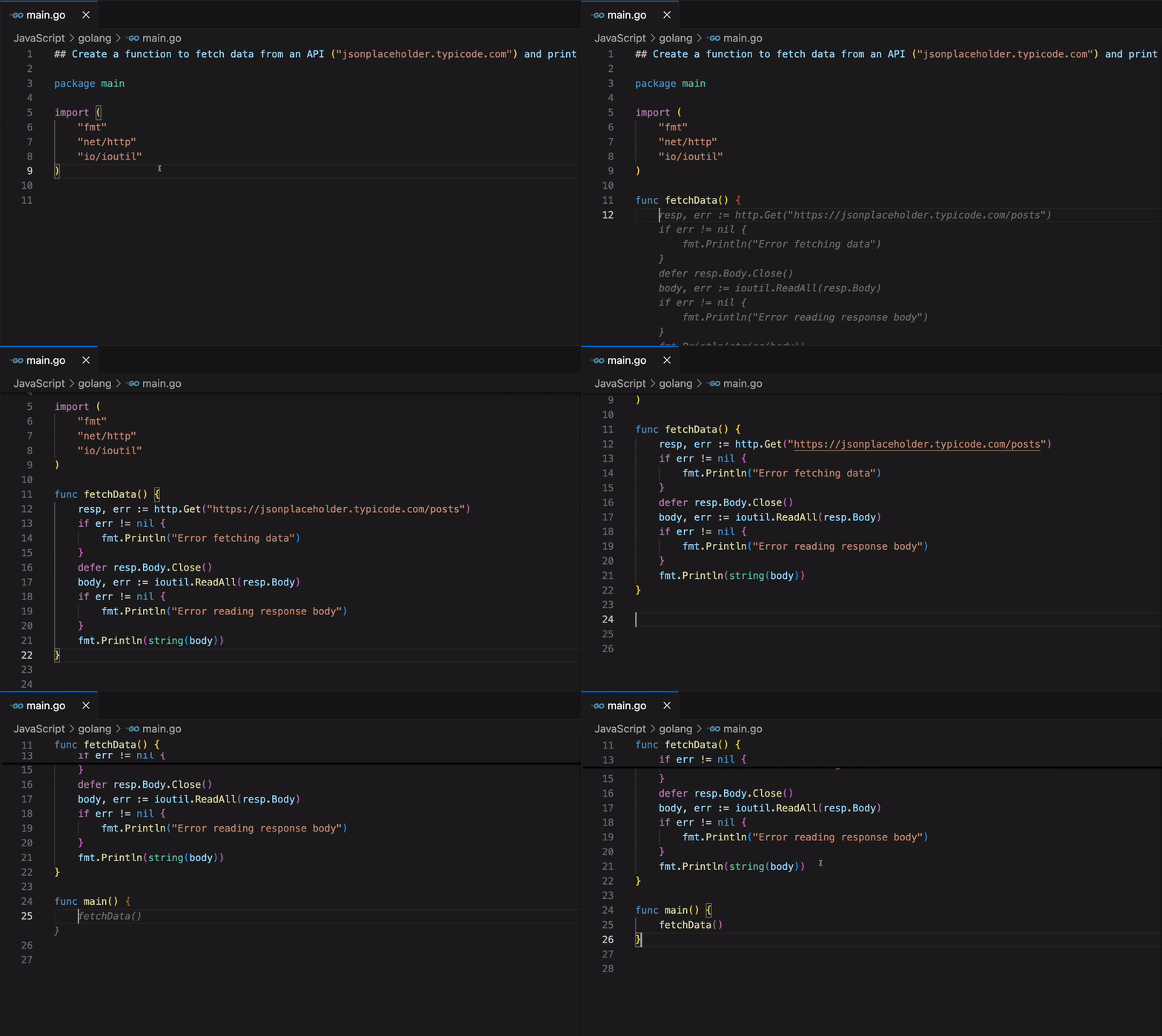
In the example below, notice how you can work with external resources (like APIs/libraries) in your code without needing to leave the editor to consult documentation. This saves valuable time and allows you to focus on more strategic tasks, enhancing overall productivity and enabling quicker project delivery.
Enhanced documentation writing
GitHub Copilot significantly improves the process of writing and maintaining code documentation:
- Inline comments: Generates contextually relevant inline comments explaining complex code sections.
- Function descriptions: Automatically suggests function descriptions, including parameter explanations and return value details.
- README generation: Assists in creating project README files by suggesting structure and content based on the project's codebase.
- Documentation consistency: Helps maintain consistent documentation style across a project.
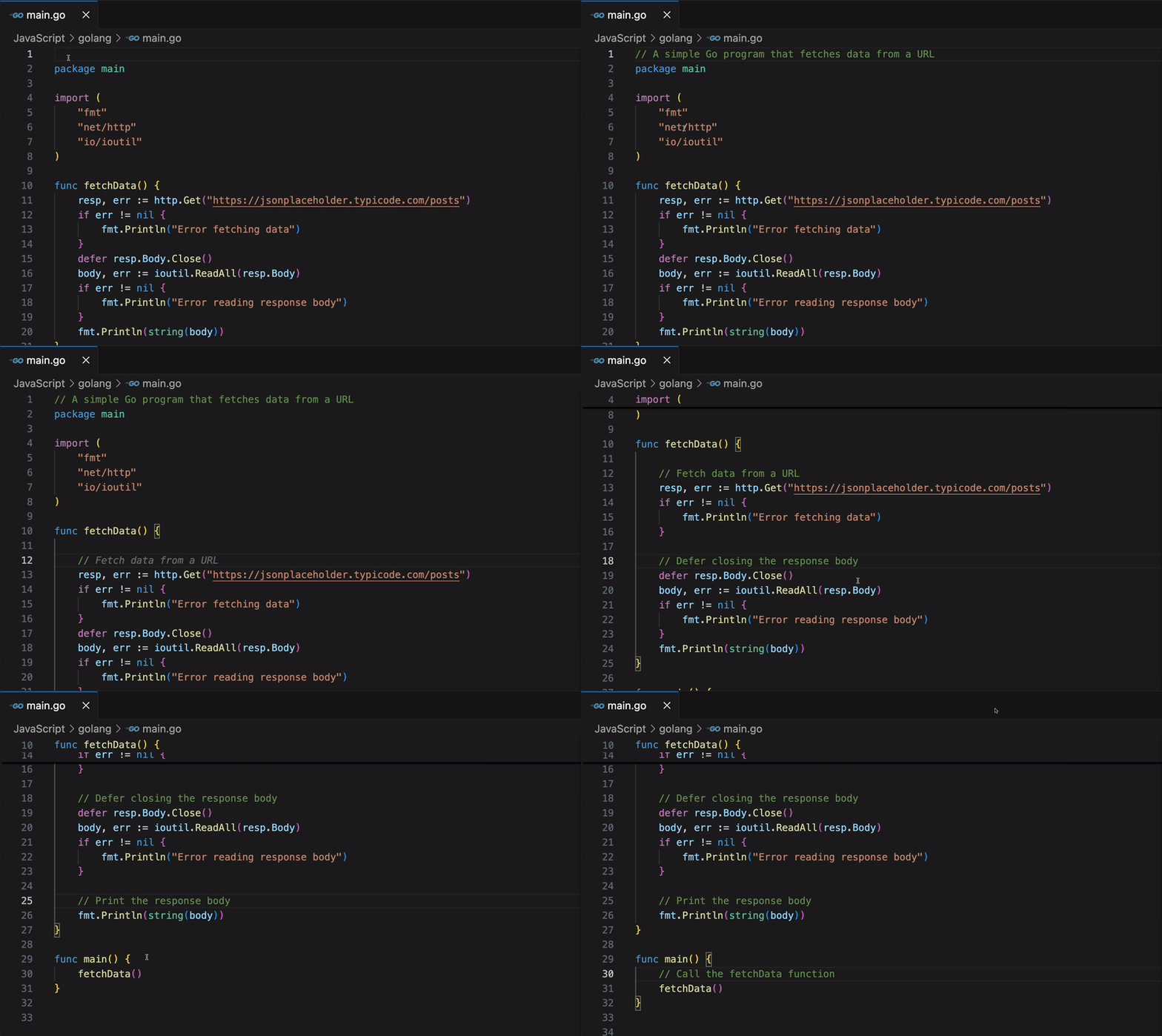
GitHub Copilot can assimilate your code, and help you write relevant comments or documentation for functions or the entire code.
Automating the boring stuff
GitHub Copilot excels at handling routine coding tasks, freeing up time for developers to focus on more complex and creative aspects of their work. Here are ways to leverage GitHub Copilot for automation:
- Boilerplate code generation: GitHub Copilot can quickly produce boilerplate code for common functionalities, such as setting up a REST API or creating a class structure.
- Sample data creation: When testing, GitHub Copilot can generate realistic sample data, saving time on manual data creation.
- Writing unit tests: GitHub Copilot can suggest test cases and even generate entire unit tests based on the code suggested.
- Code translation and refactoring: GitHub Copilot assists in code refactoring by suggesting improved patterns or more efficient implementations and even converting programming languages.
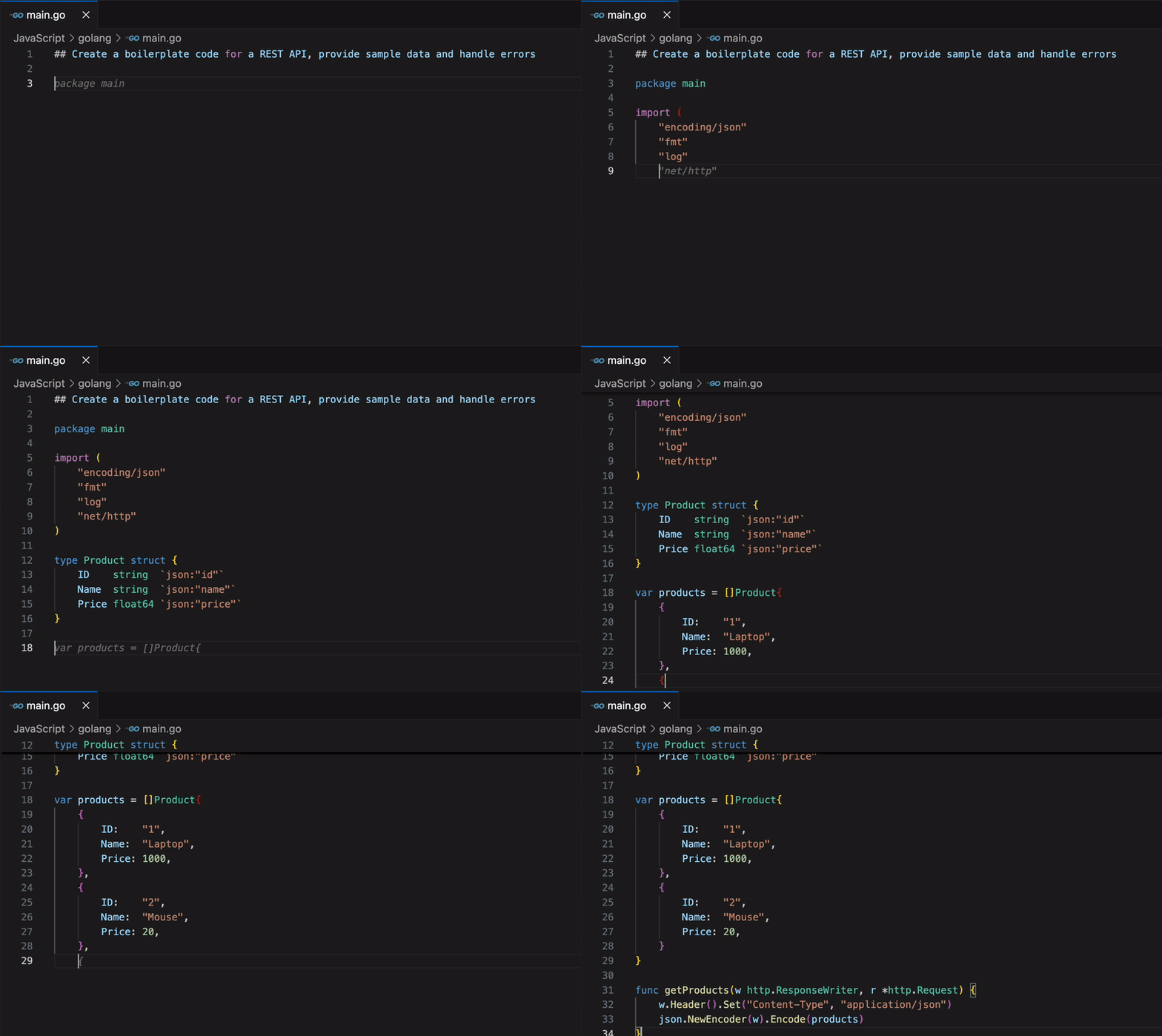
You can accelerate your development process by using GitHub Copilot to generate boilerplate code, which can then be customized to meet your specific needs.
Advanced boilerplate automation scenarios
GitHub Copilot can handle more sophisticated automation tasks that would typically require significant manual effort:
- Database schema and ORM setup: Generate complete database models, migration files, and ORM configurations based on simple entity descriptions.
- API endpoint scaffolding: Create entire REST API endpoints with proper error handling, validation, and documentation comments.
- Configuration management: Generate configuration files for different environments (development, staging, production) with appropriate settings.
- Test infrastructure: Set up complete testing frameworks including mock data, fixtures, and helper functions for complex testing scenarios.
For example, when building a new microservice, Copilot can generate the entire project structure including Docker configurations, CI/CD pipeline files, and basic monitoring setup based on a few descriptive comments about your service requirements.
Note
Complex multi-file generations consume more PRUs (~3–5 PRUs for complete project scaffolding). Simple boilerplate tasks typically use 1–2 PRUs. Learn more about Premium Request Units.
Story-driven development automation
GitHub Copilot excels at transforming simple user stories and feature requirements directly into complete, production-ready implementations:
- Feature scaffolding: Convert high-level feature descriptions into complete code structures with proper separation of concerns, including database models, API endpoints, and frontend components.
- Business logic implementation: Generate core functionality based on business rules described in plain language, automatically handling common patterns like validation, data transformation, and workflow logic.
- Integration patterns: Create standardized patterns for connecting different parts of your application ecosystem, including authentication, logging, and external service integration.
- End-to-end automation: From a single user story, generate the complete feature stack including backend logic, database changes, API documentation, and basic frontend implementation.
- Quality built-in: Automatically include error handling, input validation, logging, and basic security considerations as part of the initial implementation.
This approach enables rapid iteration from concept to working prototype, allowing teams to validate ideas quickly and gather feedback early in the development process.
Accelerating pull request workflows
GitHub Copilot transforms the pull request process by generating changes that are review-ready and reducing the time from development to deployment:
PR-ready code generation
When working on features or bug fixes, Copilot helps create comprehensive changes that minimize review cycles:
- Complete implementations: Generate full feature implementations with proper error handling, logging, and edge case coverage.
- Consistent code patterns: Ensure new code follows established project conventions and architectural patterns.
- Documentation integration: Include inline comments, function documentation, and README updates as part of the initial code generation.
- Test coverage: Generate corresponding unit tests, integration tests, and example usage alongside new functionality.
Intelligent code review assistance
Copilot can help prepare code for review and even assist during the review process itself:
- Pre-submission quality checks: Before creating a PR, use Copilot to identify potential issues, suggest improvements, and ensure code quality standards are met.
- Review comment drafting: Generate constructive, specific review comments that explain issues clearly and suggest concrete improvements with code examples.
- Rapid iteration: When reviewers request changes, Copilot can immediately generate multiple implementation alternatives, allowing authors to choose the best approach without extensive rewriting.
- Documentation refinement: Automatically improve code comments and documentation based on reviewer questions and feedback, ensuring clarity for future maintainers.
- Conflict resolution: Assist in resolving merge conflicts by understanding the intent of both code branches and suggesting optimal integration approaches.
This streamlined approach significantly reduces the number of review rounds required, enabling faster feature delivery while maintaining high code quality standards.
Note
Asking Copilot for multiple refactor drafts in a PR can consume 2–3 PRUs per draft. Learn more about Premium Request Units.
Collaborative development workflows
Copilot enhances team collaboration by ensuring consistency and quality across different developers' contributions:
- Code standardization: Help maintain consistent coding styles and patterns across team members.
- Knowledge sharing: Generate code that follows team best practices, helping junior developers learn from senior patterns.
- Context preservation: When taking over someone else's work, Copilot can help understand existing code and continue development in the same style.
- Merge conflict resolution: Assist in resolving complex merge conflicts by understanding the intent of both code branches.
Orchestrated AI workflows
Modern development increasingly benefits from coordinated AI assistance across different aspects of the development process. GitHub Copilot can work as part of orchestrated workflows where multiple AI capabilities complement each other:
Multi-agent development patterns
Consider a workflow where different AI agents handle distinct aspects of feature development:
- Draft agent: Copilot generates initial code implementations based on feature requirements
- Review agent: A secondary AI reviews the draft for code quality, security issues, and adherence to project standards
- Documentation agent: Automatically generates or updates documentation based on the code changes
- Test agent: Creates comprehensive test suites for the new functionality
This orchestrated approach ensures comprehensive coverage of development tasks while maintaining high quality standards. Each agent brings specialized focus to its domain, resulting in more thorough and production-ready code.
Note
Each handoff consumes ~1 PRU. A 2-agent draft–review flow typically uses 2–3 PRUs.
Advanced reasoning capabilities
For complex development scenarios, GitHub Copilot offers premium reasoning modes that provide deeper analysis and more sophisticated code generation:
- Enhanced context understanding: Analyzes larger codebases and more complex relationships between components
- Advanced architectural suggestions: Provides recommendations for system design and integration patterns
- Complex refactoring assistance: Handles sophisticated code transformations while preserving functionality
- Multi-file coordination: Orchestrates changes across multiple files while maintaining consistency
Note
Premium runs add more context and reasoning but often double PRU consumption (~4+ per request).
Automated story completion workflows
GitHub Copilot can transform user stories and requirements into complete, deployable features through automated workflows:
- Requirements parsing: Analyze user stories and acceptance criteria to generate implementation plans
- Feature scaffolding: Create complete feature structures including controllers, services, models, and tests
- Integration setup: Generate the necessary code to integrate new features with existing system components
- Quality assurance automation: Include comprehensive error handling, logging, and monitoring for new features
This approach enables rapid progression from concept to working software, significantly reducing the time between idea and implementation.
Personalized code completion
GitHub Copilot adapts to individual coding styles and project contexts, providing increasingly relevant suggestions over time and improving code efficiency. Here is how GitHub Copilot achieves personalized code completion:
- Contextual understanding: GitHub Copilot analyzes the development environment and project structure to offer more accurate and relevant code completions.
- Learning from patterns: As developers work on a project, GitHub Copilot learns from their coding patterns and preferences, tailoring suggestions accordingly.
In the example below, notice how GitHub Copilot suggested a style of writing functions, but when a preferred style was used, it adapted and continued suggestions with the preferred style.
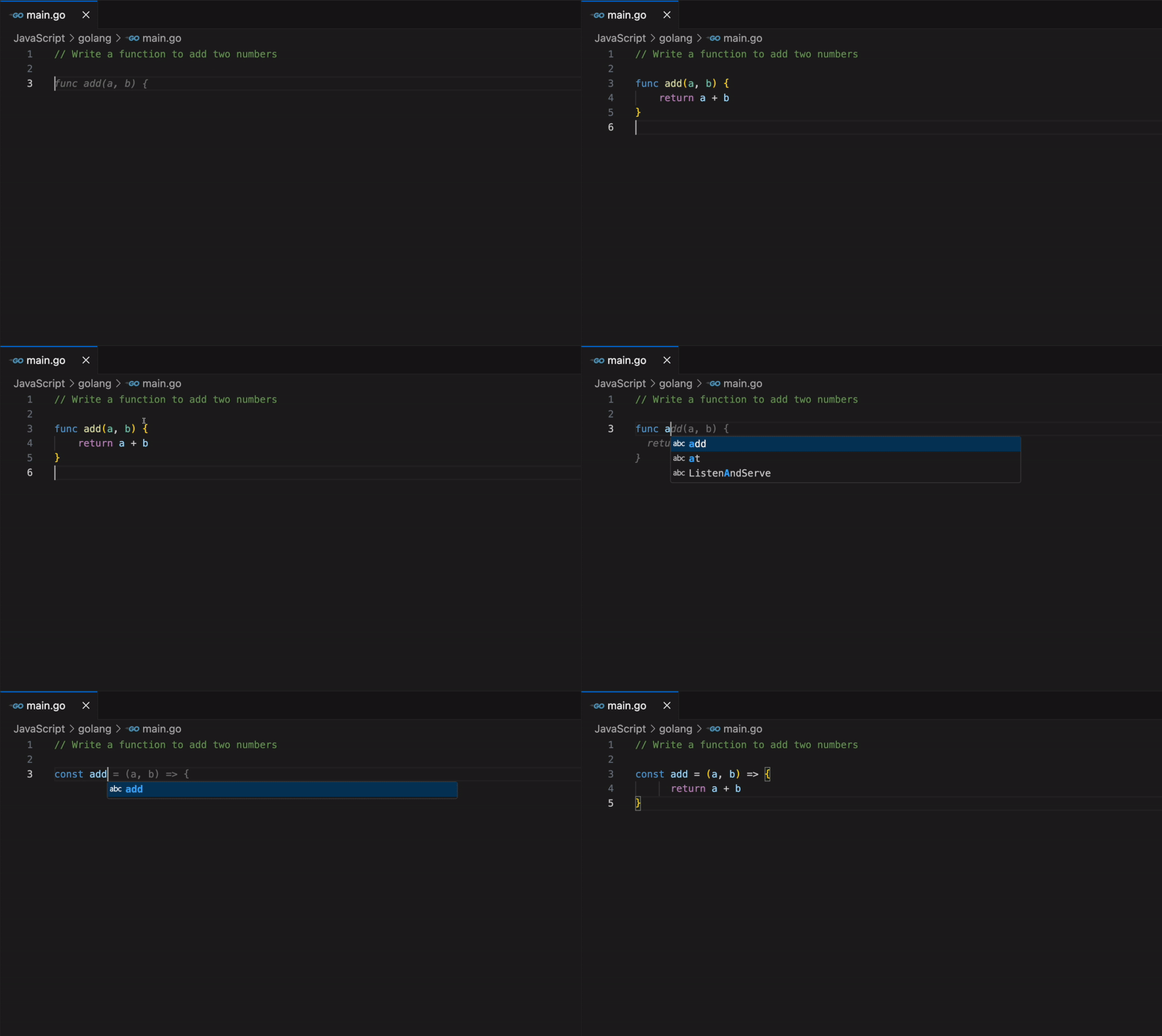
By leveraging GitHub Copilot in these ways, developers can significantly reduce the time spent on routine tasks, accelerate their learning of new technologies, and maintain better focus throughout their workday. This enhanced productivity allows for more time to be dedicated to solving complex problems and innovating within their projects.
In the next unit, we'll explore how GitHub Copilot aligns with common developer preferences and workflows.