AI in the Software Development Lifecycle (SDLC)
GitHub Copilot's capabilities extend beyond individual coding tasks, influencing various stages of the Software Development Lifecycle. This unit explores how GitHub Copilot enhances different SDLC phases, from initial planning to deployment and maintenance.
Enhancing the SDLC with GitHub Copilot
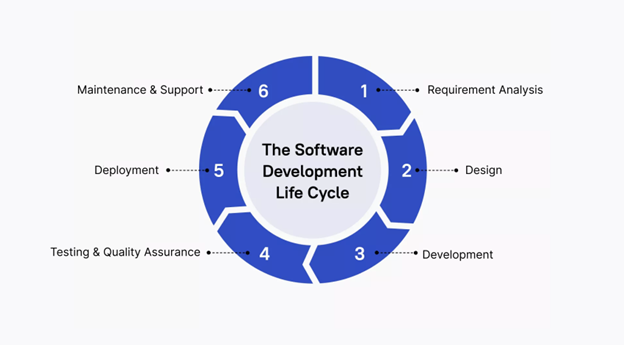
Image by Akinrefon Shedrack Tobiloba, from 'Understanding the Software Development Life Cycle (SDLC)'
Let's examine how GitHub Copilot can positively impact each stage of the SDLC:
Requirement analysis
While GitHub Copilot doesn't directly gather requirements, it can assist in translating requirements into initial code structures:
- Rapid prototyping: Quickly generate code snippets based on high-level descriptions, allowing for faster proof-of-concept development.
- User story implementation: Transform user stories into initial function or class definitions, providing a starting point for development.
- API design: Suggest API structures based on described functionality, helping to flesh out system architectures.
Design & development
This is where GitHub Copilot truly shines, offering significant productivity boosts:
- Boilerplate code generation: Automatically create repetitive code structures, saving time on setup tasks.
- Design pattern implementation: Suggest appropriate design patterns based on the problem context, promoting best practices.
- Code optimization: Offer more efficient code alternatives, helping developers write performant code from the start.
- Cross-language translation: Assist in translating concepts or code snippets between different programming languages.
Testing & quality assurance
GitHub Copilot can significantly streamline the testing process:
- Unit test creation: Generate test cases based on function signatures and behavior, ensuring comprehensive test coverage.
- Test data generation: Create realistic test data sets, saving time on manual data creation.
- Edge case identification: Suggest test scenarios that cover edge cases, improving the robustness of tests.
- Assertion suggestions: Propose appropriate assertions based on the expected behavior of the code being tested.
Automated testing workflows
GitHub Copilot can orchestrate comprehensive testing strategies that go beyond individual test creation:
- Test suite architecture: Design complete testing frameworks that include unit tests, integration tests, and end-to-end testing scenarios for complex features.
- Test automation pipelines: Generate test configuration files and CI/CD integration that automatically runs appropriate test suites based on code changes.
- Quality gates: Create automated quality checks that ensure code meets standards before progression through the development pipeline.
- Performance testing: Generate performance benchmarks and load testing scenarios to validate system behavior under various conditions.
This automated approach ensures that quality assurance becomes an integrated part of the development process rather than a separate phase, enabling faster delivery with maintained quality standards.
Deployment
While not directly involved in deployment processes, GitHub Copilot can assist in related tasks:
- Configuration file generation: Help create deployment configuration files for various environments.
- Deployment script assistance: Suggest commands or scripts for common deployment tasks.
- Documentation updates: Assist in updating deployment documentation to reflect recent changes.
Maintenance & support
GitHub Copilot proves valuable in ongoing maintenance tasks:
- Bug fix suggestions: Propose potential fixes for reported issues based on error messages and surrounding code.
- Code refactoring: Suggest improvements to existing code, helping to keep the codebase modern and efficient.
- Documentation updates: Assist in keeping code comments and documentation in sync with changes.
- Legacy code understanding: Help developers understand and work with unfamiliar or legacy code by providing explanations and modern equivalents.
Building with orchestrated AI workflows
Modern software development increasingly benefits from coordinated AI assistance where multiple AI capabilities work together to handle complex development tasks. This orchestrated approach combines the strengths of different AI agents to deliver comprehensive solutions.
Simple agent orchestration patterns
Consider a basic two-agent workflow for feature development:
Draft agent (GitHub Copilot): Analyzes feature requirements and generates initial implementation including:
- Core functionality with proper error handling
- Basic unit tests covering main scenarios
- Inline documentation explaining the implementation
- Integration points with existing code
Review agent: Analyzes the draft code and provides:
- Code quality assessment against project standards
- Security vulnerability identification
- Performance optimization suggestions
- Architectural pattern compliance review
This coordinated approach ensures that code meets quality standards before human review, significantly reducing the number of review iterations needed.
Note
Each handoff consumes ~1 PRU. A 2-agent draft–review flow typically uses 2–3 PRUs.
Advanced orchestration capabilities
For complex development scenarios, multi-agent workflows can handle sophisticated requirements:
Premium reasoning integration
Advanced AI reasoning provides deeper analysis for complex development challenges:
- Architectural decision support: Analyze trade-offs between different implementation approaches considering scalability, maintainability, and performance.
- Cross-system impact analysis: Understand how changes in one component affect other parts of a distributed system.
- Complex refactoring coordination: Orchestrate changes across multiple files and modules while preserving system functionality and performance.
- Integration pattern optimization: Suggest optimal patterns for connecting new features with existing system architecture.
Note
Premium runs add more context and reasoning but often double PRU consumption (~4+ per request).
Comprehensive feature delivery workflows
Orchestrated AI can handle complete feature delivery from requirements to deployment:
- Analysis phase: Parse user stories and technical requirements to create implementation plans
- Implementation phase: Generate complete feature code including all necessary components
- Quality assurance phase: Create comprehensive test suites and quality checks
- Documentation phase: Generate user documentation, API docs, and maintenance guides
- Deployment phase: Create deployment scripts and monitoring configurations
This end-to-end automation enables teams to deliver features faster while maintaining high quality standards across all aspects of development.