Optimize solution components for performance, concurrency, transactions, and bulk operations
The introduction promises a closer look at performance, concurrency, transactions, and bulk operations: the four failure patterns behind the equipment-provisioning system's growing pains. This unit shows you how to recognize each pattern at the API level and match it to the right fix.
Recognize throttling and retry without making it worse
As more employees submit equipment requests, the custom solution places more pressure on Dataverse itself. Dataverse enforces service protection API limits across three facets of a user's activity: the total number of requests sent, the combined execution time those requests consume, and the number of concurrent requests.
Dataverse measures the number-of-requests and combined-execution-time facets in a rolling five-minute window, while it enforces the concurrent-request facet as requests arrive. These limits apply per authenticated user account, not per app or integration. Each web server in the environment enforces these limits independently, and most environments have more than one web server.
The way a limit violation surfaces depends on how your code calls the API. The Web API returns an HTTP 429 Too Many Requests response with a Retry-After header that specifies exactly how many seconds to wait before trying again. The SDK for .NET instead returns an OrganizationServiceFault that your code catches and inspects.
These limits apply to external requests that reach Dataverse through its public endpoints. Operations that plug-ins or custom workflow activities issue inside the sandbox don't count as separate public API requests. But the extra computation they perform still contributes to the originating request's execution-time budget.
HTTP/1.1 429 Too Many Requests
Retry-After: 15
Content-Type: application/json

{ "error": { "message": "Number of requests exceeded the limit of 6000 over time window of 300 seconds." } }
For the equipment-provisioning system, this pattern shows up most often in the nightly check against the external inventory service and in any coordinator dashboard that polls for pending requests. A client that fires every request at the top of the hour, then goes silent, repeatedly pushes close to the limit instead of spreading demand out.
The fix isn't a smarter guess at a fixed delay. It's reading the Retry-After value and waiting that long. It's also starting new integrations at a lower request rate and ramping up gradually, and replacing large synchronous bursts with throughput that's smoothed across the window.
Learn more about service protection API limits.
Protect concurrent approvals with optimistic concurrency
Throttling slows the system down, but it doesn't corrupt data. A different problem appears when two coordinators open the same request record within moments of each other: one approves it while the other, working from an outdated copy, rejects it without knowing the record already changed. Optimistic concurrency is how Dataverse closes that gap.
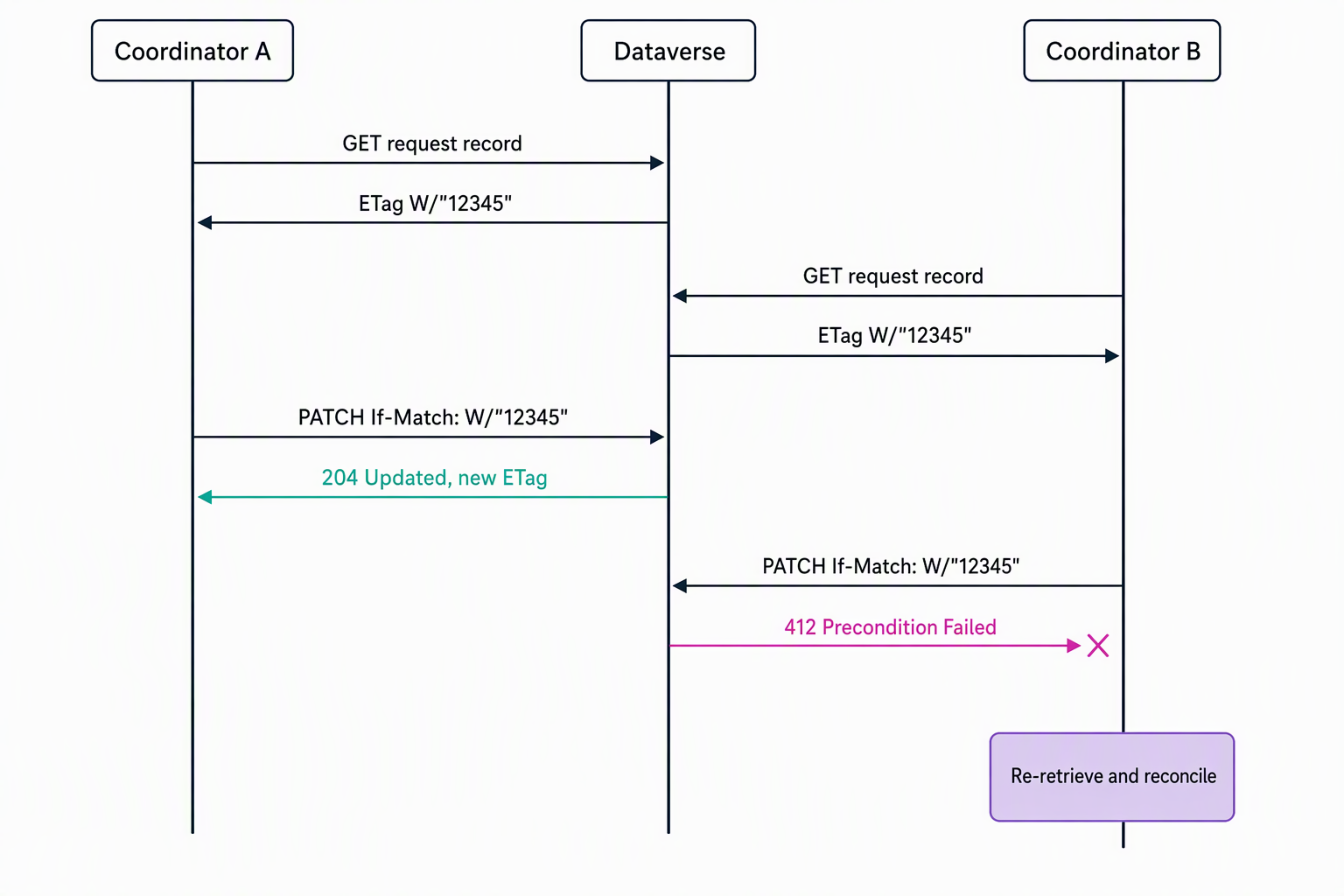
Rather than locking a record in advance, optimistic concurrency checks for change instead. It detects whether a record changed on the server between when a client retrieves it and when it tries to update or delete it. This behavior is enabled by default on all custom tables, including request, allowance, device, and employee in this solution (check the IsOptimisticConcurrencyEnabled metadata property for out-of-box tables, since some don't have it enabled).
In the Web API, you send the row's @odata.etag value (captured when you retrieved the record) in an If-Match header on the update or delete request:
PATCH [Organization URI]/api/data/v9.2/cr123_requests(00000000-0000-0000-0000-000000000001)
If-Match: W/"12345"
Content-Type: application/json

{ "cr123_status": 100000002 }
The SDK for .NET equivalent is setting ConcurrencyBehavior.IfRowVersionMatches on an UpdateRequest or DeleteRequest. If the record changed since the client retrieved it, Dataverse rejects the write instead of silently overwriting it: the Web API returns HTTP 412 Precondition Failed, and the SDK throws a fault with the code ConcurrencyVersionMismatch. Either response tells your code to re-retrieve the current record and decide how to reconcile the conflict rather than retrying the same write again.
Guiding question: Two coordinators approve the same equipment request within seconds of each other. Of the four tools in this unit (optimistic concurrency, a change set, a bulk operation message, or a retry policy), which one addresses this specific conflict? Why do the other three fall short here?
Learn more about optimistic concurrency.
Keep related writes consistent with change sets
A request record and its linked allowance deduction aren't independent: if one succeeds while the other fails, the data no longer reflects reality. This mismatch is a transaction problem, not a concurrency problem, and Dataverse addresses it at the batch level.
A Web API $batch request groups up to 1,000 individual operations into a single HTTP call, the Web API equivalent of the SDK's ExecuteMultiple message. Dataverse executes the operations sequentially, but by default each one succeeds or fails on its own, so a batch can complete with some operations done and others not.
A change set nested inside a batch changes that: it groups a set of operations into a single all-or-nothing database transaction, equivalent to the SDK's ExecuteTransaction message. If any operation in the change set fails, Dataverse rolls back every operation in that change set.
For the equipment-provisioning scenario, creating a request record together with its linked allowance deduction update belongs in a change set. If the allowance update fails, the request creation rolls back with it, instead of leaving an orphaned request with no corresponding allowance impact.
Use a change set whenever related writes span different tables and must all succeed or all roll back together. For elastic tables, though, a change set or ExecuteTransaction currently succeeds but isn't atomic, so don't rely on all-or-nothing rollback there.
Learn more about executing batch operations with the Web API.
Speed up same-table writes with bulk operation messages
Change sets solve consistency across tables, but they aren't built for raw throughput on a single table. The bulk operation messages—CreateMultiple, UpdateMultiple, UpsertMultiple, and DeleteMultiple for elastic tables—exist for exactly this case: writing many rows of the same table in one request.
They outperform a batch or ExecuteMultiple call built from individual operations, because Dataverse runs the plug-in execution pipeline once for the whole set instead of once per row. This pipeline-runs-once behavior applies to logic registered on the CreateMultiple and UpdateMultiple messages; plug-ins registered on the single-row Create or Update messages still run once per row.
POST [Organization URI]/api/data/v9.2/cr123_devices/Microsoft.Dynamics.CRM.UpdateMultiple
Content-Type: application/json

{
  "Targets": [
    { "cr123_deviceid": "...", "cr123_status": 1, "@odata.type": "Microsoft.Dynamics.CRM.cr123_device" },
    { "cr123_deviceid": "...", "cr123_status": 1, "@odata.type": "Microsoft.Dynamics.CRM.cr123_device" }
  ]
}
Consider a nightly sync that refreshes hundreds of device inventory rows from the external inventory service. Because every row targets the same table, UpdateMultiple is the better fit than wrapping each row in its own batch operation.
Reach for bulk messages when the work is importing or updating many rows of one table. Reach for batch requests with change sets when the operations span different tables or need an all-or-nothing guarantee. The two tools solve different problems: bulk messages maximize throughput for same-table writes, while batch requests and change sets coordinate transactional integrity across tables.
Learn more about bulk operation messages.
Match the failure pattern to the right tool
With all four patterns in view, the decision mostly comes down to what's at risk: a stale write, a partial transaction, or sheer volume.
| Situation | Tool to reach for |
|---|---|
| A single record that another user might change first | Optimistic concurrency (If-Match or ConcurrencyBehavior.IfRowVersionMatches) |
| Related writes across tables that must all succeed or all fail | A change set inside a $batch request |
| Many rows of the same table | A bulk operation message (CreateMultiple, UpdateMultiple, UpsertMultiple) |
| A high-volume client repeatedly hitting 429 responses | Retry using the Retry-After value, with a smoothed request rate |
These four tools cover failures that originate in how a solution handles its own data. In the next unit, you turn to a failure that originates somewhere else entirely: an access token that expires or gets rejected mid-operation, and how you implement and troubleshoot OAuth-based authentication to keep the equipment-provisioning system running.