Implement and troubleshoot authentication by using OAuth
The previous unit treats an expired access token as one more failure pattern to recognize. This unit opens that pattern up. You see why Dataverse requires a token in the first place, and how your solution acquires one for both a signed-in coordinator and an unattended external inventory service. You also learn how to tell a token problem apart from a Dataverse permissions problem when a call starts failing.
Why Dataverse insists on OAuth
Every call to the Dataverse Web API requires OAuth 2.0, and the identity provider behind that requirement is Microsoft Entra ID. That single requirement covers two different callers. A coordinator who signs in to approve equipment requests authenticates interactively, through a real sign-in prompt. The external inventory service that posts updated device availability back into Dataverse has no user available to sign in at all. It runs on a schedule or in response to an event, with nobody watching.
Both paths rely on the Microsoft Authentication Library (MSAL) to do the work of acquiring a token. The older ADAL library still appears in some existing code, but it no longer receives active updates, so new work targets MSAL instead. The library you choose matters less than the shape of trust behind it, and that shape is the first decision your solution makes.
Match the authentication shape to the caller
Before any token exists, you register the client application in Microsoft Entra ID. That registration's application type, Web app/API or Native, determines which credential options are available to it later, so it's worth getting right from the start.
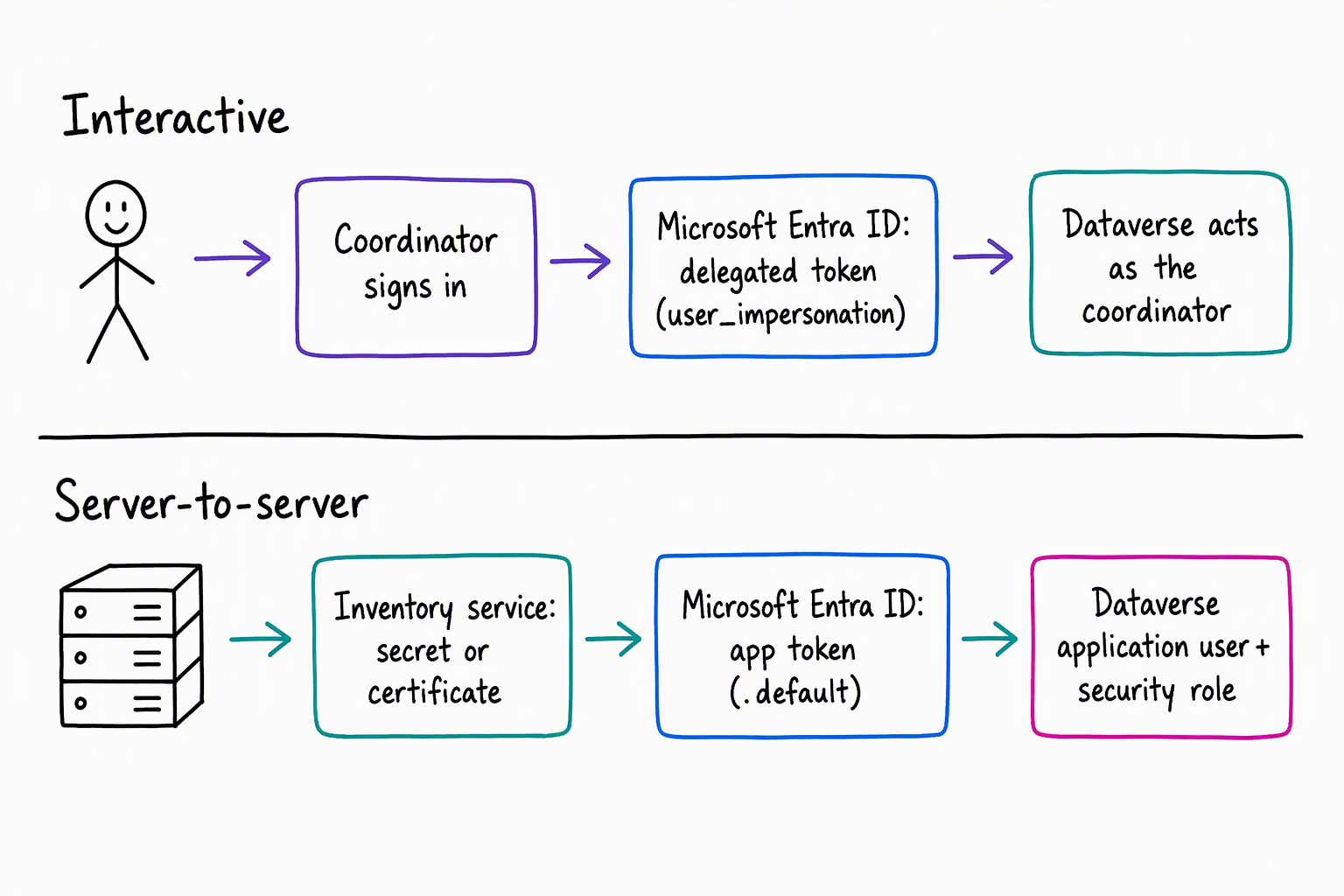
From there, the two shapes diverge. Interactive authentication suits the coordinator's scenario: a person signs in, and you grant the app registration the "Access Dynamics 365 as organization users" delegated permission. The resulting token carries that person's own privileges into Dataverse, so the coordinator can only do what their own security role already allows.
Server-to-server (S2S) authentication suits the external inventory service instead. There's no interactive user to authenticate, so trust comes from a client secret or certificate configured on the app registration, and you skip the delegated permission step entirely.
In its place, Dataverse needs its own record of that application: an application user, created inside Dataverse and tied to the app registration through the systemuser table's ApplicationId and AzureActiveDirectoryObjectId columns. That application user is then assigned a security role, the same mechanism that governs any human user's privileges.
For the equipment-provisioning system, this means the external inventory service never impersonates a person. It authenticates as its own application user, scoped to a security role that grants exactly what posting device availability requires, most likely read and write on device and nothing more. If that service were ever compromised, that one narrow role bounds the damage it could do, not whatever privileges a human coordinator happens to hold.
Acquire a token and attach it to every request
With the authentication shape settled, acquiring a token is mechanical. The client calls MSAL with its registration details and credential (a signed-in user's context for interactive flows, a client secret or certificate for S2S), and MSAL returns an access token. That token travels as a Bearer token on the Authorization header of every Web API request, alongside the OData-MaxVersion and OData-Version headers Dataverse expects:
GET [Organization URI]/api/data/v9.2/cr123_devices?$select=cr123_name,cr123_available
Authorization: Bearer <access-token>
OData-MaxVersion: 4.0
OData-Version: 4.0
Accept: application/json
The scope requested shapes what that token represents. An interactive, delegated flow requests a <environment-url>/user_impersonation scope. The external inventory service's confidential-client flow instead requests <environment-url>/.default, the scope shape that matches an application-only credential:
var app = ConfidentialClientApplicationBuilder.Create(clientId)
    .WithClientSecret(clientSecret)
    .WithAuthority(authority)
    .Build();

var result = await app.AcquireTokenForClient(
    new[] { "https://contoso.api.crm.dynamics.com/.default" }
).ExecuteAsync();
Every token also carries an expiration. A client that holds on to a token past its lifetime, or that only reacts to a failure instead of renewing proactively, is exactly the client that gets rejected mid-operation. That's the failure named at the end of the previous unit. The fix isn't a retry of the same stale token. It's re-acquiring a fresh one before the current one lapses.
Diagnose an authentication failure in the right layer
When the external inventory service's call to Dataverse fails, the useful first question isn't "what's wrong with authentication." It's "which layer is rejecting this call, Entra ID or Dataverse," because the two failure categories look similar from the outside and need different fixes.
Four symptoms point to four different causes:
- A token that's expired or previously rejected calls for re-acquisition, not resubmission. Confirm that the client's refresh logic actually runs ahead of expiry rather than only firing after a hard failure.
- An app that authenticates to Entra ID successfully but still can't reach data in Dataverse points to a different gap: either no application user was ever created for that app registration, or the application user exists but its assigned security role doesn't cover the operation being attempted.
- Requesting the wrong scope for the calling pattern also causes trouble, and it fails before the request reaches Dataverse at all. Examples include a delegated
user_impersonationscope from a daemon with no signed-in user, or a.defaultscope from a flow that expects a real user. - A call that authenticates cleanly but fails only on specific operations, like writing to
devicebut not reading it, points to a different cause. It almost always traces back to the application user's security role in Dataverse, not to anything in the app registration itself.
Guiding question: The external inventory service posts device-availability updates successfully for a full day, then every call starts returning an authorization failure. Is this more likely an Entra ID-level problem or a Dataverse-level problem, and what's the first thing you check?
With token lifecycle and authorization sorted, the remaining failure pattern is one of timing rather than identity: operations that outlive a single request entirely. The next unit turns to that pattern, performing asynchronous logic through background operations so the equipment-provisioning system can hand off long-running work instead of making a caller wait for it.