Perform asynchronous logic by using background operations
The previous unit closes on a pattern of timing rather than identity: operations that outlive a single request entirely. In this unit, you explore how asynchronous logic and background operations let the equipment-provisioning system hand off long-running work instead of making a caller wait for it.
What the asynchronous service does
A fulfillment check against the external inventory service, or a bulk reconciliation across every open request record, can run long. Holding a synchronous connection open for it is the wrong design from the start. Dataverse's asynchronous service exists for exactly this situation. It's a managed, first-in-first-out (FIFO) queue that executes long-running operations, including registered asynchronous plug-ins, workflows, and built-in operations like bulk mail or bulk import. It runs them independently of the main synchronous operation that triggered them.
The asynchronous service tracks every operation it runs as a System Job, backed by the AsyncOperation table. The service evaluates jobs in the order their CreatedOn date suggests, but execution isn't strictly FIFO: different job types draw on different resources, so one job type can process ahead of another type that entered the queue earlier.
When code creates system jobs that genuinely need to wait for one another, a DependencyToken enforces that ordering explicitly rather than relying on queue position alone. This dependency mechanism isn't something you configure on an asynchronous plug-in step that Dataverse queues for you.
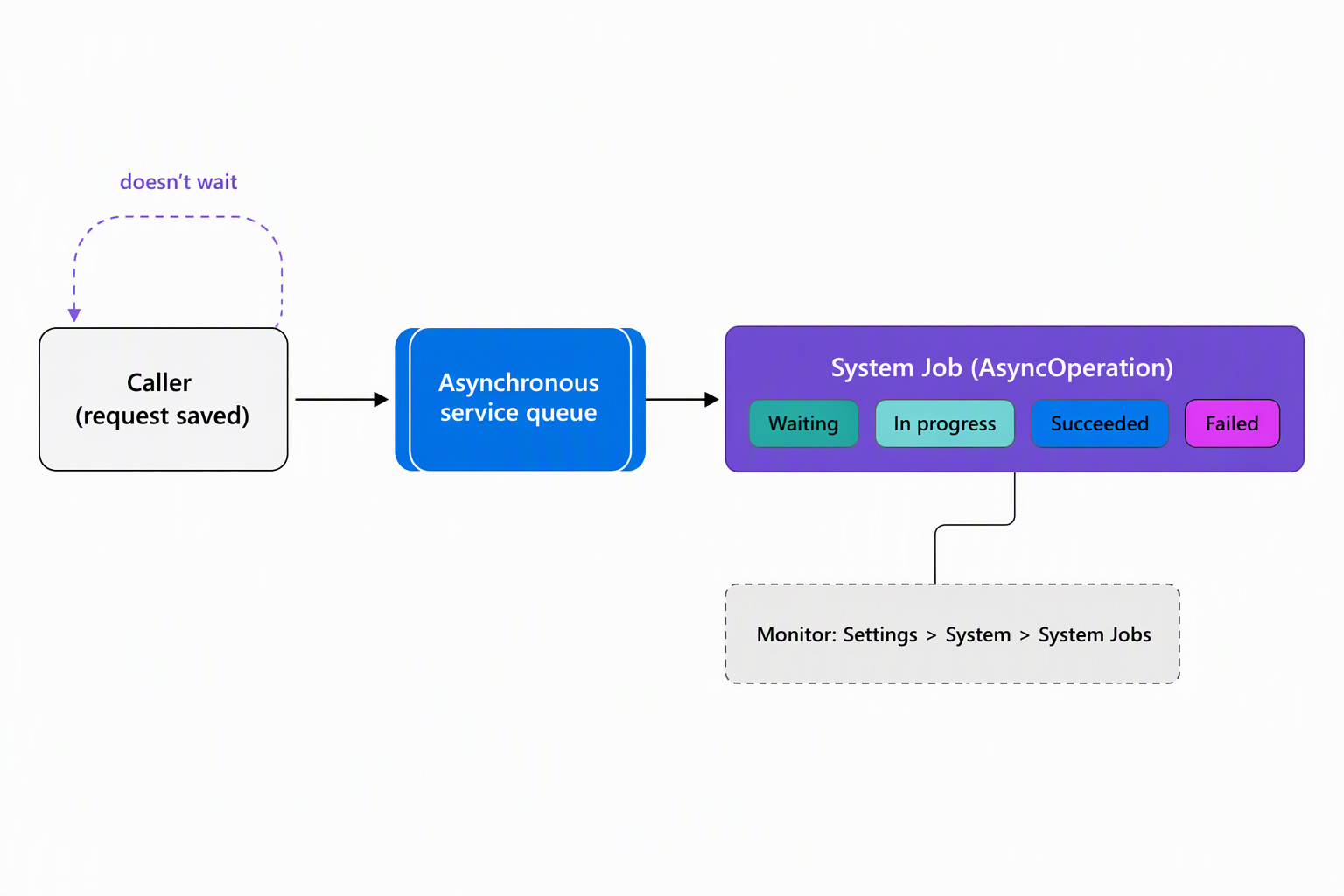
You monitor these jobs in the app under Settings > System > System Jobs, or query the AsyncOperation table directly. The columns that matter most for diagnosing a stuck or failed job are StateCode and StatusCode for its current status, and CompletedOn for when it finished. Also check ErrorCode for what went wrong, RetryCount for how many attempts it already made, and MessageName for which operation it represents:
GET [Organization URI]/api/data/v9.2/asyncoperations?$select=statecode,statuscode,completedon,errorcode,retrycount,messagename&$filter=_regardingobjectid_value eq 00000000-0000-0000-0000-000000000001
A user with write privilege on AsyncOperation can manage a job's lifecycle: cancel it, pause it, resume it, or postpone it by setting StateCode, StatusCode, and PostPoneUntil. What that same privilege doesn't grant is the ability to create a system job directly from code, or to modify the internal execution-payload columns a job carries. The queue is manageable, not something your solution writes to directly.
Register a plug-in step to run asynchronously
Business logic that reacts to a data change, but doesn't need to block the caller while it runs, is a natural fit for an asynchronous plug-in. Consider an allowance record's running total: when a coordinator approves a request, something needs to update that total, but the coordinator doesn't need to wait for it.
Every plug-in step registers for either synchronous or asynchronous execution. A synchronous step runs immediately, and the entire operation, including the caller, waits for it to finish. An asynchronous step instead hands its execution context to the system job queue, where it runs sometime after the main operation completes.
That handoff is only available at the PostOperation stage: a synchronous PostOperation step runs inside the same database transaction as the main operation, while an asynchronous PostOperation step runs outside it, after the transaction already committed.
Moving a step to asynchronous execution changes when it runs, not how long it's allowed to run once it starts. Every Dataverse message operation, plug-ins included, still has a two-minute execution time-out. An asynchronous allowance-update step that's slow because it loops through excessive related records fails the same way a synchronous one would. Asynchronous registration buys the caller a faster response, not a longer execution budget.
Run a discrete operation as a background custom API
Note
Background operations built on custom APIs are a preview capability in Dataverse at the time of writing. Treat the guidance in this section as an emerging capability rather than a fully mature, broadly production-proven part of the platform. Revalidate behavior against current documentation before relying on it in a production solution.
An asynchronous plug-in step is still triggered by a message that already happened. A bulk reconciliation that re-checks device availability against the external inventory service for every open request is a different shape of problem: it's a discrete, on-demand operation that a client wants to kick off by itself, then check on later, without waiting for it inline.
Background operations address that shape. They let you define a Dataverse request as a custom API and run it in the background, instead of holding a connection open for its duration.
The SDK for .NET requests this with an ExecuteBackgroundOperation message that wraps the inner request and optionally carries a CallbackUri. The call returns a BackgroundOperationId along with a Location value pointing to a status-monitor URL. The Web API path adds a Prefer: respond-async header to the request and reads the response headers instead of waiting on a response body:
POST [Organization URI]/api/data/v9.2/cr123_ReconcileDeviceAvailability
Prefer: respond-async
Content-Type: application/json

{}
HTTP/1.1 202 Accepted
Location: [Organization URI]/api/backgroundoperation/00000000-0000-0000-0000-000000000002
x-ms-dyn-backgroundoperationid: 00000000-0000-0000-0000-000000000002
When the operation finishes, Dataverse can notify you by posting to the CallbackUri you supplied or by raising the OnBackgroundOperationComplete event. If you prefer polling, query either the backgroundoperations table or the status-monitor resource URL from the Location header. The Location value identifies the status-monitor resource, not the Web API table row URL.
If the operation hits an error partway through, Dataverse retries it automatically, up to three times, using exponential backoff between attempts. Calling a background operation at all requires the caller to hold read and write privilege on the backgroundoperations table, the same way acting on a system job requires privilege on AsyncOperation.
Choose the mechanism that matches the request
With both mechanisms in view, the decision between them comes down to what triggers the work and what the caller needs back. An asynchronous plug-in fits logic that must react to something that already happened in Dataverse but doesn't need to block the operation that caused it, such as the allowance-update example: the request's approval already occurred, the running total needs to catch up afterward.
A background operation fits a discrete, on-demand action defined as its own API. It's the kind a client deliberately starts and wants to track to completion through a callback or status check, such as the device-reconciliation sweep: nothing in Dataverse triggers it automatically, a client decides to run it, and that client wants to know when it's done.
Guiding question: The asynchronous service processes jobs roughly in
CreatedOnorder, but execution isn't strictly FIFO, and aDependencyTokencan force one system job to wait on another. If a reconciliation job and a follow-up notification job needed to stay in order, what could happen without a sharedDependencyToken, and why wouldn't queue position alone protect that sequence?
This module covered the service protection limits and concurrency checks from the earlier unit, the OAuth token lifecycle from the unit before this one, and the asynchronous mechanisms covered here. With all three in place, the diagnostic toolkit for this module is complete. The next unit puts all three capability shifts to the test.