Optimize your report
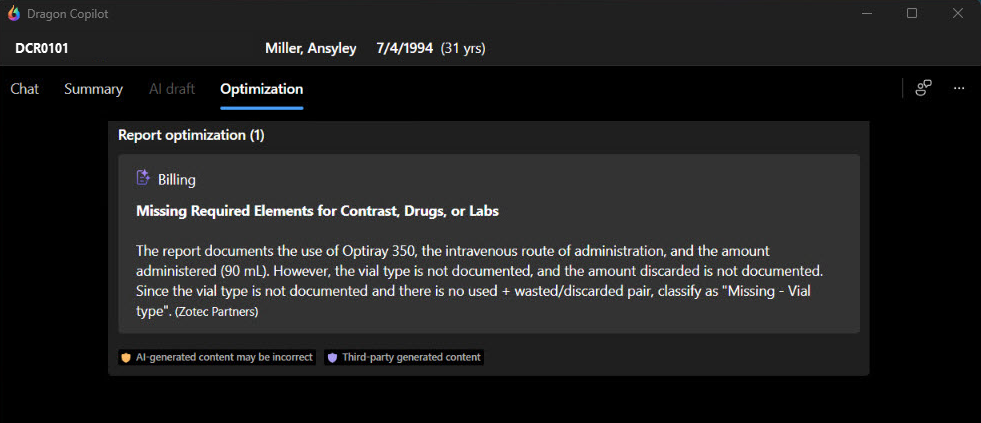
Optimization uses third-party AI technology to review draft report text and provide recommendations. These recommendations can help improve clinical documentation, capture appropriate technical and professional charges, reduce amendments or addendums, and improve your billing processes.
When you generate an impression in PowerScribe One, Dragon Copilot initiates an optimization review and displays recommendations for you to consider. Review the recommendations and update the report as needed before you finalize it.
Practice session
- Go to the Impression field in the Report Editor in PowerScribe One.
- Generate an impression in the report.
- Review the recommendations on the Optimization tab in Dragon Copilot.
- Review the recommendations and update the report if needed.
Note
Your system might not have this feature enabled. Contact your administrator to confirm.
Key benefits of using Optimization
Optimization can help you:
- Review report content and consider recommendations based on available documentation.
- Identify documentation gaps that can support quality and compliance.
- Get AI-generated recommendations before you finalize a report.
- Integrate recommendations into your interpretation workflow.
- Review an AI transparency statement.
Optimization uses AI-generated recommendations and isn't a substitute for clinical judgment. You're responsible for reviewing and validating all content before you finalize a report.