Access training and support
Use Settings to customize the font and text size, view the Dragon Copilot container version, and access the privacy policy. Use Help to access learning and support resources.
Use Settings
To access Settings and Help, select the ellipses (...) in the upper-right of Dragon Copilot.
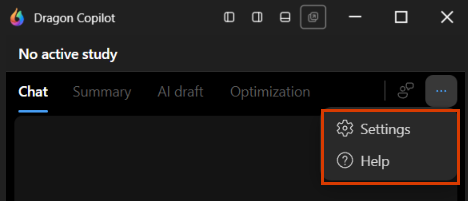
Settings include the following options:
- Account Information: Displays your user ID.
- Customization: Lets you change the font and text size.
- About Dragon Copilot: Displays container version information for Dragon Copilot.
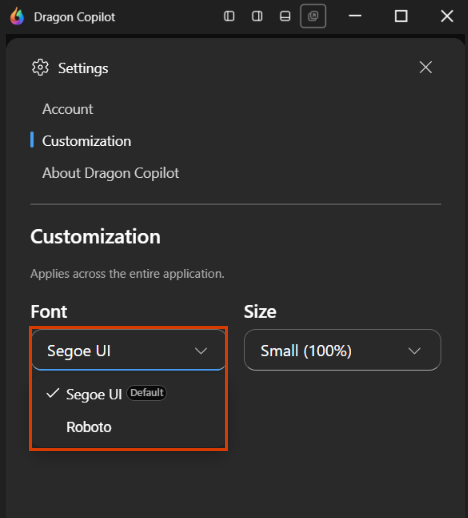
Change the font and text size
To change font and text size:
- Select the ellipsis (...) in the upper-right corner of Dragon Copilot, and then select Settings.
- Under Font, select Segoe UI or Roboto.
- Under Font size, select Small, Medium, or Large.
- Select Close settings(x) icon to close Settings.
Your changes apply immediately. Dragon Copilot remembers your latest settings and applies them the next time you sign in.
Use Help
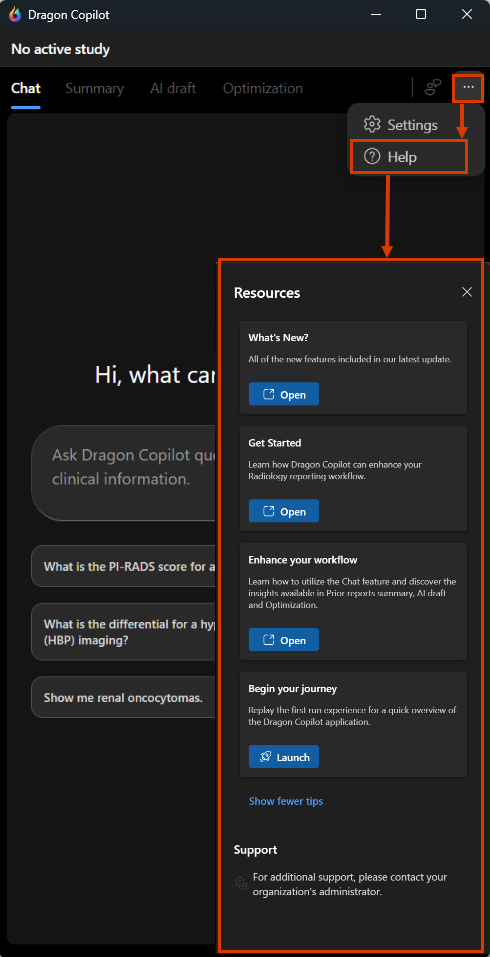
Use Help to access Dragon Copilot learning resources and learn how to get support.
Access learning resources and support
Select Resources to access Dragon Copilot learning content.
- What's new: Learn about the latest feature and updates.
- Get started: Learn how to get started with Dragon Copilot.
- Enhance your workflow Learn how to use Dragon Copilot features in your radiology workflow.
- Take a tour: Get a quick overview of the key features in Dragon Copilot (radiologists).
Select Support to learn how to get more support, such as contacting your organization’s administrator.
Note
A blue dot on the ellipsis and Help indicates there is updated What’s new content is available. The blue dot disappears when you open the help menu or select "See what's new" button in the popover. If you select Dismiss in the What's new popover, the blue dot won't disappear.