Customize your workspace
Use docking and resizing feature in Dragon Copilot to organize the workspace to fit your needs.
Customize your workspace
You can resize and position the Dragon Copilot window to fit your workspace. Watch the following video to learn about docking and resizing in Dragon Copilot:
Dock Dragon Copilot to PowerScribe One
Select a docking option to position Dragon Copilot window alongside PowerScribe One.
- Dock Right: Anchors Dragon Copilot to the right of PowerScribe One.
- Dock Left: Anchors Dragon Copilot to the left of PowerScribe One
- Dock Below: Anchors Dragon Copilot below PowerScribe One.
- Detach: Lets you move Dragon Copilot freely from PowerScribe One.
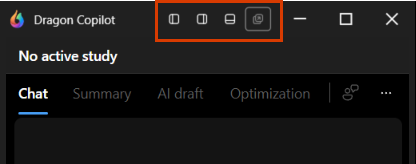
To dock Dragon Copilot:
- Make sure PowerScribe One is open and isn't minimized.
- At the top of the Dragon Copilot window, select a dock option: Dock Right, Dock Left, Dock Below, or Detach.
Hover over a docking option to preview its behavior. If docking requires PowerScribe One to move or resize, Dragon Copilot displays this information before you select the option. When Dragon Copilot is docked:
- Moving PowerScribe One also moves Dragon Copilot.
- Minimizing or restoring PowerScribe One also minimizes or restores Dragon Copilot.
- Bringing PowerScribe One to the foreground also brings Dragon Copilot to the foreground.
- Resizing PowerScribe One does not resize Dragon Copilot.
Dragon Copilot saves the docking position and window size for each monitor configuration. For example, you can use different layouts for your home and hospital workstations. Dragon Copilot also saves the window size for each docking position. When you return to a previously used docking position, Dragon Copilot restores the saved size when enough screen space is available.
Undock Dragon Copilot
To return Dragon Copilot to an independent window, use one of the following methods:
- At the top of the Dragon Copilot window, select Detach.
- Drag the docked Dragon Copilot window away from PowerScribe One.
When you undock Dragon Copilot or select a different docking position, PowerScribe One returns to its previous size and position.