Transfer data between tables using DataTransfer
When refactoring an app, it's common to move a field from one table to another or to copy all data from one table to another table. With this feature, the developer can copy the data from the old field to the new field, or copy the data from the old table to the new table, in a set-based manner without the need to write a loop. This makes writing upgrade code significantly faster.
DataTransfer is an AL data type that supports the bulk transferring of data between SQL based tables. Instead of operating on a row-by-row model, like the record API does, DataTransfer produces SQL code that operates on sets. This behavior improves the performance when moving data during upgrade.
For comparison, the following code illustrates how to copy rows using the record API:
al-languageCopy
local procedure CopyRows()
var
  from: Record FromTable;
  to: Record ToTable;
begin
  if from.Find() then
    repeat
      to.SmallCodeField := from.SmallCodeField;
      to.IntField := from.IntField;
      to.id := from.id;
      to.Insert();
    until from.Next() = 0;
end;
The same can be done using DataTransfer:
al-languageCopy
local procedure CopyRows()
var
  dt: DataTransfer;
  to: Record ToTable;
begin
  dt.SetTables(Database::FromTable, Database::ToTable);
  dt.AddFieldValue(2, to.FieldNo("SmallCodeField"));
  dt.AddFieldValue(3, to.FieldNo("IntField"));
  dt.AddFieldValue(1, to.FieldNo("id"));
  dt.CopyRows();
end;
The DataTransfer object can be used for essentially two operations:
Copy data from one or more fields in a table to fields in another table. A typical scenario is when you've made a field obsolete, but you can also use it to set default field values, similar to Record.ModifyAll().
Copy data from entire rows in a table to rows in another table. A typical scenario is when you've made a table obsolete.
The DataTransfer object can only be used in upgrade code and it will throw a runtime error if used outside of upgrade codeunits. When you use the DataTransfer object in install codeunits, it's checked that the install code runs inside the scope of installing an extension, which means that the install code is triggered from the OnInstallAppPerDatabase and OnInstallAppPerCompany events that are emitted during installation.
The DataTransfer object can't be used on the following tables:
Non-SQL tables
System tables
Virtual tables
Audited tables as the destination
Obsoleted tables as the destination
DataTransfer uses a builder design pattern that, in general, requires that you complete the following steps:
Specify the source and destination tables by calling the SetTables.
Specify which fields to transfer or constant values by calling the AddFieldValue. Or you can set a constant value for fields in the destination using AddConstantValue, respectively.
Define the relationship between the source and destination tables by calling AddJoin. In most cases, this method is required for copying fields.
Add constraints on the data to transfer by calling AddSourceFilter.
Invoke the query for transferring data by calling CopyFields or CopyRows.
Because DataTransfer operates in bulk and not on a row-by-row basis, row based events or triggers won't be executed. For example, when calling CopyFields, none of the following events will be called: OnBeforeModify, OnModify, or OnAfterModify. Or, when calling CopyRows, none of the following events will be called: OnBeforeInsert, OnInsert, or OnAfterInsert.
Copy fields
Calling CopyFields on the DataTransfer object will copy selected fields from one table (the source) to another table (the destination). Unless you're copying with the same source and destination table, specifying a join condition is necessary. The join condition specifies how to match rows from the source with rows from the destination table.
A typical scenario is obsoleting a field and moving its data into another table. For example, suppose you have two tables, Source and Destination, as illustrated with sample data below. You're planning on obsoleting field S3 in the Source table. But before you do, you want to copy some values of S3 into the field D3 of the Destination table. Specifically, you only want to copy field S3 in rows where field S2 is equal to A.
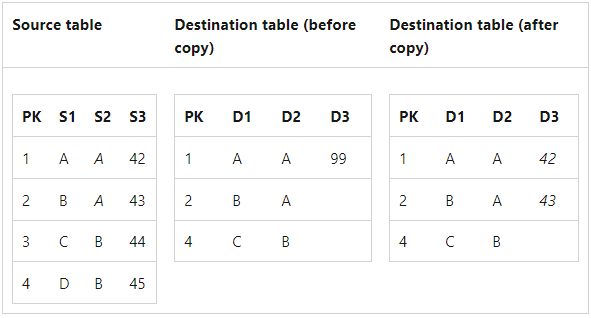
The code to accomplish this operation is as follows:
al-languageCopy
local procedure CopyFields()
var
    dt: DataTransfer;
    dest: Record Destination;
    src: Record Source;
begin
    dt.SetTables(Database::Source, Database::Destination);
    dt.AddFieldValue(src.FieldNo("S3"), dest.FieldNo("D3"));
    dt.AddSourceFilter(src.FieldNo("S2"), '=%1', 'A');
    dt.AddJoin(src.FieldNo("PK"), dest.FieldNo("PK"));
    dt.CopyFields();
end;
The same scenario could also be coded using the record API, by first looping over all rows in the Source table with a filter on field S2, then for each match, calling Get on the destination record, setting the fields, and calling Modify.
The record-based solution executes three SQL operations per-row, while the DataTransfer does a maximum of two SQL queries altogether. Measurements for DataTransfer and record API solutions have shown a ~200x performance improvement for DataTransfer. Gains are even greater if the destination table has modify triggers or if the environment has significant latency to SQL.
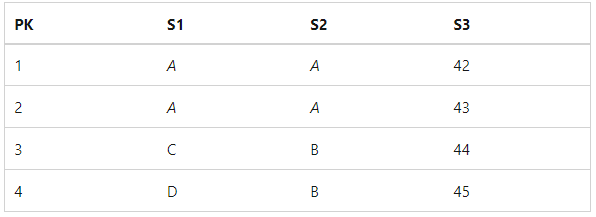
The join condition can be specified on arbitrary fields, which leaves the possibility that the set of fields doesn't produce a unique set of rows on that set of fields. This situation would lead to a many-to-many relation between the tables. A many-to-many relation would require the runtime to know which row to select, which at best, would be selected at random. Instead, the upgrade runtime will detect this situation and throw an error. The following table illustrates an example where joining the fields S1 and S2 doesn't produce a unique set of rows, and would therefore lead to a runtime error.
Calling CopyRows on the DataTransfer object inserts a row in the destination table for each matching row in the source table. Fields in the inserted row are populated with values specified by calling AddFieldValue or AddConstantField. Fields not specified by AddFieldValue or AddConstantField are populated with the field's InitValue or the field's default value.
If the code tries to copy a row from the source table that has the same primary key as an existing row in the destination table, a runtime error will be generated.
To help explain CopyRows, consider an example using sample tables Source and Destination again.
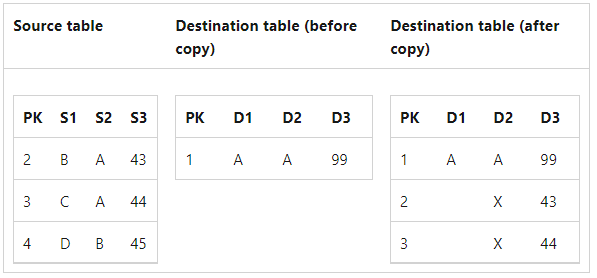
In this code example, you copy the PK and S3 fields for all rows where S2 equals A and add them as new rows in the Destination table. You use the AddConstantValue method to give the field D2 the value X in the inserted rows.
al-languageCopy
local procedure CopyRows()
var
    dt: DataTransfer;
    src: Record Source;
    dest: Record Destination;
begin
    dt.SetTables(Database::Source, Database::Destination);
    dt.AddFieldValue(src.FieldNo("PK"), dest.FieldNo("PK"));
    dt.AddFieldValue(src.FieldNo("S3"), dest.FieldNo("D3"));
    dt.AddConstantValue('X', dest.FieldNo("D2"));
    dt.AddSourceFilter(src.FieldNo("S2"), '=%1', 'A');
    dt.CopyRows();
end;
As with CopyFields, CopyRows is a bulk operation. It provides performant execution by doing only a single SQL statement for the entire operation, instead of doing multiple per-row operations. Measurements have shown a ~50x performance improvement with a DataTransfer solution compared with a record API solution.