Configure Defender for Storage and Defender for Databases
Enabling a workload protection plan is the first step—configuring it for the right coverage depth is the second. Defender for Storage and Defender for Databases both offer configuration choices that directly determine what gets protected and how deeply threats are detected. In the Contoso Financial Services scenario, customer financial records live in Blob Storage and sensitive transaction data runs in Azure SQL databases. Here, you learn how to configure the three protection layers in Defender for Storage. You learn to manage malware scanning scope, enable Defender for Databases protection, and choose between the bundle and individual subplans based on your database portfolio.
Configure Defender for Storage protection layers
Defender for Storage provides three distinct protection layers. Understanding each layer helps you make informed configuration decisions. The first layer is always active when the plan is enabled, while the other two require explicit configuration choices.
Activity monitoring operates automatically the moment you enable Defender for Storage—no diagnostic logs or other setup required. This layer analyzes data and control plane data from Azure Blob Storage, Azure Files, and Azure Data Lake Storage Gen2. Powered by Microsoft Threat Intelligence and behavioral models, activity monitoring detects threats like SAS token abuse (entities accessing data without identities), anomalous access from Tor exit nodes, and suspicious data access patterns. For Contoso, this baseline protection identifies unusual account activity across all storage resources without configuration overhead.
Note
A Tor exit node is the final relay in the Tor anonymization network—the point where traffic leaves Tor and reaches its destination. Threat actors use Tor to mask their true origin when accessing cloud resources. Because legitimate enterprise workloads rarely access Azure Storage via Tor, any request from a known Tor exit node IP is a high-confidence anomaly signal, even when the request uses valid credentials.
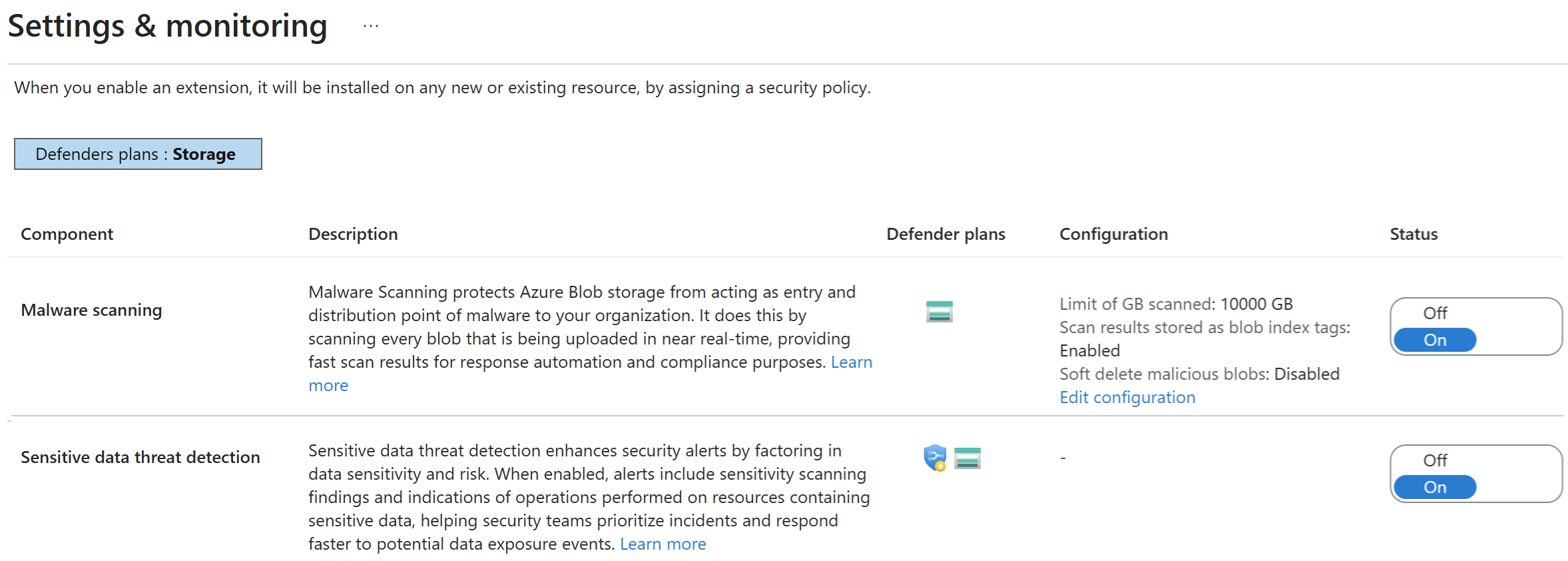
Malware scanning operates as a configurable add-on that scans uploaded blobs in near real time using Microsoft Defender Antivirus. This layer is important for Contoso's customer-facing upload workflows—any blob a user uploads could contain malware before Contoso's systems process it. Unlike activity monitoring, malware scanning is billed per gigabyte of data scanned. Microsoft applies a default monthly cap of 10,000 GB (10 TB) of scanned data per storage account per month. When the cap is reached, scanning stops for the remainder of the month and an alert fires to notify you—meaning any blobs uploaded after that point aren't scanned until the next month. You configure malware scanning by navigating to the Defender for Storage plan in Environment Settings → Settings → configure the malware scanning toggle and set the monthly cap value.
Sensitive data threat detection uses an agentless engine called Sensitive Data Discovery that automatically finds storage resources containing sensitive information. This layer integrates with Microsoft Purview sensitive information types (SITs) and classification labels. When enabled, security alerts for resources containing sensitive data are prioritized higher, giving your security operations team clearer context about what's at risk. Sensitive data threat detection is enabled by default in the Defender for Storage plan Settings and incurs no extra cost beyond the base plan. For Contoso's financial records storage, this prioritization ensures alerts about customer data receive immediate attention.
Important
When malware scanning reaches its monthly cap, uploaded blobs are no longer scanned until the next month—creating a detection gap. Set the monthly cap based on your expected upload volume and risk tolerance. High-risk storage accounts handling user-generated content should have a cap that reflects actual traffic patterns, not a conservative default.
Manage malware scanning scope
The scope at which you enable Defender for Storage determines how uniformly protection applies across your environment and how granularly you tune malware scanning per account.
When you enable Defender for Storage at the subscription level, protection applies to all storage accounts in that subscription with the same settings. This approach provides comprehensive coverage with minimal configuration effort—every storage account inherits the subscription's malware scanning toggle and monthly cap value. For organizations with consistent security requirements across all storage resources, subscription-level enablement simplifies management and ensures no storage account is accidentally left unprotected.
When you enable Defender for Storage at the storage account level, you gain selective coverage and can apply different malware scanning configurations to specific accounts. This approach is useful for Contoso because their customer-facing storage accounts need malware scanning enabled. A configuration with caps sized to match upload volumes, while internal storage accounts for operational logs or backups don't require malware scanning at all. Configuring at the account level lets you align protection depth with the risk profile of each resource.
You can also combine approaches: enable Defender for Storage at the subscription level to establish baseline activity monitoring for all accounts, then override malware scanning settings at the storage account level to fine-tune cost and coverage. Storage account-level settings always take precedence over subscription-level defaults, giving you flexibility to adjust protection as risk profiles change.
Enable Defender for Databases protection
Defender for Databases protects database workloads by detecting threats through anomaly detection, behavioral baselines, and integration with Microsoft Threat Intelligence. When suspicious activity occurs—such as SQL injection attempts, brute force sign in attacks, or unusual data exfiltration patterns—Defender for Databases generates security alerts that your security operations team can investigate and respond to.
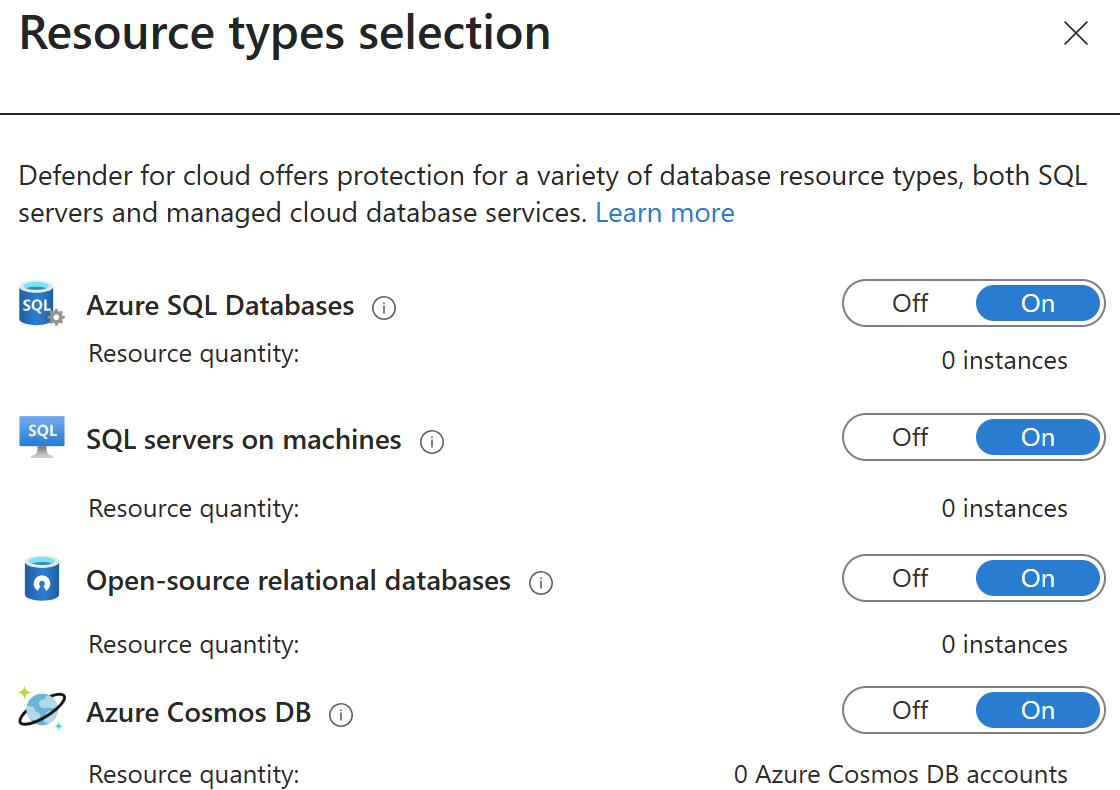
The Databases plan uses a bundle approach: when you toggle the Databases plan to On in Environment Settings, it simultaneously enables four subplans:
- Defender for Azure SQL Databases - protects Azure SQL Database and Azure SQL Managed Instance against SQL injection, brute force attacks, and anomalous access patterns.
- Defender for SQL Servers on Machines - protects SQL Server instances running on virtual machines, whether hosted in Azure, on-premises, AWS, or Google Cloud Platform via Azure Arc.
- Defender for open-source relational databases - protects PostgreSQL, MySQL, and MariaDB on Azure against database-specific attack vectors and anomalous query patterns.
- Defender for Azure Cosmos DB - protects Azure Cosmos DB accounts against document injection, unusual access patterns, and data exfiltration attempts.
All four subplans activate together with a single toggle, providing comprehensive database protection across your entire portfolio. For Contoso, this means their Azure SQL databases, on-premises SQL Servers connected via Azure Arc, and any open-source databases used for development workloads are all protected under one unified plan.
Choose between the bundle and individual subplans
The bundle approach provides comprehensive coverage with minimal configuration, but individual subplan enablement offers precision when your database portfolio is more selective or when cost control requires targeted protection.
Each of the four database subplans can be enabled individually rather than as a bundle. This approach is appropriate when a subscription's actual database portfolio doesn't include all four types—you enable protection only where you deployed workloads. If your organization has no Cosmos DB deployments that subplan provides no detection value and can remain disabled until those workloads are introduced. Similarly, if all database workloads run on Azure SQL with no on-premises SQL Server instances, the SQL Servers on Machines subplan isn't relevant to your environment.
Defender for Azure SQL and Defender for open-source relational databases also support resource-level scope, letting you enable or disable protection at the individual database level. This granularity is useful for excluding dev/test databases from paid protection while covering all production databases.
Tip
Start with the bundle approach to establish baseline protection across all database types, then refine enablement at the subplan or resource level after mapping your actual database workloads and their risk classifications.