Understand the Microsoft Entra Agent ID object model
Relecloud's fraud-investigation agent isn't missing a setting. It's missing an identity that anyone can point to, govern, and hold someone accountable for. Before you can assign a sponsor or an owner to fix that gap, you need to understand exactly what kind of object you're governing—because it isn't an application registration, and it isn't a plain service principal, even though it looks related to both at first glance.
Why a service principal alone isn't enough
Before Microsoft Entra Agent ID existed, an agent's tools each carried their own identity in whatever application or system they touched. A tool that calls Microsoft Graph typically authenticates through a service principal, and a tool that calls an Azure API authenticates through another. Each piece works on its own, but no single object represents the agent as a whole. Nothing ties the pieces together, and nothing forces a human to stand behind them.
That gap matters because a service principal, on its own, carries none of the governance infrastructure an autonomous AI agent needs. It has no enforced sponsorship, so nothing requires a human to claim accountability for it. It generates no agent-aware audit entries, so its actions blend into generic application activity instead of surfacing as a distinct, reviewable identity. It has no blueprint-managed lifecycle, so nothing automatically governs how it's created, renewed, or retired as the agent evolves. Relecloud's fraud-investigation agent shows exactly what that gap produces: an identity that keeps working long after the person who understood it walks out the door.
The Microsoft Entra Agent ID object model
Microsoft Entra Agent ID closes that gap with a purpose-built object model, distinct from application registrations and standalone service principals. It introduces four related object types.
| Object | What it is | Key trait |
|---|---|---|
| Agent identity blueprint | Template and authentication foundation for one or more agent identities | Holds credentials; a policy applied to it (like Conditional Access) reaches all its agent identities at once |
| Agent identity blueprint principal | Records a blueprint's presence in a specific tenant | Acquires tokens and appears in audit logs; created automatically when a blueprint is added to a tenant |
| Agent identity | The runtime identity for a specific agent—a special service principal | Has no credentials of its own; relies on its blueprint for tokens; carries its own downstream permissions |
| Agent's user account | An optional 1:1 account paired with an agent identity | Needed only when a system strictly requires a user object (shared mailbox, Teams channel, document library) |
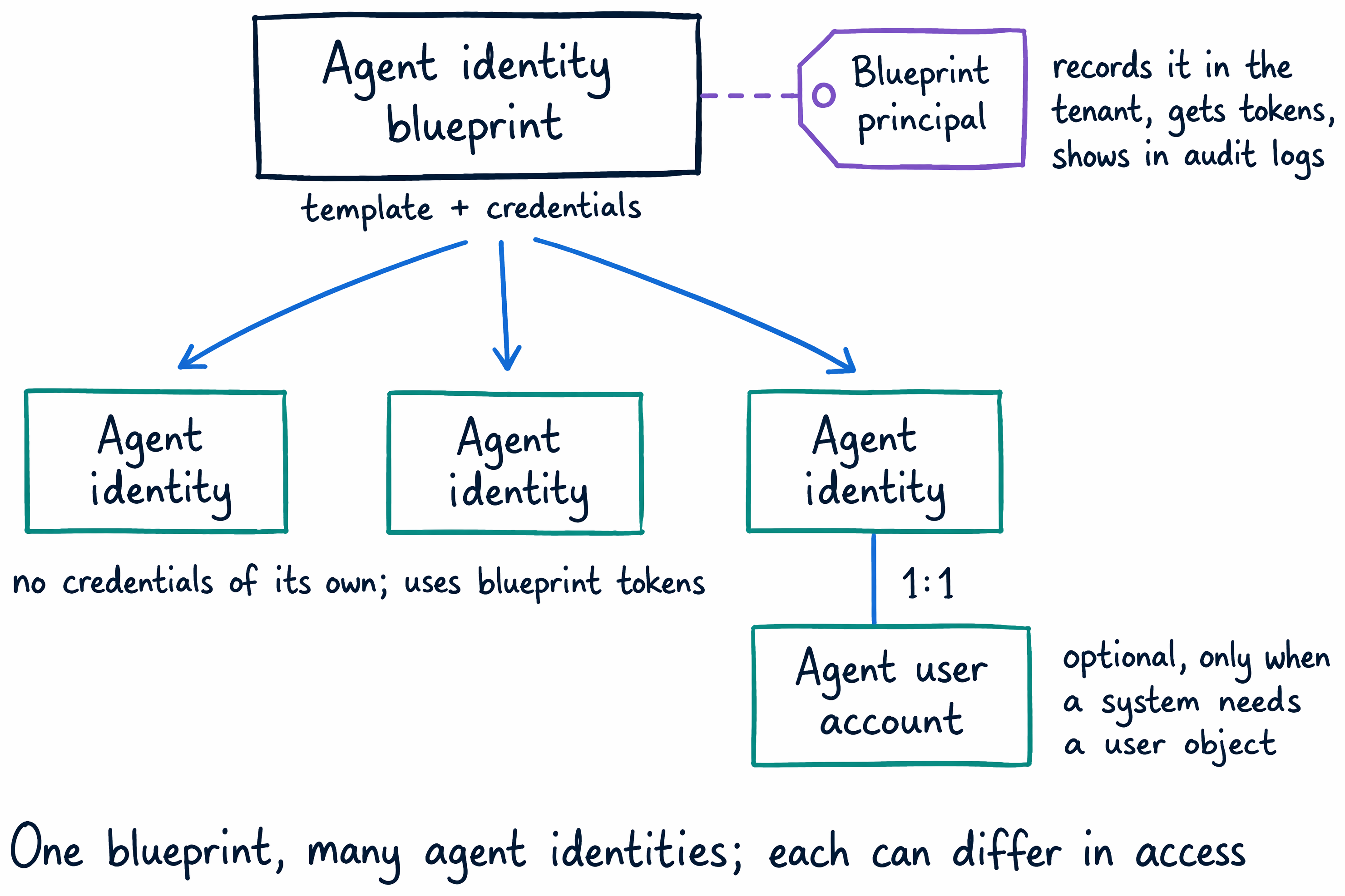
The agent identity blueprint is the object in Microsoft Entra ID that serves as the template and authentication foundation for one or more agent identities. It holds credentials and uses them to acquire tokens on behalf of every agent identity created from it. This matters administratively: policies you apply to a blueprint, such as Conditional Access, take effect for all its agent identities at once, rather than requiring separate configuration for each one.
When a blueprint is added to a tenant—relevant for agents built to work across multiple tenants—Entra creates an agent identity blueprint principal. This object records the blueprint's presence in that tenant and enables it to acquire tokens and appear in that tenant's audit logs.
The agent identity is the runtime identity for a specific AI agent. It's a special kind of service principal in Entra ID, but unlike a standalone service principal, it has no credentials of its own. Instead, it relies entirely on its blueprint to acquire tokens on its behalf. Each agent identity also carries its own permissions on downstream resources, so two agents created from the same blueprint can still have completely different access.
Some agents also need an agent's user account—an optional, one-to-one account paired with an agent identity. Relecloud's fraud-investigation agent might need one if it has to open a shared mailbox, post to a Teams channel, or access a document library, because those systems strictly require a user object rather than a service principal. The user account doesn't replace the agent identity; when an agent needs one, both objects exist side by side, each doing a job the other can't.
Guiding question: Relecloud's fraud-investigation agent used a bare service principal before it had an Entra Agent ID identity. Walk through each governance gap named above—sponsorship, audit, lifecycle—and explain specifically why a service principal alone couldn't have caught the problem this module opens with: an agent still running, fully credentialed, after its only known owner left the company.
Interactive and autonomous agents
Two patterns describe how an agent identity gets used at runtime, and they're worth naming briefly because they shape how much access an agent actually exercises. An interactive agent acts on behalf of a signed-in user through the OAuth 2.0 on-behalf-of flow, so it can only reach what that user already consented to—a human stays in the loop for every action. An autonomous agent operates independently under its own identity through the OAuth 2.0 client credentials flow, with no human approving each individual action. Relecloud's fraud-investigation agent, reviewing every case Woodgrove Bank flags without a person triggering each review, fits the autonomous pattern—which is exactly why it needs its own governed identity instead of borrowing a signed-in user's access.
Where an agent identity comes from
An agent identity doesn't always originate the same way, and knowing the common creation channels helps you recognize what you're looking at when you find one already in your tenant. Microsoft Foundry auto-provisions a blueprint and identity for each project, then a dedicated identity for each agent it publishes. Copilot Studio can auto-assign an identity to an agent you build there. In Microsoft Teams, developers manage blueprints directly through the Developer Portal. Microsoft Agent 365 gives every agent it manages its own Agent ID, covering identity, lifecycle, and access from the start. You can also configure an Azure App Service or Azure Functions app to use the agent identity platform, so an agent hosted there connects to resources as a governed agent identity. Third-party agents, built on platforms like AWS Bedrock or n8n, connect into this same model through the Microsoft Entra Auth SDK or workload identity federation.
However an agent identity gets created, it lands in Microsoft Entra ID as an object you can govern with the same lifecycle and access features you already use for human identities. This agent has an identity now. It still doesn't have anyone accountable for it—how do you fix that?